
A truck driver does not need another device that becomes useless halfway through a route. Between a phone, headset, dash-mounted navigation, ELD, tablet, and other cab equipment, charging access may exist—but time, outlet space, and attention are still limited.
A smartwatch for truck drivers with long battery life should reduce hassles during multi-day trips. It can keep calls, selected notifications, reminders, and basic wellness data available without joining the nightly charging lineup. It must also stay out of the driver’s attention while the truck is moving.
This guide looks at long routes, overnight stops, irregular schedules, safety rules, and realistic battery use.
Why Truck Drivers Need Dependable Battery Life
A cab may already be powering a phone, headset, dash camera, navigation device, tablet, or other equipment. A watch charger is another cable to pack and locate.
Long-haul work rarely follows a simple morning-to-evening pattern. Early departures, overnight routes, delays, loading time, fuel stops, and unplanned stays can make daily charging inconvenient.
Long battery life is useful because it keeps several small functions available:
- Alarms and time checks
- Important call alerts
- Selected message notifications
- Step and activity records during stops
- Movement reminders
- Sleep tracking during off-duty periods
The watch is useful when it remains available without demanding much maintenance.
For drivers whose schedules routinely stretch beyond a normal workday, this guide to a smartwatch for long shifts without daily charging explains how calls, screen use, and activity tracking affect workweek battery life.
Wrist Notifications During Long Routes
A smartwatch can make an incoming alert easier to notice, but easier access is not always safer access.
The best setup for a driver is selective. Before starting the route, choose which notifications are important enough to reach the wrist. A dispatcher call, family emergency, appointment reminder, or delivery update may deserve an alert. Social media, promotions, group chats, and routine app notifications usually do not.
Fewer alerts protect battery life and reduce temptation. At a fuel stop, dock, rest area, or overnight location, the driver can review what arrived without opening several phone apps.
While the truck is moving, even a short glance at a small screen can pull visual and mental attention away from traffic. A wrist vibration should not become an invitation to read a message.
Drivers should use driving or focus settings, silence nonessential alerts, and wait for a safe stopping point.
The right question is not, “Can the watch show every notification?” It is, “Can it show only the alerts worth checking later?”
Bluetooth Calling and Phone Proximity
Bluetooth calling can be convenient in the cab because the phone often stays mounted, charging, or connected to another system. A compatible watch can display the caller and provide controls for accepting or rejecting a call.
The featured long-battery smartwatch also includes a microphone and speaker for wrist-based calls. However, this is Bluetooth calling, not independent cellular service. The paired phone needs to remain nearby and connected.
That distinction matters on the road.
The watch may help with a brief call while parked, completing paperwork, checking the vehicle, or walking through a truck stop.
It should not be treated as permission to conduct distracting conversations while driving. “Hands-free” does not mean “attention-free.” State laws, federal commercial-driving rules, carrier policies, and the conditions around the vehicle still apply.
Configure calling before the truck moves. If a call requires looking at or tapping through the watch, let it wait. A proper hands-free system or headset may be clearer inside a noisy cab.
Readers prioritizing both endurance and call access can compare the practical trade-offs in this guide to a smartwatch with long battery life and calling.
Battery Life During Multi-Day Trips
The product featured in this guide is rated for up to 30 days of battery life and uses a 370mAh battery. That maximum should not be interpreted as a promise that every truck driver will get a full month.
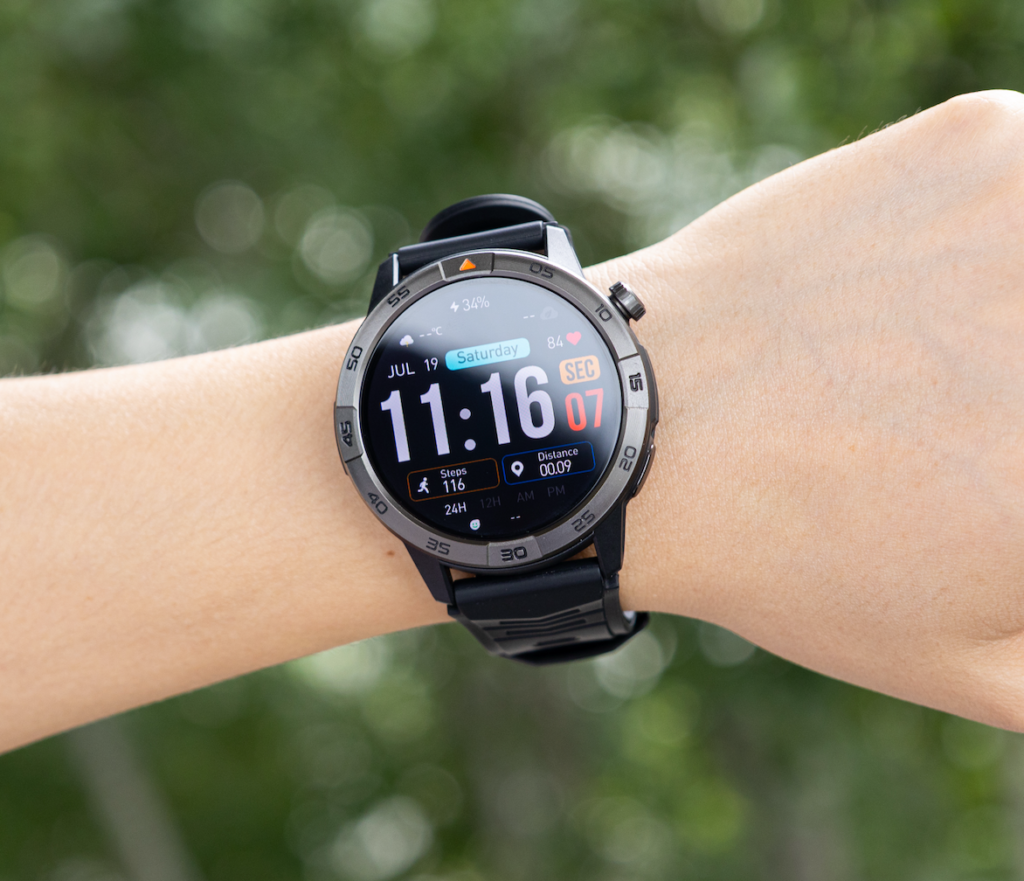
Road use can be demanding. Frequent calls, high screen brightness, repeated notifications, GPS, offline maps, and continuous health measurements all consume power.
A more useful way to estimate battery life is to consider feature load.
| Road-use activity | Relative battery demand | Practical approach |
|---|---|---|
| Time, alarms, and step counting | Lower | Keep enabled as needed |
| Selected call and message alerts | Low to moderate | Limit alerts to essential apps |
| Sleep and periodic heart-rate tracking | Moderate | Use settings that match your goals |
| Short Bluetooth calls | Moderate | Keep conversations brief |
| Always-on display and maximum brightness | Higher | Use raise-to-wake and moderate brightness |
| GPS and offline navigation | High | Use only when it adds real value |
Light use may approach the longer end of the advertised range, while frequent GPS and calls will require earlier charging. The real advantage is enough reserve for multiple workdays, overnight stops, and schedule changes.
GPS and Offline-Map Usefulness
Built-in GPS and offline maps sound especially relevant to drivers, but their role needs to be defined carefully.
A smartwatch may be useful for:
- Walking around a large truck stop
- Recording an outdoor walk during an off-duty period
- Finding your way back during personal travel
- Viewing a simple route while outside the vehicle
- Tracking distance and pace during exercise
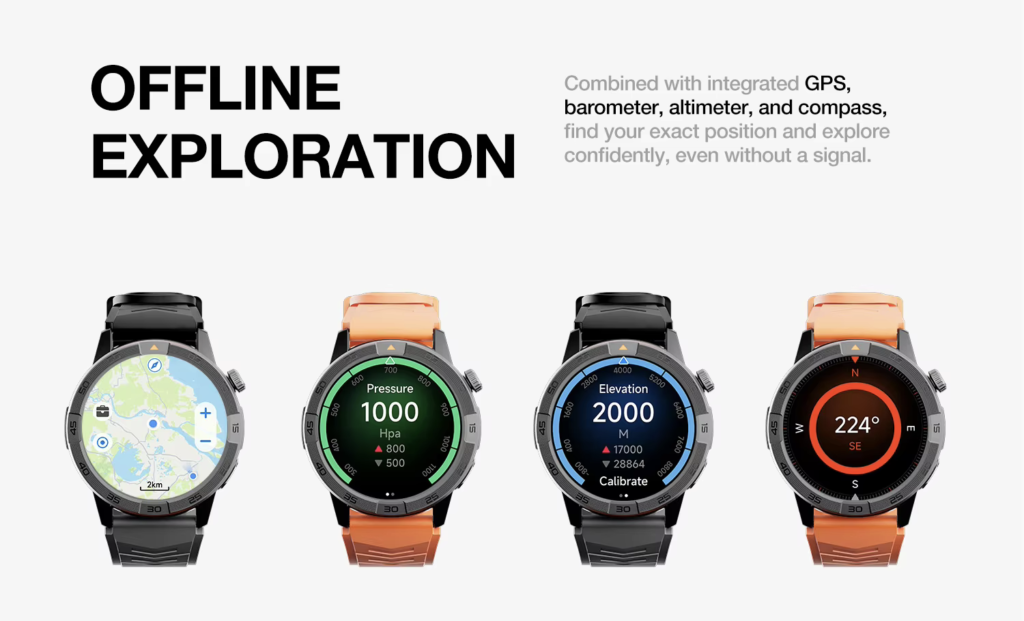
It should not replace navigation designed for commercial vehicles.
A general smartwatch map may not account for bridge heights, vehicle dimensions, weight limits, hazardous-material restrictions, truck-prohibited roads, legal parking, or commercial routing requirements.
Drivers should continue to rely on appropriate truck-navigation tools, road signs, dispatch instructions, and official route information.
Offline maps can provide backup orientation when service is weak, but they should be downloaded and configured while parked. GPS also uses substantial power, so reserve it for situations where wrist-based tracking adds value.
Sedentary and Break Reminders
Long periods behind the wheel can make movement reminders appealing. A watch may vibrate after extended inactivity or support alarms for a personal routine.
Used properly, these reminders can encourage a driver to walk, stretch, drink water, or check activity during an appropriate stop.
They are not instructions to stop immediately, and they are not compliance tools.
A vibration may occur when there is no safe or legal place to pull over. The driver should continue to a suitable location rather than reacting to the watch. Personal reminders must never override traffic conditions, parking restrictions, dispatch requirements, or safe vehicle operation.
A smartwatch does not replace an ELD or required hours-of-service records. Treat its reminders only as optional prompts during already planned stops.
Sleep Tracking Between Routes
Truck drivers may sleep in sleeper berths, hotels, terminals, or at home, sometimes at different hours from one day to the next.
Longer smartwatch battery life can make sleep tracking more consistent because the watch does not need to spend every off-duty period on a charger.
A sleep record may reveal irregular bedtimes, short sleep periods, frequent awakenings, or changes between route days and home days. That can support self-awareness, but it has firm limits.
A consumer smartwatch cannot determine that a driver is safe to operate a commercial vehicle. It cannot diagnose a sleep disorder, replace medical evaluation, or compensate for inadequate rest.
A favorable sleep score does not clear someone to drive when they feel drowsy.
If a driver feels fatigued or struggles to stay alert, required rest, carrier procedures, and medical advice take priority. The watch is a trend log, not a fatigue detector.
Safety Limitations While Driving
A smartwatch can distract through sounds, vibrations, text previews, call controls, maps, and menus.
Drivers should not read messages, scroll notifications, dial contacts, study maps, adjust settings, or operate the watch while the vehicle is moving.
Before departure:
- Set the watch face and brightness
- Enable driving, focus, or do-not-disturb settings
- Silence nonessential notifications
- Pair calling equipment
- Load any maps needed later
- Set alarms and reminders
Once moving, the watch should remain passive. An incoming vibration can wait until the truck is safely parked.
Federal rules restrict handheld mobile-phone use by commercial drivers and allow hands-free phone operation only under specific conditions. State distracted-driving laws may add further restrictions, and employer policies may be stricter.
A Bluetooth calling watch does not cancel any of those requirements.
No feature justifies taking your eyes, hands, or attention away from driving.
Recommended Smartwatch Features for Truck Drivers
A truck-focused smartwatch does not need hundreds of apps. It needs a focused group of features that remain useful across long routes and off-duty periods.
| Feature | Why it matters on the road | What to verify |
| Multi-week battery potential | Reduces charging during multi-day trips | Conditions behind the maximum claim |
| Bluetooth calling | Helps with brief calls while parked or away from the phone | Phone must remain nearby |
| Selective notifications | Keeps important alerts visible without constant phone checking | App-level notification controls |
| AMOLED display | Makes time and caller information easier to read | Brightness and always-on battery impact |
| Built-in GPS | Useful for walking and personal route tracking | Not truck-specific navigation |
| Offline maps | Provides orientation without cellular service | Region coverage and download process |
| Sleep tracking | Supports personal routine awareness | Not medical or fitness-for-duty advice |
| Sedentary reminders | Encourages movement during suitable stops | Does not replace HOS or ELD compliance |
| iOS and Android support | Offers flexibility when phones change | Companion-app requirements |
| Water and dust protection | Helps with rain, sweat, and routine outdoor use | Care limits and warranty terms |
At $150, the featured smartwatch combines up to 30 days of advertised battery life, Bluetooth calls, GPS, offline maps, a 1.43-inch AMOLED display, IP68 and 5ATM ratings, sleep and activity tracking, alarms, calendar tools, music control, a compass, and an altitude meter.
Its appeal is the combined feature balance.
Road-Ready Advantages and Trade-Offs
Advantages include fewer charging concerns, wrist call alerts, stop-time tracking, and iOS/Android compatibility.
Trade-offs include a maximum—not guaranteed—30-day claim, phone-dependent calls, faster drain with GPS, noncommercial maps, and no customer reviews currently shown on the product page.
Drivers who need LTE calling, an established app ecosystem, advanced training analysis, medical-style features, or proven truck-navigation integration should consider a different category of device.
Final Buying Advice
A good smartwatch for truck drivers with long battery life should be quiet when the truck is moving and useful when the driver is parked.
It should remain powered through changing schedules, show selected alerts, support brief calls near the phone, track walks and sleep, and reduce the number of charging cables competing for space in the cab.
It should never become another screen demanding attention on the highway.
The 30-day-rated smartwatch is a practical option for drivers who want road-trip reliability, Bluetooth calling, offline maps, an AMOLED display, and everyday tracking around the $150 price point.
Its best use is as a low-maintenance companion—not as a replacement for an ELD, truck GPS, medical guidance, required rest, or safe driving judgment.
Explore the 30-day smartwatch with GPS and Bluetooth calling to decide whether its feature balance fits the way you work and travel.