
A delivery route rarely follows the clean schedule shown at the start of the day. Traffic builds, customers call, apartment entrances are difficult to find, packages require both hands, and a normal shift can turn into overtime with little warning.
That is where a long battery smartwatch for delivery drivers can be useful. It should stay powered through dispatch alerts, short calls, outdoor stops, activity tracking, and the drive home without becoming another device that needs attention during the route.
This guide follows one realistic delivery day to show where a smartwatch can help, where it should stay out of the way, and why battery life matters more on the road than it does in a controlled office routine.
Why Delivery Work Is Hard on Smartwatch Batteries
Delivery work combines several tasks that use smartwatch power at the same time.
The screen wakes repeatedly as calls and notifications arrive. Bluetooth stays connected to the phone. GPS may be used during walking sections or when checking a location while safely stopped. Activity tracking records hours of movement, and outdoor brightness may need to be higher than it would be indoors.
A delivery shift moves between the vehicle, sidewalks, loading areas, porches, and apartment buildings. Bright sunlight, rain, gloves, and frequent screen checks can make the watch work harder than it would in an office.
The goal is not simply to finish one shift. It is to reduce the need to think about charging before every route.
For drivers who regularly work extended schedules, this guide to a smartwatch for long shifts without daily charging provides a broader look at battery needs across overtime and back-to-back workdays.
6:15 a.m. — Morning Route Preparation
The watch is most useful before the first stop, while the driver is parked.
This is the right time to check the battery, confirm the phone connection, review notification settings, and decide which alerts should reach the wrist. Dispatch updates, customer calls, calendar reminders, and urgent family messages may be useful. Social media alerts, shopping promotions, and noisy group chats usually are not.
Reducing unnecessary notifications protects battery life and prevents constant, low-value vibrations.
A practical pre-route setup may include:
- Moderate screen brightness
- Raise-to-wake instead of an always-on display
- Essential notifications only
- Bluetooth calling connected
- Health and activity tracking set to preferred intervals
- Any offline maps downloaded before departure
This preparation should happen while the vehicle is parked. Once the route begins, the watch should not require menu changes, app searches, or repeated adjustments.
An alarm or calendar reminder can help with the start of the shift, but the watch is not a dispatch system and should not replace the delivery platform required by the employer or contractor.
8:40 a.m. — Calls and Alerts While Handling Packages
The first real advantage appears when both hands are occupied.
A driver may be carrying a large box, balancing several grocery bags, pushing a cart, or holding a building door when the phone rings. Reaching into a pocket can be awkward, and putting a package down may not be practical.
A Bluetooth calling smartwatch can display the caller and support a short response while the paired phone stays nearby. It works best for quick messages such as confirming an entrance, unit number, or callback time—not long conversations. Frequent calls also use more battery.
Notifications can also help a driver notice that something changed without immediately opening the phone. A dispatch message, gate code, or customer update may appear on the wrist, but it should be read only when the driver is stopped and it is safe to do so.
Bluetooth calling does not make distracted driving safe. Drivers should not tap through contacts, read long messages, or manage calls while the vehicle is moving. State laws, employer policies, and safe-driving practices still apply.
For people who value both call access and endurance, the guide to a smartwatch with long battery life and calling explains the trade-off between wrist convenience and battery use.
11:30 a.m. — Screen Visibility Outdoors
By late morning, the driver may have moved between shade, direct sunlight, dark hallways, loading docks, and vehicle interiors dozens of times.
A smartwatch screen that looks excellent indoors can become difficult to read outside. Delivery drivers need to recognize the time, caller name, battery status, or short notification quickly. They should not have to stare at the display or shield it with the other hand.
A 1.43-inch AMOLED touchscreen can support strong contrast for quick outdoor checks. The challenge is brightness: maximum brightness uses more power, while a setting that is too low becomes frustrating in sunlight.
Automatic brightness, when available, or a moderate setting that remains readable is usually the better compromise. Raise-to-wake can also reduce unnecessary screen time compared with keeping the display permanently active.
The watch face matters as well. Large time digits, a visible battery indicator, and limited clutter are more useful during a route than an animated face packed with small complications.
Outdoor readability is not about making the watch more entertaining. It is about getting the needed information in one quick glance while safely stopped or away from the vehicle.
1:45 p.m. — GPS and Location Use Between Stops
Delivery work is location-heavy, but a smartwatch should have a supporting role rather than becoming the main navigation device.
Built-in GPS and offline maps can help with orientation around a large apartment complex, office campus, parking area, or unfamiliar neighborhood while the driver is parked or walking.
However, the watch should not replace the phone-based delivery app, vehicle navigation, or route instructions provided by the employer. A small wrist display is not ideal for studying turns while driving, and general offline maps may not include delivery entrances, access instructions, road restrictions, or real-time changes.
The safest approach is simple:
- Use the primary navigation system for the driving route
- Check the smartwatch only while parked or walking
- Download offline maps before the shift
- Avoid continuous GPS when it is not needed
- Never study the watch display while the vehicle is moving
GPS is one of the heavier battery users on a smartwatch. A driver who keeps location tracking active for hours will charge more often than someone who uses it briefly during walking segments.
The value is having location support available when it helps, not running it continuously just because the feature exists.
4:20 p.m. — Activity Tracking During a Physical Shift
A delivery route involves walking, stairs, lifting, and repeated vehicle entry, even without a planned workout.
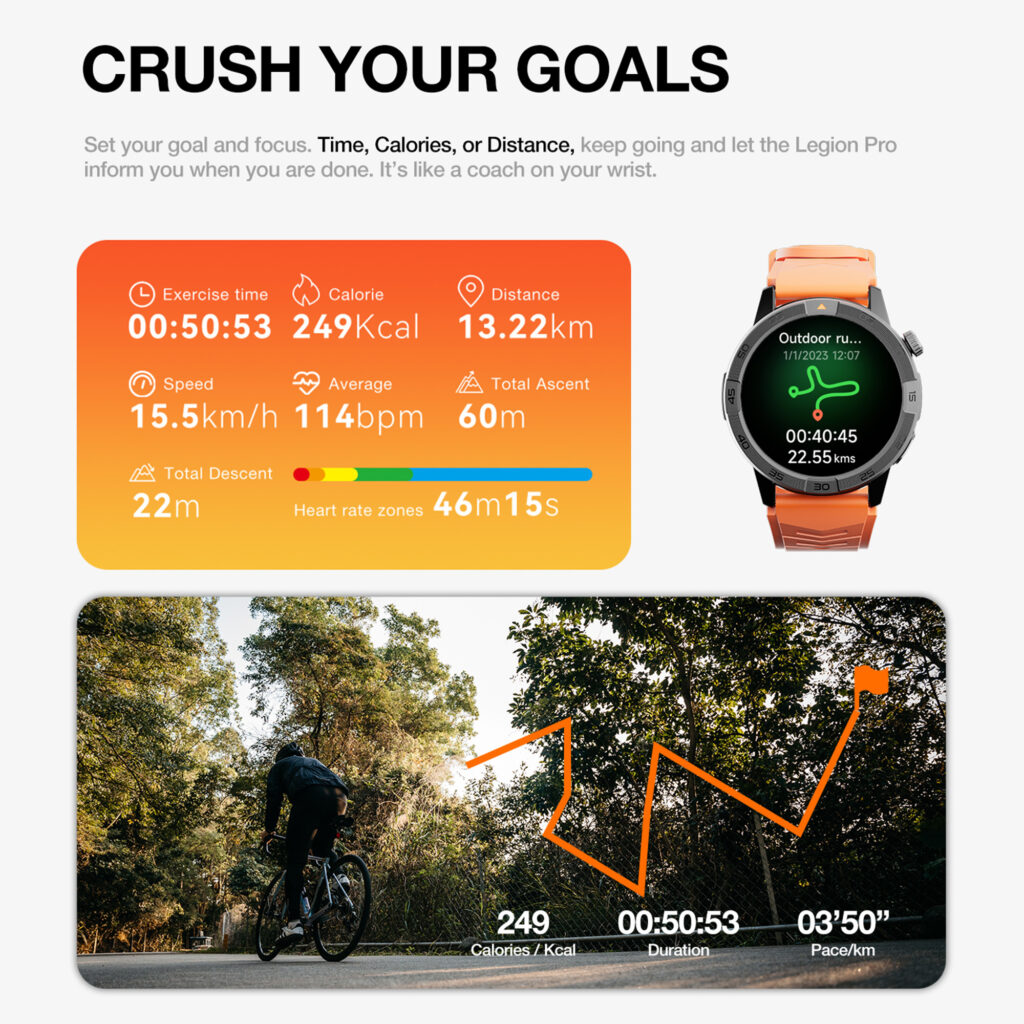
A smartwatch can record steps, estimated calories, heart rate, and general activity throughout the shift. This can help a driver understand how physically demanding different routes are or compare an urban apartment route with a suburban driving-heavy route.
The data should be treated as a personal trend, not an exact work-performance score.
A high step count does not show lifting technique, hydration, fatigue, joint strain, or whether the driver took appropriate breaks. Heart-rate and calorie figures from a consumer watch are also wellness estimates rather than medical measurements.
The most practical use is trend awareness: some routes involve more walking, while others are more vehicle-heavy.
Long battery life supports this because the watch can remain on the wrist from the first loading period through the final delivery. A device that needs charging during the afternoon creates a gap in the record and loses usefulness at the busiest part of the day.
Water resistance is helpful around sweat, light rain, and routine hand washing, but ratings should not be treated as permission for every type of water exposure. The product’s care instructions should still be followed.
7:10 p.m. — The Route Turns Into Overtime
The scheduled end time passes, but several stops remain.
This is the moment when battery reserve becomes more valuable than a perfect best-case claim. The watch still needs enough power for incoming calls, time checks, alerts, and the trip home.
A watch rated for up to 30 days creates a much larger starting window than a device designed around nightly charging. Actual runtime will depend on how the driver uses it. Frequent calls, high brightness, GPS, constant screen wake-ups, and continuous monitoring will reduce the number of days between charges.
The advertised maximum is not a guarantee that every driver will go a full month without charging.
A realistic route may involve repeated screen wake-ups, several short calls, constant Bluetooth connectivity, outdoor brightness, activity tracking, and occasional map checks. The main benefit is enough reserve that one unexpected overtime shift does not create immediate battery anxiety.
A driver should still develop a charging habit that fits the workweek. That may mean charging during a day off, during route preparation when the battery is low, or at another predictable time. The goal is fewer interruptions, not pretending the watch never needs power.
9:05 p.m. — Returning Home With Battery Remaining
At the end of the route, the useful result is not an impressive battery screenshot. It is that the watch remained available through the complete shift.
It showed the time, delivered selected alerts, supported short calls, recorded movement, and remained available through overtime.
That is the difference between a battery specification and a workday benefit.
The featured smartwatch combines an up-to-30-day battery rating with Bluetooth calling, GPS, offline maps, an AMOLED display, activity and sleep tracking, notifications, and iPhone and Android compatibility.
For delivery drivers, the value is not any one feature. It is the way the features remain available across a long, mobile day.
Limitations Delivery Drivers Should Consider
A smartwatch can support the route, but it cannot solve every delivery problem.
Bluetooth calling requires the paired phone to remain nearby. The watch is not listed as an independent LTE device, so it cannot replace the phone when the driver leaves it far behind.
GPS and offline maps are supporting tools, not substitutes for the delivery app or safe vehicle navigation. Drivers should not read maps, messages, or call menus while moving.
Battery life will be shorter than the maximum when calls, GPS, high brightness, and frequent notifications are used heavily. The exact result depends on individual settings and route conditions.
The health features are for general wellness awareness, not diagnosis.
Gloves, cold weather, and wet hands can also make touchscreen interaction less convenient.
The product page currently does not display customer reviews. Buyers who rely on owner feedback should review the seller’s return, shipping, and warranty terms before ordering.
Practical Advantages
- Less pressure to charge before every route
- Quick caller and notification visibility
- Short wrist calls while parked or handling packages
- Outdoor-readable AMOLED display
- GPS and offline maps for appropriate walking use
- Full-shift activity and sleep tracking
- Compatibility with iOS and Android
Practical Trade-Offs
- No independent cellular calling is listed
- Heavy GPS and call use reduces battery life
- The watch cannot replace a delivery app or vehicle navigation
- Touchscreen use may be difficult with gloves
- General wellness tracking is not medical monitoring
- Safe use requires waiting until the vehicle is parked
Questions Delivery Drivers Often Ask
Can a Delivery Driver Answer Customer Calls From the Watch?
Yes, through Bluetooth calling when the paired phone is nearby. The feature is most useful for short conversations while parked, walking, or handling packages. Drivers should not manage calls through the watch while driving.
Can the Watch Replace a Delivery Navigation App?
No. GPS and offline maps can support orientation while walking or parked, but they do not replace the route, customer instructions, live traffic, or delivery details in the required app.
Will the Battery Last Through a 10- or 12-Hour Shift?
A watch rated for up to 30 days should have more than enough theoretical capacity for one long shift, but actual battery use depends on its starting charge, calls, GPS, screen brightness, notifications, and tracking settings.
Is Activity Tracking Useful for Delivery Work?
It can show step, heart-rate, calorie, and activity trends across different routes. These figures are estimates and should not be treated as medical or job-performance measurements.
Does the Watch Work With Both iPhone and Android?
The product listing states compatibility with iOS and Android. Buyers should confirm that their phone supports the required companion app and operating-system version.
Final Recommendation
A long battery smartwatch for delivery drivers should fit the route instead of adding another task to it.
Prepare it before departure, limit alerts, keep wrist calls brief, and check maps only while parked or walking.
The 30-day-rated smartwatch is a practical match for drivers who want Bluetooth calling, an outdoor-readable AMOLED display, built-in GPS, offline maps, activity tracking, and fewer charging concerns in one everyday device.
It is not a replacement for safe driving judgment, a delivery platform, phone navigation, or medical equipment. Its role is smaller but useful: keep essential wrist features available from route preparation through overtime and the drive home.
Explore the 30-day smartwatch with GPS and Bluetooth calling and decide whether its full-shift feature balance fits your delivery routine.