
The best smartwatch for battery life under $200 should do more than stay powered for a long time. At this price, buyers should expect endurance, Bluetooth calling, GPS, a clear display, phone compatibility, and everyday fitness tools. They should not expect every premium app, medical-style feature, or cellular function found on pricier watches.
Decide which features deserve your budget and which extras you can skip. This guide compares real under-$200 options and shows where a $150, 30-day-rated smartwatch delivers strong value.
Quick Recommendation
For buyers who want the longest advertised battery window while keeping Bluetooth calls, GPS, offline maps, an AMOLED display, and iPhone/Android compatibility, the $150 smartwatch featured here offers the strongest all-around balance in this comparison.
Its main advantage is not that it is the cheapest option. Lower-priced watches exist. Its advantage is that the additional money buys a broader combination of everyday features while keeping the price comfortably below $200.
Choose it when your priorities are:
- Charging less often
- Answering short calls from the wrist
- Using GPS and offline maps
- Reading alerts on a sharp round AMOLED display
- Tracking steps, sleep, heart rate, and general activity
- Avoiding dependence on one phone ecosystem
Buyers who prioritize deeper fitness software may prefer an Amazfit model. Buyers who want full third-party apps, mobile payments, LTE, or tightly integrated phone features may need to raise the budget.
What $200 Should Buy in a Smartwatch
A $200 ceiling is high enough to avoid bare-bones wearables, but low enough that trade-offs still matter. Your money should cover the functions you will use every week.
Battery Life That Changes Your Charging Routine
A good under-$200 watch should last several days at minimum. When battery life is the main buying reason, one to four weeks of potential use is a reasonable target.
“Up to 30 days” is a maximum, while “14 days typical use” is tied to a defined testing pattern. GPS, calls, bright screens, health monitoring, and frequent notifications reduce runtime.
What matters is whether the watch supports your routine without constant charging.
Bluetooth Calling That Is Actually Usable
At this price, Bluetooth calling should include a microphone, speaker, caller display, and the ability to accept or reject calls while the paired phone is nearby.
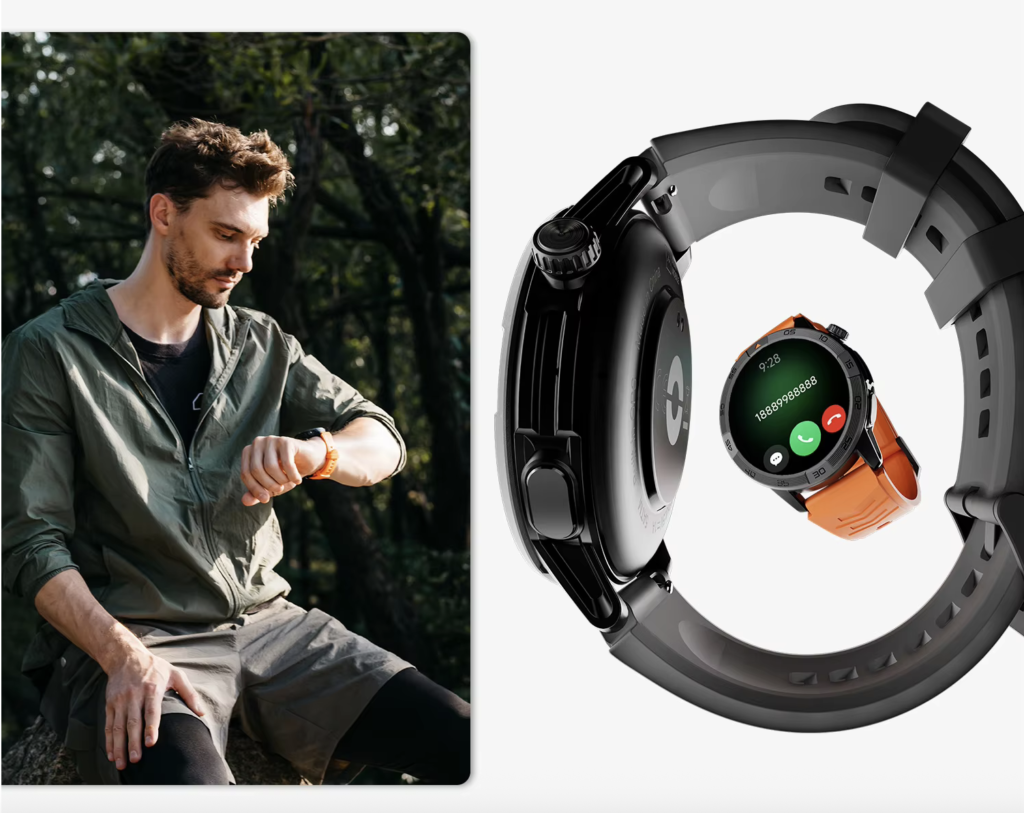
It is best for short conversations when reaching the phone is inconvenient. Independent calling requires LTE and usually a carrier plan.
Built-In GPS Rather Than Phone-Only Tracking
Built-in GPS allows the watch to record outdoor routes without depending entirely on the phone for location.
Offline or downloadable maps add more value for walking, running, hiking, and travel.
A watch under $200 does not need elite dual-frequency positioning to be useful, but it should clearly state whether navigation is built in, phone-assisted, or unavailable.
A Display You Will Enjoy Looking At
AMOLED has become realistic below $200. Buyers should expect strong contrast, clear notifications, and enough brightness for normal outdoor use.
Display quality affects the entire experience. Calls, maps, fitness data, and alarms are only convenient when the screen is easy to read.
Cross-Platform Compatibility
A practical budget smartwatch should clearly state whether it supports iOS, Android, or both.
Cross-platform support is valuable for gifts and phone switching, although replies, voice tools, payments, and app integrations may differ by operating system.
Everyday Protection and Comfort
Water resistance, a secure strap, and a comfortable case matter more than decorative materials.
Look for a clearly stated rating such as 5ATM or IP68, then follow the manufacturer’s care instructions.
Water resistance does not mean the watch is impact-proof, chemical-proof, or safe for every water activity.
Essential Features Versus Optional Features
A budget becomes easier to manage when features are divided into three levels.
| Priority | What belongs here | Why it matters |
|---|---|---|
| Essential | Reliable battery, notifications, comfortable fit, phone compatibility, readable display | These determine whether the watch remains useful every day |
| High-value | Bluetooth calling, built-in GPS, sleep tracking, water resistance | These add convenience without requiring a premium platform |
| Optional | LTE, full app store, mobile payments, ECG, advanced training load, onboard streaming | Useful for specific buyers, but not necessary for everyone |
Someone who mainly wants calls, alarms, steps, sleep, and occasional navigation may gain little from a large app store.
Someone who uses contactless payment daily may consider NFC essential.
Your priorities should control the budget.
Battery-Life Comparison by Smartwatch Type: Real Options Under $200
The table below uses current official U.S. pricing and manufacturer battery claims. Testing conditions differ, so the numbers should not be treated as perfectly equivalent.
| Model | Smartwatch type | Current price | Advertised battery | Bluetooth calls | GPS and maps | Best fit |
| Featured 30-day smartwatch | Everyday all-rounder | $150 | Up to 30 days | Yes | Built-in GPS and offline maps | Buyers wanting long battery potential and a broad feature balance |
| Amazfit Active Max | Fitness-focused all-rounder | $169.99 | Up to 25 days typical use | Yes | GPS and offline maps | Buyers wanting stronger fitness tools, storage, and a brighter display |
| Amazfit Bip 6 | Budget value smartwatch | $79.99 | Up to 14 days typical use; up to 26 days in saver mode | Yes | Built-in GPS and downloadable maps | Buyers prioritizing price and a large AMOLED screen |
| Amazfit Active 2 | Compact fitness smartwatch | $99.99 | Up to 10 days typical use; up to 19 days in saver mode | Yes | GPS and offline maps | Buyers wanting a smaller round design and established fitness software |
The Bip 6 minimizes price while still covering calls, GPS, maps, and a large AMOLED display.
The Active 2 emphasizes compact styling and fitness features.
The Active Max uses more of the budget for a brighter display, onboard storage, and deeper workout support.
The featured $150 model sits between them, emphasizing battery headroom, Bluetooth calls, offline maps, and a round AMOLED display. It is the stronger fit when everyday simplicity matters more than advanced training software.
Why the $150 Model Offers Strong Value
The value case comes from what is included before reaching the $200 limit.
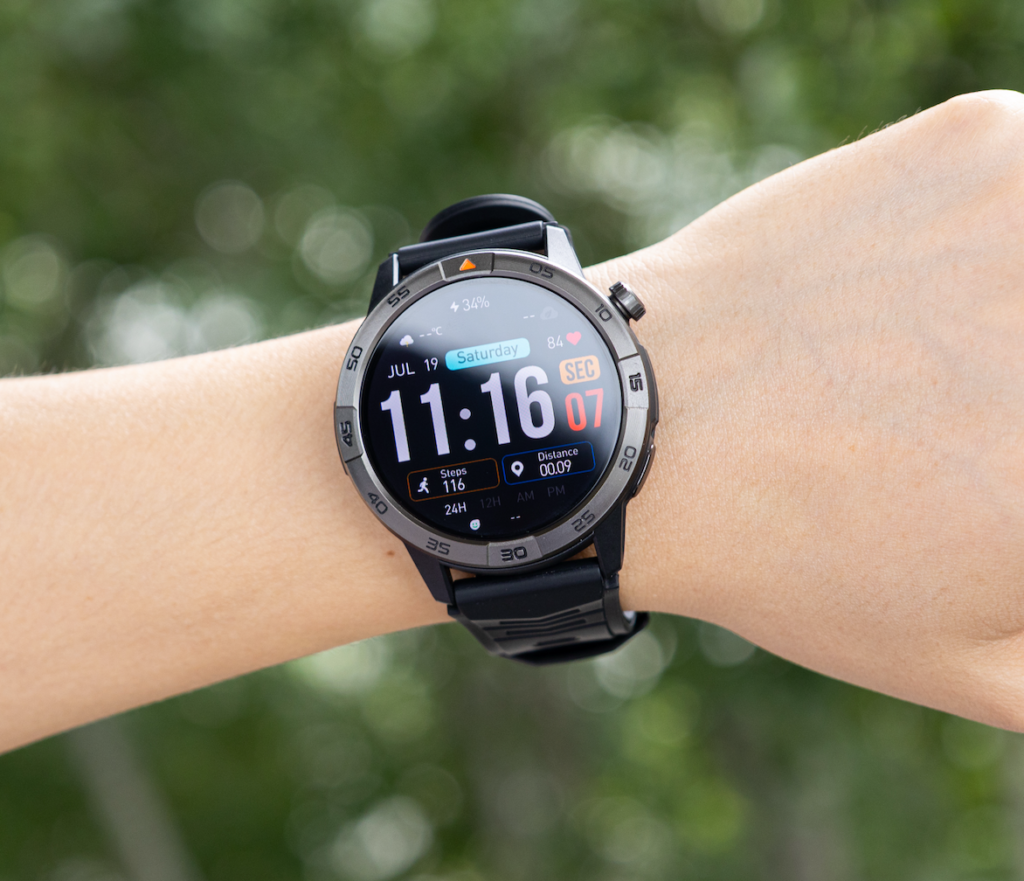
The product listing includes a 370mAh battery rated for up to 30 days, Bluetooth calling, built-in GPS, offline maps, a 1.43-inch AMOLED display, activity and sleep tracking, notifications, music controls, alarms, calendar tools, IP68 and 5ATM protection, and iOS/Android compatibility.
At the current $150 price with free shipping, it leaves $50 below the buyer’s ceiling while covering the main everyday features.
The strongest buying argument is the combination.
A cheaper watch may offer good battery life but fewer navigation, display, or design advantages.
A fitness-focused watch may deliver stronger analytics but use nearly the full budget.
This model targets buyers who want a premium feel without paying mainly for an ecosystem.
Readers comparing similar value combinations can also review this guide to an affordable smartwatch with long battery life and calling.
Compromises Compared With Premium Smartwatches
Staying under $200 means accepting limits. A trustworthy buying guide should make them clear before checkout.
No Independent LTE Calling
Bluetooth calling requires the paired phone to remain nearby.
Premium LTE watches can call without the phone, but they usually cost more and may require a monthly carrier fee.
A Smaller App Ecosystem
The product page lists everyday tools rather than a full third-party app store.
Buyers expecting downloadable productivity apps, streaming services, smart-home controls, or extensive integrations may find it limited.
Less Advanced Health and Training Analysis
The watch covers general wellness and activity tracking.
It should not be treated as a medical device, and serious athletes may prefer established platforms with training load, recovery, race planning, and more detailed sensor analysis.
Less Evidence From Owners
The product page currently displays no customer reviews.
Buyers who depend heavily on long-term owner feedback may prefer a model with a larger review history.
Unclear Long-Term Software Support
The listing does not describe a multi-year update policy.
Major platforms often provide clearer software roadmaps, security updates, and app support.
These compromises help explain the $150 price.
Who Should Spend More Than $200?
Raise the budget when one of the following functions is central to your daily life.
You Need LTE Without a Phone
Independent calls, messages, and mobile data require a cellular-capable model and compatible carrier support.
You Want a Full Smartwatch App Platform
Apple Watch and Wear OS devices offer deeper apps, payments, voice assistants, messaging, and phone integration.
Battery life is often shorter, but the software experience is broader.
You Need Advanced Sports Analytics
Serious runners, cyclists, triathletes, and endurance athletes may benefit from more accurate GPS, structured workouts, recovery tools, and external sensor support.
You Need Specific Health Features
ECG, fall detection, medical notifications, or clinically validated functions may justify a higher budget.
Availability and regulatory approval can vary by device and region.
You Value Long-Term Platform Support
A higher price may buy a more established update policy, service network, accessory ecosystem, and resale value.
Spending more is sensible only when those added capabilities will be used regularly.
Who Should Save Money?
You may not need to spend the full $200 when your requirements are simpler.
A lower-cost model such as the $79.99 Bip 6 may be enough when you mainly want notifications, Bluetooth calls, a large display, basic maps, fitness tracking, and roughly two weeks of typical battery life.
The $99.99 Active 2 may suit buyers who prefer a smaller round watch, 10-day typical battery life, offline maps, and a more fitness-oriented app experience.
Saving money makes sense when ten to fourteen days is sufficient, you prefer an established fitness app, or the watch will be used mainly for steps, sleep, workouts, and notifications.
For more options near the lower end of the budget, see this guide to a long-lasting smartwatch under $150.
Buying Checklist Before You Spend $200
1. Define Your Real Battery Pattern
Estimate how often you will use GPS, calls, always-on display, sleep tracking, and continuous sensors.
Compare normal-use claims, not only battery-saver figures.
2. Confirm the Calling Method
Check whether the watch uses Bluetooth or LTE.
Bluetooth is enough for many buyers but depends on a nearby phone.
3. Verify GPS and Map Details
Look for built-in GPS, offline maps, downloadable maps, and navigation limitations.
These terms are not interchangeable.
4. Check Phone and App Compatibility
Confirm the required operating-system version, companion app, and whether important functions work equally on iPhone and Android.
5. Review Water Resistance Carefully
Check the exact IP or ATM rating and the manufacturer’s care instructions.
Do not assume water resistance covers heat, chemicals, high-pressure water, or impact damage.
6. Look Beyond the Feature List
Review the warranty, return policy, software support, customer feedback, replacement chargers, and strap availability.
7. Decide Which Compromise You Accept
Under $200, the trade-off may be fewer apps, no LTE, less advanced fitness analysis, shorter battery life, or a less established support history.
Choose the compromise that affects you least.
Budget Buyer Questions
Is a $150 Smartwatch Too Cheap to Be Good?
Not necessarily.
A lower price may reflect a smaller app ecosystem or fewer advanced sensors. Evaluate the exact features, policies, and support rather than judging the watch only by price.
Is 30-Day Battery Life Realistic?
It is a maximum claim.
Calls, GPS, brightness, notifications, and continuous monitoring can shorten runtime. The product page does not publish separate heavy-use or continuous-GPS estimates.
Can an Under-$200 Watch Answer Calls?
Yes.
Several current models below $200 support Bluetooth calling. The paired phone generally needs to remain nearby.
Should I Choose a 30-Day Maximum or a 14-Day Typical Claim?
A typical-use figure is easier to interpret because the testing pattern is usually defined.
A maximum claim may offer more battery headroom but less certainty about everyday results.
Is AMOLED Worth Paying For?
Yes, when screen clarity and appearance matter.
AMOLED can provide stronger contrast and better-looking watch faces, although always-on use and high brightness consume more power.
Final Verdict
The best smartwatch for battery life under $200 is not automatically the cheapest watch or the one with the largest battery number.
It is the model that puts the budget into the features you will use most.
The $150 smartwatch offers a persuasive balance: up to 30 days of advertised battery life, Bluetooth calling, GPS, offline maps, a sharp AMOLED screen, everyday health tracking, water protection, and compatibility with both major phone platforms.
The Amazfit Active Max is a stronger alternative for buyers who want deeper fitness tools and a 25-day typical-use claim.
The Bip 6 delivers impressive value at $79.99, while the Active 2 offers a compact round design and established fitness software for $99.99.
Choose the $150 model when your priority is premium-feeling everyday convenience with a larger charging window, not a full flagship app ecosystem.
Review the 30-day smartwatch with GPS and Bluetooth calling and compare its practical features with the limits you are willing to accept before spending your $200 budget.