
A ten- or twelve-hour shift can expose battery problems that never appear during casual use. The watch starts the morning with alarms and notifications, tracks movement for hours, handles a few calls, and still needs enough power for overtime, the commute home, and sleep tracking.
For workers who need a smartwatch battery that lasts through long shifts, the useful question is not whether a product can survive one carefully controlled day. It is whether the watch can remain dependable through an unpredictable schedule without forcing the user to disable every helpful feature.
The timeline below is a realistic use-case scenario, not a recorded laboratory or field test. It does not assign invented battery percentages. Instead, it shows when power is used during a long day and what that means for charging frequency.
What Long-Shift Workers Actually Need
Long-shift workers perform different jobs, but their battery needs often overlap. A practical watch should be ready before clock-in, continue through overtime, and remain useful after work without encouraging constant screen interaction.
The most useful daily functions are usually:
- Time, alarms, and shift reminders
- Selected calls and notifications
- Step and general activity tracking
- Heart-rate checks
- A readable display
- Bluetooth calling for brief conversations
- Enough battery reserve for overtime and overnight wear
GPS and offline maps can matter for mobile or outdoor work, but they change the battery calculation considerably. A fixed-location employee checking alerts uses power differently from someone running navigation for long periods.
Workers who want a broader feature-selection guide can read about choosing a smartwatch for long shifts without daily charging. The scenario below focuses on how those features may be used across one extended day.
A Typical 12-Hour Shift Scenario
Assume the watch begins the day adequately charged and paired with a compatible phone. The user has enabled important calls, calendar alerts, step tracking, heart-rate monitoring, and sleep tracking.
The always-on display is off, brightness is moderate, and GPS is used only when needed.
6:00 a.m. — Alarm and Battery Check
The day begins with a wrist alarm rather than a loud phone alarm across the room. Before getting up, the worker checks the time and confirms that the watch has enough power for the planned schedule.
This check should feel routine, not anxious. Missing one charging night should not automatically ruin the next shift.
Sleep tracking may already have run overnight, but that background use is usually less demanding than navigation, calls, or a constantly illuminated display.
7:00 a.m. — Commute and Notifications
During the commute, the watch receives a schedule reminder and one important message. The phone remains in a bag, pocket, or vehicle mount.
This is a low-to-moderate battery period when notifications are selective. Each alert causes vibration, wireless activity, and a screen wake-up, but a few important alerts are very different from allowing every email, social notification, promotion, and group chat to reach the wrist.
The watch is most efficient when it acts as a filter:
See the alert → decide whether it matters → return attention to the commute
Drivers should configure notification settings before moving and avoid interacting with the watch while driving. The device should reduce phone handling, not transfer distraction to the wrist.
9:00 a.m. — Activity Tracking Begins
By midmorning, movement has increased.
The watch counts steps and may record general activity while the worker walks between departments, stands for long periods, or moves around a job site.
Passive step tracking generally demands less power than starting a GPS-recorded workout. That distinction matters. A watch can monitor ordinary movement throughout a shift without using the same amount of energy required for continuous route tracking.
Heart-rate monitoring may also run automatically. The frequency of those readings can affect battery use. Workers who only want general wellness information may not need the most aggressive continuous setting.
The value here is consistency. A long shift can generate a more complete picture of daily movement than a short gym session, but consumer data should remain a wellness reference rather than a productivity score or medical measurement.
12:00 p.m. — Calls and Reminders
At lunch, an incoming call appears on the watch.
The worker checks the caller name and answers briefly from the wrist because the paired phone is nearby.
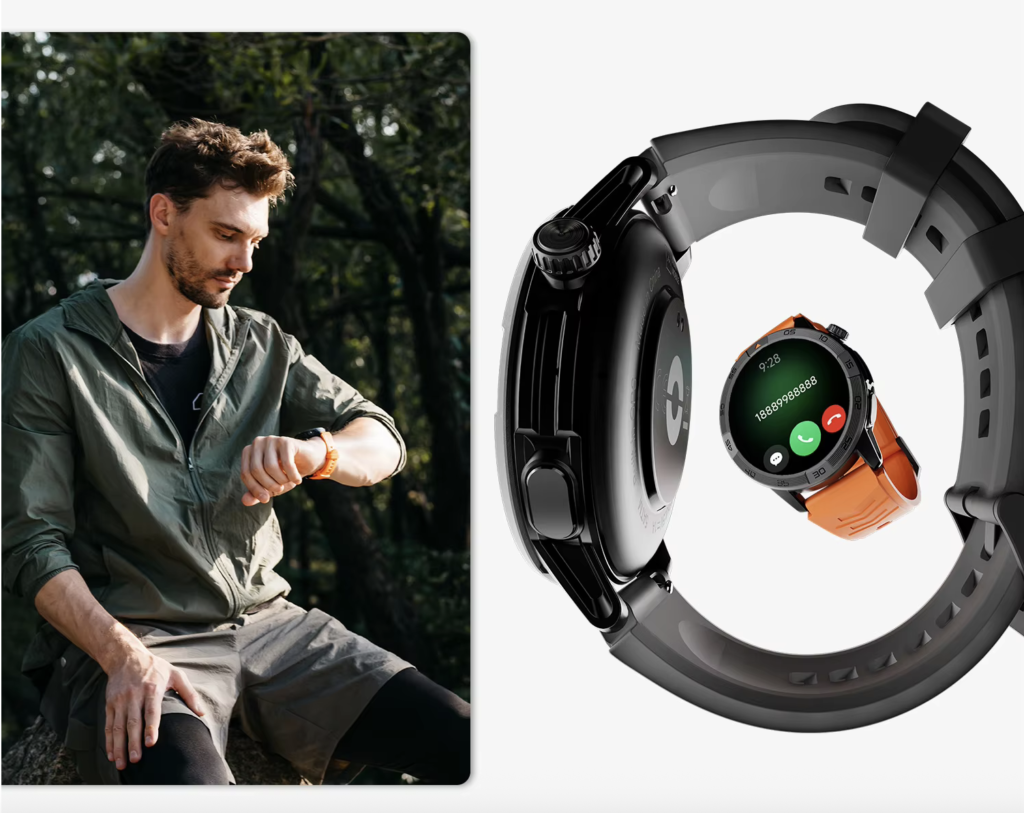
Bluetooth calling is one of the more noticeable battery events in this scenario. The watch uses its wireless connection, microphone, speaker, processor, and display at the same time.
A short call may be convenient. A long conversation will use more power and may be uncomfortable in a noisy workplace.
The best workday pattern is to use the watch for quick exchanges:
- Confirm that the call was seen
- Give a short update
- Ask the caller to wait until break
- Decide whether to continue on the phone
A shift reminder adds value without extended screen time.
Bluetooth calling is not independent cellular service; the phone must remain close enough to maintain the connection.
3:00 p.m. — Step and Heart-Rate Checks
Fatigue becomes more noticeable during the second half of a long shift. The worker checks step progress and heart-rate information during a break.
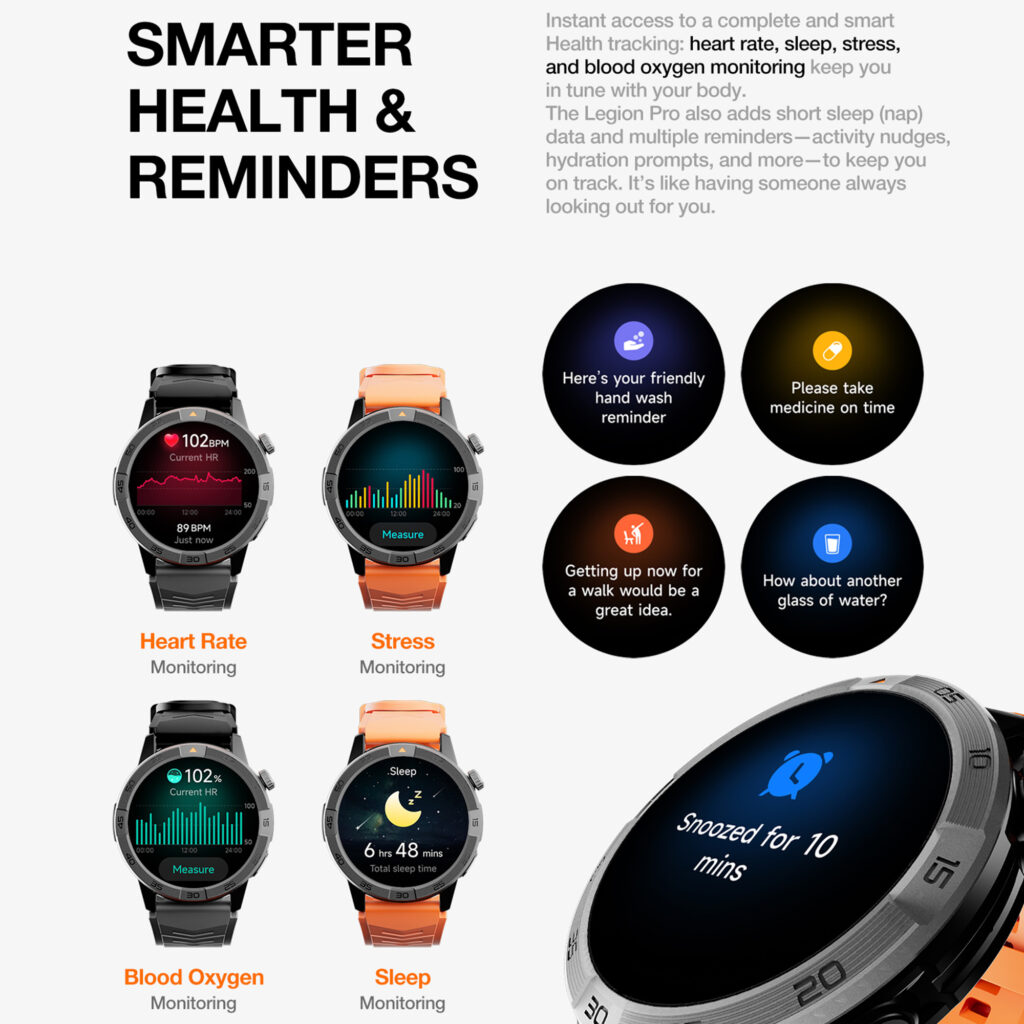
This is a good example of intentional use. The watch screen wakes for a specific reason, the information is reviewed, and the display turns off again.
Sedentary reminders may help someone at a fixed station but are unnecessary for a worker already moving continuously. Battery life improves when the watch settings reflect the actual job.
6:00 p.m. — End of the Regular Shift
The planned workday is over, but the device still has several possible jobs ahead.
The worker may need the watch for the commute, an evening call, a grocery stop, activity tracking, or an after-work walk. This is why “lasting through a shift” should not mean reaching clock-out with almost nothing left.
A dependable work watch needs reserve capacity.
For someone on a standard schedule, this point marks the transition from work use to personal use. For someone asked to stay late, it becomes the beginning of overtime.
The watch should not force that decision. Its role is to stay available while the schedule changes around it.
8:00 p.m. — Overtime or Commute Home
Two hours later, the day has taken one of two paths.
In the overtime scenario, the watch continues showing time, selected alerts, and movement data. A quick call may let family know the shift is running late.
In the commute-home scenario, the user receives a message and checks an alarm for the next morning.
A mobile worker may briefly use GPS or offline maps, but continuous navigation would place a much heavier demand on the battery than ordinary alerts.
This is the period where a larger battery window becomes more than a specification. Overtime was not part of the morning plan, yet the user does not need to find a charger or switch the watch into an unusably restricted mode.
10:00 p.m. — Sleep-Tracking Preparation
The watch has now supported alarms, a commute, notifications, activity tracking, health checks, a call, and either overtime or an extended evening.
The final question is whether it can remain on the wrist overnight.
A short-battery model may need charging now, creating a gap in sleep data. A watch designed for longer endurance can be worn to bed and charged later at a more convenient time.
The user can reduce overnight drain by enabling sleep or do-not-disturb mode, limiting unnecessary screen wakes, and keeping only the monitoring features they actually value.
The day ends with the watch still available rather than becoming an urgent charging task.
Which Features Use the Most Power During a Long Shift?
The timeline shows that not every feature has the same battery cost.
Continuous GPS and Offline Navigation
GPS usually creates one of the heaviest workloads because the watch repeatedly determines location and processes route data.
Occasional navigation is different from leaving GPS active for hours.
Workers who need continuous location tracking should expect a much shorter charging interval than workers using time, steps, and notifications.
Long Bluetooth Calls
A wrist call activates several components at once.
Brief calls fit the long-shift use case better than extended conversations. Moving a long call to the phone or a headset can preserve watch battery and improve privacy.
Always-On Display and High Brightness
A display that remains visible throughout the shift consumes more power than raise-to-wake.
Maximum brightness may be useful outdoors, but it is often unnecessary inside.
Frequent Screen Wake-Ups
Every vibration followed by a screen check adds a small amount of drain.
A high volume of unimportant notifications can become significant over a long day.
Continuous Sensor Monitoring
Heart-rate and other background readings use power. The impact depends on how often the sensors sample and how the software manages them.
The featured watch is advertised with a 370mAh battery and up to 30 days of runtime, but the product page does not publish separate estimates for heavy shift use, continuous GPS, or frequent calling.
Those numbers should not be invented.
Settings That Help the Battery Cover More of the Workweek
The goal is not to switch off everything. It is to reduce waste.
Start with notifications. Keep calls from important contacts, shift alerts, schedule changes, and essential direct messages. Remove promotions, newsletters, and social updates that do not require immediate attention.
Use raise-to-wake rather than always-on display. Set brightness to a readable level instead of maximum. Choose a short screen timeout and a simple watch face.
Use GPS only for activities or routes that genuinely need location recording. End the session when navigation is complete.
Keep Bluetooth calls short. For a longer discussion, switch to the phone or a headset.
Adjust health monitoring to match your purpose. More frequent readings may be useful for some users, but others only need general trends.
A broader explanation of reducing charging frequency is available in this guide to a smartwatch that does not need frequent charging.
Can It Cover Multiple Shifts Between Charges?
A single 12-hour scenario does not answer how often every user will charge. That depends on the pattern repeated across the week.
A Lighter Shift Pattern
The user mainly checks time, steps, alarms, and a few notifications. Calls are rare, brightness is moderate, and GPS is normally off.
This pattern gives the watch the best chance of reaching the longer end of its advertised range.
A Balanced Shift Pattern
The user receives regular alerts, takes several short calls, tracks sleep, checks health information, and occasionally uses GPS.
This is likely closer to how many workers use a smartwatch. Runtime should be expected to fall below the maximum, but the device may still reduce charging substantially compared with a daily-charge model.
A Feature-Heavy Shift Pattern
The watch handles many calls, frequent notifications, high brightness, continuous monitoring, and long GPS sessions.
This user will charge much sooner. The important question is whether the watch still covers several demanding days more comfortably than a short-battery alternative.
For a wider work-focused discussion, see this guide to a smartwatch with long battery life for work.
Final Suitability Assessment
This scenario does not prove an exact number of hours or days because it is not a recorded battery test. It does show why a smartwatch designed for multi-week potential can suit long-shift workers.
The featured $150 watch combines an advertised battery life of up to 30 days with Bluetooth calling, a 1.43-inch AMOLED display, built-in GPS, offline maps, notifications, alarms, calendar tools, sleep tracking, heart-rate monitoring, steps, and activity tracking.
That combination is most suitable for workers who need dependable time checks, selected alerts, brief calls, general activity data, and enough battery reserve for overtime and overnight wear.
It is less suitable for someone who needs continuous GPS throughout every shift, independent LTE calls, advanced occupational safety functions, medical monitoring, or a large third-party app ecosystem.
The strongest reason to consider it is not the promise of an exact month. It is the larger margin between charges when the workday extends beyond the original plan.
Conclusion: Can a Smartwatch Battery Last Through Long Shifts?
A smartwatch battery can last through long shifts when the device begins with sufficient charge, the settings match the job, and the heaviest features are used deliberately.
Notifications, steps, alarms, occasional health checks, and brief Bluetooth calls create a different workload from continuous GPS, long conversations, maximum brightness, and an always-on display. Actual runtime will reflect that difference.
For workers who want a watch that remains useful from the morning alarm through overtime, the commute home, and sleep tracking, the 30-day-rated model offers a practical balance of endurance and everyday functions.
Review the 30-day smartwatch with GPS and Bluetooth calling and compare its features with the way your longest shift actually unfolds.