
At 7:02 a.m., the smartwatch showed a full battery. At 11:46 a.m., only 28% remained.
The aquarium education coordinator wearing it had not installed a new app, changed the watch face, or spent the morning on long calls. The device had simply gone from ready for work to unlikely to survive lunch.
When the question is “why does smartwatch battery die so fast?”, the most useful clue is often not the final low-battery warning. It is the first moment when ordinary battery use turns into an unusually steep decline.
The coordinator does not need a generic list of battery-saving tips. The better solution is to reconstruct the last full charge, locate the first battery cliff, match that time block to the activity running on the watch, and repeat one comparable block with that activity handled differently.

Open the San Antonio Battery Case
The coordinator works at an aquarium in San Antonio, Texas.
A normal morning includes preparing educational materials, answering staff messages, moving between indoor and outdoor exhibit areas, and checking the time while guiding visitors. The smartwatch usually remains useful through the afternoon.
This workday is different.
Before the first outdoor exhibit walk, the coordinator starts a walking activity on the watch. The screen displays elapsed time, route information, movement data, and heart-rate readings.
After returning indoors, attention shifts immediately to a visiting school group. The coordinator cannot remember ending the activity.
By late morning, the battery is nearly empty.
That creates one clear question:
Did an outdoor GPS activity remain active after the exhibit walk and cause the severe midday battery loss?
The rest of the article answers only that question.
Confirm the Last Full Charge
A battery autopsy needs a reliable starting point.
The coordinator first verifies that the watch truly began the day fully charged rather than merely spending the night beside a charger.
At 7:02 a.m.:
- The display showed 100%.
- The charging indicator had completed.
- The magnetic cable was attached correctly.
- The watch felt normal rather than unusually warm.
- No dirt or moisture covered the charging contacts.
- No system update had installed that morning.
This matters because an incomplete overnight charge can imitate severe daytime drain.
A magnetic connector may shift. A cable may loosen. Charging contacts may fail to align. If the watch began the morning with less power than expected, the later decline would not represent a true full-charge failure.
That explanation does not fit this case. The starting charge appears genuine, so the coordinator can reconstruct the workday with confidence.
Preserve the original setup
The coordinator does not immediately turn off:
- GPS
- Bluetooth
- Notifications
- Calling
- Heart-rate tracking
- Raise-to-wake
- Outdoor brightness
Changing every setting at once might improve runtime, but it would destroy the evidence.
Suppose the watch performs better after six features are disabled. The coordinator still would not know which feature caused the original battery cliff.
The goal is not to produce the longest possible battery life. It is to identify what caused this one severe drain event.
Why Does Smartwatch Battery Die So Fast? Find the First Battery Cliff
The 28% reading at 11:46 a.m. confirms that something went wrong, but it does not reveal when the problem began.
The coordinator divides the morning into time blocks.
| Time block | Battery pattern | Watch activity | Main clue |
|---|---|---|---|
| 7:02–8:30 a.m. | Normal decline | Alarm, staff messages, time checks | Last-known-good period |
| 8:30–9:10 a.m. | Decline begins increasing | Outdoor walking activity starts | GPS becomes active |
| 9:10–10:40 a.m. | First steep battery drop | Route tracking, workout display, heart-rate tracking | First battery cliff |
| 10:40–11:46 a.m. | Fast loss continues indoors | Activity may still be running | Strongest evidence |
The first block matters because the watch behaves normally.
There is no unexplained shutdown, unusual warmth, alert flood, or connection problem. That period becomes the last-known-good state.
The pattern changes after the outdoor walking activity begins.
From 9:10 to 10:40 a.m., the battery falls much faster. That block becomes the center of the investigation.
Why the first steep decline matters
The first battery cliff is more useful than the final percentage because it connects abnormal consumption to a specific activity.
By the time the watch reaches 28%, several hours have passed. The original cause may no longer be visible on the main screen.
Instead of asking, “What drains smartwatch batteries?” the coordinator can ask a narrower question:
What changed immediately before the battery curve became steep?
The outdoor GPS activity changed.
Reconstruct What the Watch Was Doing
The coordinator records only the activities connected to this workday.
During the outdoor exhibit walk, the watch was handling:
- GPS positioning
- Route recording
- Workout timing
- Heart-rate measurement
- Movement tracking
- Repeated screen checks
- Brighter outdoor viewing
Several functions were active together, so increased power use during the walk is not surprising.
The stronger clue appears after the coordinator returns indoors.
The watch is no longer being checked as often. Direct sunlight is no longer affecting screen visibility. No long wrist call begins, and staff notification volume remains ordinary.
Yet the battery continues dropping quickly.
That suggests the active process may not have ended when the physical activity ended.
Returning indoors does not necessarily close a workout session. If the activity remained open, the watch could continue timing, route tracking, sensor collection, or related processing while the coordinator was standing inside the aquarium.
Match the Battery Cliff to the GPS Activity
A possible cause becomes useful only when its timing matches the problem.
The outdoor activity started shortly before the first steep decline. It was also the clearest change between the normal early-morning block and the abnormal midmorning block.
The coordinator checks the activity history.
The record shows a session that lasted longer than the actual exhibit walk. Its elapsed time extends into the indoor period, where the battery continued falling.
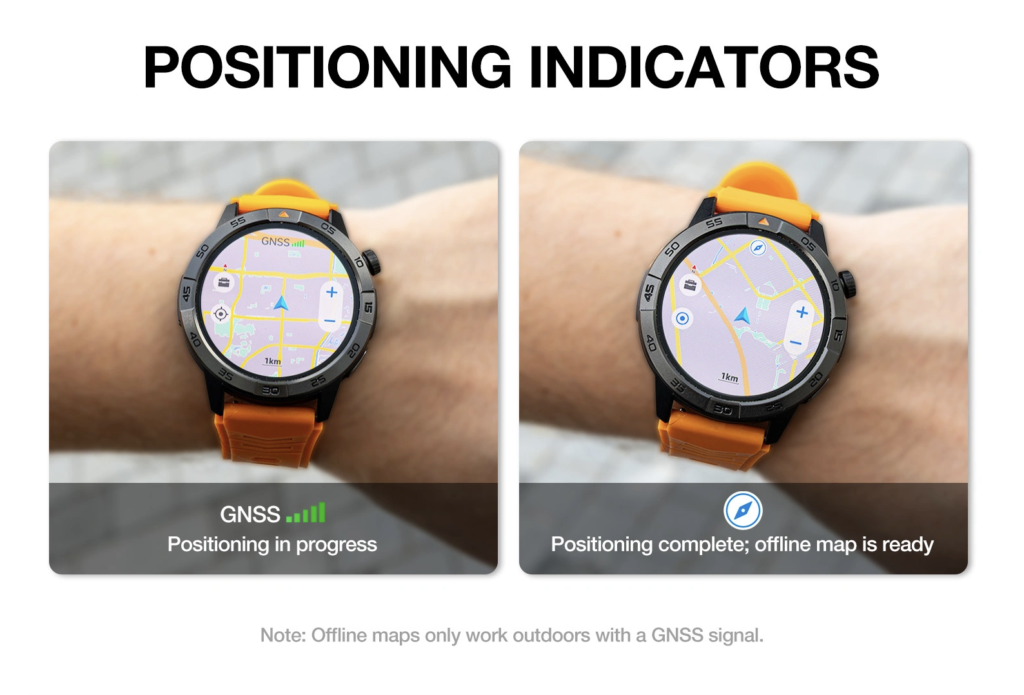
That does not prove GPS caused every percentage point of the loss. The display, heart-rate sensor, and repeated wrist checks also consumed power.
It does make the unfinished activity the strongest explanation for the continued decline.
Compare the last normal workday
The coordinator reviews a previous aquarium workday with a similar schedule.
That morning also included:
- Indoor preparation
- An outdoor exhibit walk
- Bright San Antonio sunlight
- Staff communication
- Repeated time checks
- Activity tracking
The watch did not approach an emergency battery level before lunch.
The important difference is that the coordinator clearly remembers ending the activity after completing the route.
Before deciding that the entire watch has poor endurance, the coordinator can check what normal everyday battery use looks like across a comparable workday.
The earlier normal day strengthens the unfinished-GPS explanation because the surrounding routine remained similar while the activity-ending behavior changed.
Eliminate the Weaker Suspects
The coordinator still checks whether another feature fits the timing more closely.
This is not a general troubleshooting list. Each alternative is examined only to decide whether it explains this one battery cliff better than the unfinished GPS activity.
Outdoor brightness
Bright Texas sunlight likely increased display use during the exhibit walk.
The coordinator checked the screen repeatedly, and the watch needed to remain readable outdoors. That may have contributed to power use while the route was active.
However, the severe decline continued after the coordinator returned indoors.
Brightness cannot explain the full indoor portion of the battery cliff.
One short family call
The call history shows one brief family call during the morning.
Wrist calling can activate the microphone, speaker, Bluetooth connection, and display at the same time. A long conversation or repeated calls could create a noticeable drain period.
This call was short and did not begin near the first abnormal decline.
Its timing is too weak to make it the primary cause.
Bluetooth searching
The paired phone remained in the coordinator’s work bag and stayed nearby.
Notifications continued arriving, and the watch did not show repeated connection warnings. There is no clear sign that the device spent the critical block searching for the phone.
Bluetooth instability can affect battery life, but it is not supported by this workday timeline.
Staff notifications
The coordinator reviews the message history.
No unusual group conversation, repeated call alert, or promotional flood appeared between 9:10 and 10:40 a.m. The number of alerts resembled a normal morning.
Notifications do not match the timing or severity of the decline as closely as the unfinished activity.
After eliminating the weaker explanations, the GPS session remains the strongest testable cause.
Re-Enact the Critical GPS Block
The coordinator does not need to repeat the entire day.
Only the abnormal period needs to be tested.
On the next comparable morning, the watch begins at a similar charge level. The same phone remains paired, the same watch face stays active, and notification access remains unchanged.
The coordinator repeats the outdoor exhibit walk.
Keep the conditions comparable
The second test uses:
- The same walking activity mode
- The same general exhibit route
- Similar outdoor conditions
- Similar screen-checking behavior
- The same paired phone
- The same notification settings
Changing several variables would make the result difficult to interpret.
Only one action changes.
End the activity deliberately
At the end of the walk, the coordinator:
- Opens the activity screen.
- Stops the workout.
- Saves the record.
- Confirms the GPS indicator is inactive.
- Returns to the normal watch face.
- Records the battery percentage.
- Checks the battery again two hours later.
The watch still uses more power during the tracked walk than it did during the quiet early-morning block. That is expected.
The important result appears afterward.
Once the activity is stopped, the battery curve slows. The severe indoor decline does not return.
The corrected pattern also leaves more reserve for the rest of the shift. The coordinator can use this guide to plan battery reserve beyond clock-out instead of judging the watch only by whether it survives the scheduled outdoor route.
The controlled repeat has now changed the exact block where the original drain continued.
Issue the Verdict
The evidence points to one conclusion.
The severe midday battery loss was most consistent with an outdoor GPS activity that may have remained active after the coordinator returned indoors.
The conclusion is supported by five observations:
- The watch behaved normally before the activity began.
- The first battery cliff appeared after GPS tracking started.
- The fast decline continued after the outdoor walk ended.
- A previous normal workday included a properly ended activity.
- The controlled repeat stopped the activity and removed the severe indoor decline.
The watch did not need every feature disabled.
The coordinator needed one reliable end-of-activity habit.
The three-point closing check
After each tracked exhibit walk, the coordinator confirms:
- The workout has stopped.
- GPS is no longer active.
- The regular watch face has returned.
This directly addresses the identified problem without removing the feature that made the watch useful.
When the GPS Verdict No Longer Fits
The unfinished-activity explanation is useful only while the evidence supports it.
The coordinator should stop repeating the same GPS test if severe drain continues while the activity is definitely closed.
The verdict would no longer fit if the watch:
- Loses power rapidly during quiet indoor use
- Repeats the battery cliff with GPS inactive
- Shuts down at inconsistent percentages
- Becomes unusually hot
- Charges unpredictably
- Shows swelling or case separation
Those signs would point beyond this one corrected activity.
If the decline remains unexplained, the next step is to test whether battery performance remains consistently weak across several comparable periods.
That is a different problem from the one diagnosed here. This investigation stops once the unfinished-GPS event has been reconstructed, tested, and corrected.
Questions About This Battery Case
Can one GPS session drain a smartwatch quickly?
A GPS session can increase battery use because route tracking, workout timing, sensors, and screen activity may operate together. In this case, the greater concern was that the session may have continued after the outdoor walk ended.
Why did the battery keep falling after the coordinator went indoors?
Returning indoors did not automatically stop the active workout. The activity record extended beyond the actual exhibit walk, matching the period of continued battery loss.
Did bright San Antonio sunlight cause the entire problem?
Outdoor brightness probably contributed during the walk, but it did not explain why the severe decline continued after the coordinator returned indoors. The unfinished activity matched the complete timeline more closely.
Why not turn off GPS permanently?
GPS supported a useful work activity. The problem was not simply that GPS existed; it was that the activity may not have been ended. Stopping the session preserved the feature while correcting the drain pattern.
How did the battery graph reveal the cause?
The graph showed when ordinary decline became unusually steep. That first battery cliff appeared after the GPS activity started, allowing the coordinator to match the decline to the active process.
When might the battery problem involve hardware?
Hardware becomes more concerning when severe drain continues while the watch is idle, appears with heat or swelling, causes inconsistent shutdowns, or remains after the suspected activity has been tested and eliminated.
Close the Case at the First Battery Cliff
To answer “why does smartwatch battery die so fast?”, the aquarium education coordinator did not need to disable every feature or replace the watch immediately.
The coordinator reconstructed one charge cycle.
The morning began with a confirmed full battery. The first abnormal decline appeared after the outdoor GPS activity started. The loss continued after the exhibit walk ended, while weaker suspects did not match the timing.
During the controlled repeat, the coordinator deliberately stopped the activity. The severe indoor battery cliff did not return.
One user had one problem: the watch could not finish a normal workday.
One solution answered it: reconstruct the last full charge, identify the first battery cliff, and repeat the matching GPS block with the activity correctly ended.
Reconstruct one charge cycle hour by hour before changing the entire setup.
When replacement becomes necessary, compare the battery, built-in GPS, offline maps, and Bluetooth-calling details of this long-battery smartwatch with built-in GPS against the demands of the complete workday.