
Two small openings interrupt the side of the watch case.
One may capture sound. Another may release it. From a product photograph, both remain clues rather than proof.
A buyer considering a smartwatch under 150 with speaker and microphone needs more evidence than a grille, call icon, or answer button. A complete wrist conversation exists only when speech travels successfully in two directions.
Outbound arrow: Wearer → microphone → Bluetooth connection → paired phone → remote caller
Incoming arrow: Remote caller → paired phone → Bluetooth connection → speaker → wearer
For a home-inspection office coordinator in Toledo, Ohio, those arrows may carry a short scheduling exchange with an inspector working across town. If either direction breaks, the watch may display calling features without supporting a complete wrist conversation.
The two case openings begin the investigation. They do not finish it.
How to Read the Two-Way Audio Diagram
Give every segment in the diagram one of four marks.
| Path mark | Meaning |
|---|---|
| Solid arrow | The stage is confirmed through documentation or direct use. |
| Dotted arrow | The stage is suggested but remains unverified. |
| Broken arrow | The required audio fails at this point. |
| Transfer arrow | The audio moves to the phone or another connected device. |
Useful evidence may come from the exact product specification, user manual, companion-app instructions, direct test calls, remote-caller feedback, and observation of the active audio device.
Do not identify a visible case opening as a microphone or speaker solely from its shape. It could be a pressure vent, decorative cutout, or part of another case function. Leave that segment dotted until stronger evidence is available.
Outbound Arrow: From the Wearer to the Remote Caller
The first direction follows the wearer’s speech until it reaches the other person.
Stage 1: Does the Microphone Capture the Wearer’s Voice?
A watch can display an incoming call without carrying the wearer’s speech. The first stage therefore confirms whether a microphone participates in the phone call.

Look for evidence such as:
- A microphone listed for the exact model
- Two-way Bluetooth calling documented in the manual
- A microphone port identified in a labeled product diagram
- Call or microphone permissions requested during setup
- A remote caller hearing speech sent from the wrist
The last item provides the clearest functional evidence. A hardware listing may confirm that the component exists, but a direct call shows whether it is being used in the expected path.
The Toledo coordinator can use a sentence containing details the remote caller can repeat:
The inspector is finishing the Oak Street property and can take the next appointment at 2:30.
Ask the person in the field whether “Oak Street” and “2:30” were understandable. The wearer should speak with the wrist in a natural position rather than holding the watch directly against the mouth.
Mark the result as:
- Confirmed Capture: The remote caller hears and understands the wearer.
- Unclear Capture: Some speech arrives, but the active microphone remains uncertain.
- No Wearer Audio: The call stays connected, but the remote caller hears no speech from the watch.
This stage verifies microphone participation. It does not rank microphone quality against competing watches.
Stage 2: Does the Voice Cross the Bluetooth Connection?
Capturing speech does not complete the outbound arrow. The voice still needs to leave the watch and enter the phone call.
That transfer may depend on:
- An active Bluetooth pairing
- A paired smartphone
- Call-audio permission
- Microphone permission
- Contact or phone access
- A companion app
- A separate Bluetooth audio connection on some models
- Correct input and output routing
A watch may remain connected for notifications while phone-call audio uses a different connection condition. Notification delivery alone does not prove that the microphone path is active.
Test the watch while the paired phone remains in a normal Toledo office position, such as on the reception desk, charging behind the desk, or beside the scheduling computer.
The goal is not to measure maximum Bluetooth range. The useful question is whether the watch can complete the required conversation while the phone stays where it normally belongs.
A buyer who is unsure what happens after tapping the answer control should confirm what answering a call requires.
Stage 3: Does the Wearer’s Voice Reach the Remote Caller?
The outbound arrow reaches its destination only when the inspector receives the coordinator’s message.
| Outbound stage | Evidence | Result |
|---|---|---|
| Wearer speaks | Direct observation | Confirmed |
| Microphone captures speech | Remote-caller feedback | Confirmed / Unclear |
| Bluetooth transports audio | Watch remains the active input device | Confirmed / Broken |
| Remote caller receives details | Street and time repeated correctly | Confirmed / Broken |
The remote caller can repeat:
Oak Street, with the next appointment at 2:30.
If those details arrive correctly, the outbound arrow is complete.
Use one outbound verdict:
- Outbound Arrow Complete
- Microphone Stage Unconfirmed
- Bluetooth Segment Broken
- Audio Redirected Before Arrival
Do not assume the return direction works merely because the remote caller can hear the wearer.
Incoming Arrow: From the Remote Caller to the Wearer
The second direction begins when the inspector speaks back.
Stage 4: Does the Remote Voice Enter the Call?
Use a response with details the coordinator can repeat:
I can finish here in twenty minutes and head to the Monroe Street inspection next.
The important information is “twenty minutes” and “Monroe Street.” Those details make it possible to judge whether the message reaches the wearer.
The call may remain active while its audio is routed somewhere other than the watch. The next stages identify the actual destination.
Stage 5: Does Return Audio Cross Bluetooth to the Watch?
Incoming speech must travel from the phone call back across Bluetooth.
Observe whether:
- The caller’s voice begins on the watch
- The phone speaker remains inactive
- Volume controls affect the watch
- Audio remains on the wrist after a screen tap
- The route survives normal wrist movement
- The watch remains the selected audio device
A watch may receive the call alert while the conversation itself stays on the phone. That result confirms alert or call-control support, not complete wrist audio.
Mark this segment as:
- Return Audio Confirmed: The caller’s voice crosses to the watch.
- Phone Audio Only: The call is active, but speech comes from the phone.
- Route Unclear: Sound is heard, but the active output cannot be identified.
- Return Bridge Broken: The remote caller hears the wearer, but the wearer receives no sound.
Stage 6: Does the Speaker Play Phone-Call Audio?
A watch speaker may be used for alarms, ringtones, prompts, short music playback, or voice-assistant responses. Those functions do not automatically prove that phone-call speech can be routed through the same speaker.
Look for:
- A speaker listed for the exact watch model
- Phone-call playback documented in the manual
- A speaker grille identified in a labeled diagram
- The remote caller’s voice coming directly from the watch
- Call-volume controls affecting the watch speaker
- Watch audio stopping when the call is transferred to the phone
Confirm two separate facts:
- The speaker exists.
- The phone call uses it for incoming speech.
Mark the speaker stage as:
- Call Audio Confirmed
- Non-Call Audio Only
- Speaker Present, Routing Unclear
- No Wrist Audio
Stage 7: Does the Wearer Understand the Message?
The incoming path ends when the coordinator hears and understands the inspector.
Record whether:
- The voice comes from the watch
- “Twenty minutes” is understandable
- “Monroe Street” is clear
- Volume can be adjusted
- The audio remains on the wrist
- The phone speaker activates instead
- The watch must be held unnaturally close to the ear
| Incoming stage | Evidence | Result |
|---|---|---|
| Remote caller speaks | Direct test | Confirmed |
| Phone call receives voice | Conversation remains active | Confirmed |
| Bluetooth carries return audio | Watch remains the output device | Confirmed / Broken |
| Speaker plays call audio | Voice heard from the watch case | Confirmed / Broken |
| Wearer understands the message | Key details repeated correctly | Confirmed / Unclear |
The purpose is to confirm functional understanding, not rank the watch against competitors for sound quality.
Control Gate: Can the Wearer Open and Close the Audio Path?
The two arrows remain inactive until the call is answered.
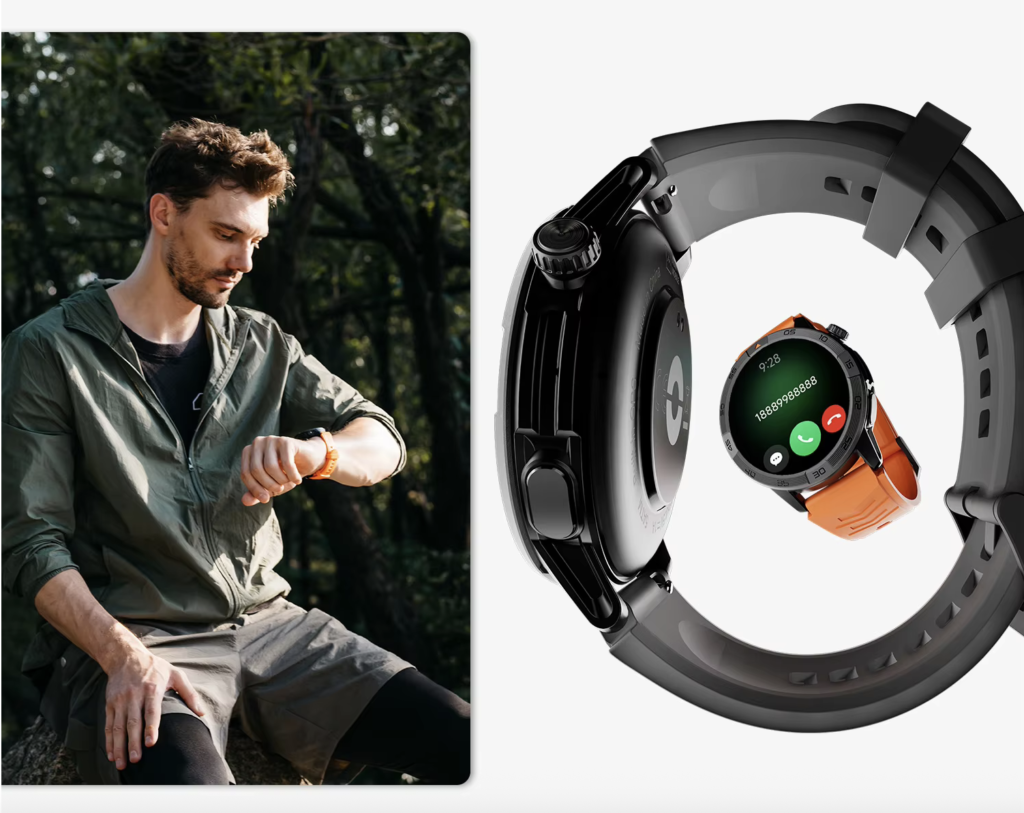
Verify:
- Incoming-call alert
- Caller identification
- Answer control
- Reject control
- End-call control
- Volume adjustment
- Audio-device selection, when available
- Transfer to the phone, when supported
The Toledo coordinator should be able to:
- Recognize the inspector’s name
- Answer from the wrist
- Hear the schedule update
- Reply with the next appointment
- End the call deliberately
A call icon proves only that some type of call interface exists. It does not prove that the controls open the complete microphone-and-speaker path.
Readers who need to inspect the software side can check the controls and permissions behind the feature.
Phone Boundary: Place the Paired Phone Inside the Diagram
For many affordable calling watches, the smartphone remains part of the system.
The phone may provide:
- Cellular service
- Contact information
- Call processing
- Bluetooth audio transport
- Network access
- Companion-app permissions
The accurate paths may therefore be:
Wearer → watch microphone → Bluetooth → paired phone → remote caller
Remote caller → paired phone → Bluetooth → watch speaker → wearer
Use one boundary label:
- Phone Required Nearby
- Phone Required, Position Flexible
- Independent Calling Documented
- Independence Unconfirmed
A microphone and speaker do not prove standalone calling. Independent calling may require cellular hardware, carrier support, activation, a compatible regional model, and an ongoing service plan.
To separate wrist hardware from phone independence, verify when the phone must remain within range.
Audio Routing Fork: Watch, Phone, or Another Device?
Once the call opens, its audio can move among several destinations:
- Watch microphone and speaker
- Phone microphone and speaker
- Bluetooth earbuds
- Vehicle audio
- Another connected device
| Action | Expected destination | Actual destination |
|---|---|---|
| Answer from watch | Watch audio | __________ |
| Transfer to phone | Phone audio | __________ |
| Return audio to watch | Watch audio | __________ |
| Reconnect after a brief interruption | Expected wrist route | __________ |
The coordinator can answer on the watch, move a longer scheduling discussion to the phone, and then attempt to return the call audio to the wrist.
Observe whether both speech directions move together and whether another connected device takes priority.
This is not a full Bluetooth troubleshooting procedure. The purpose is to determine whether the normal call route behaves predictably.
Complete the Bidirectional Audio Diagram
Place both arrows on one page.
Outbound:
Wearer → Microphone → Bluetooth → Paired Phone → Remote Caller
Incoming:
Remote Caller → Paired Phone → Bluetooth → Speaker → Wearer
Mark every segment as solid, dotted, broken, or redirected.
| Path stage | Result |
|---|---|
| Microphone documented | Yes / No / Unclear |
| Wearer heard by remote caller | Yes / No |
| Outbound Bluetooth audio works | Yes / No / Unclear |
| Return audio reaches the watch | Yes / No / Unclear |
| Speaker plays phone-call audio | Yes / No |
| Wearer understands the caller | Yes / No |
| Answer and end controls work | Yes / No |
| Paired-phone requirement identified | Yes / No |
| Audio route remains predictable | Yes / No |
Choose the Correct Hardware Verdict
Complete Two-Way Path
Use this verdict when the wearer’s voice reaches the remote caller, the caller’s voice returns through the watch speaker, controls work, phone dependence is understood, and audio routing remains predictable.
Outbound Path Broken
Use this verdict when the remote caller cannot hear the wearer, microphone participation remains unconfirmed, or outgoing speech fails before reaching the call.
Incoming Path Broken
Use this verdict when the remote caller hears the wearer but the wearer cannot hear the caller through the watch.
Audio Redirected to Phone
Use this verdict when the watch displays or answers the call but the phone handles one or both audio directions.
Hardware Claim Unconfirmed
Use this verdict when the listing shows a call icon or visible case openings but documentation and direct testing have not confirmed both arrows.
After the hardware path is confirmed, buyers can place the audio hardware inside the wider calling stack.
Label the Audio Diagram With Its Test Setup
Add only the conditions needed to interpret the two arrows:
- Exact watch model
- Phone model and operating-system version
- Phone position during the call
- Connected Bluetooth audio devices
- Active call and microphone permissions
- Observed audio destination
- Test date
These details show the conditions under which the audio path was confirmed. They also help explain why routing may differ with another phone, operating-system version, connected headset, or phone position.
Frequently Asked Questions
Does every calling smartwatch have a microphone?
No. Some watches only display incoming-call alerts or allow the wearer to reject a call. Confirm the exact hardware and test whether the remote caller hears speech from the watch.
Can a speaker-only smartwatch answer phone calls?
A speaker may play a ringtone or incoming audio, but a two-way conversation also requires a microphone, Bluetooth audio transport, working controls, and correct call routing.
Does a call icon prove two-way calling?
No. The icon may represent call alerts, rejection controls, recent calls, a dialer, or another communication function. Both audio directions still need confirmation.
Why does call audio sometimes move back to the phone?
The phone may remain the selected audio device, the watch may require manual routing, another Bluetooth device may take priority, or the watch may not support complete call audio.
Must the paired phone remain nearby?
Often yes for Bluetooth calling. Check the exact watch model’s phone requirement and test the normal distance needed for the buyer’s routine.
Can the speaker work for alarms but not for phone calls?
Yes. A watch may play alarms, prompts, or ringtones without routing phone-call speech through its speaker.
How can the watch microphone be tested?
Use a direct call and speak a short sentence containing a street name, appointment time, or other checkable detail. Ask the remote caller to repeat what was heard.
Does clear outgoing speech prove the speaker works?
No. The outbound and incoming paths are separate. The remote caller may hear the wearer even when return audio remains on the phone.
Both Audio Arrows Must Reach Their Destinations
Return to the two small openings in the case.
One may capture sound. Another may release it. Neither alone proves that a wrist conversation exists.
The Toledo home-inspection coordinator needs the outbound arrow to carry an appointment update to the inspector. The incoming arrow must return the field response to the watch. Controls have to open the path, Bluetooth must transport the audio, and the paired-phone boundary must be understood.
Start at the wearer’s voice, follow the outbound arrow to the remote caller, reverse direction, and trace both audio paths through this watch before accepting a speaker-and-microphone claim.
Two-way calling exists only when both arrows remain unbroken from mouth to ear and back again.