
Five arrows spread across a yellow legal pad before jury check-in begins at a Baton Rouge courthouse. One points toward apps and phone alerts. Another leads to activity tracking. A third ends at time, alarms, and a timer. The fourth preserves an analog look with limited connected functions. The final arrow says, “Keep the current watch.” Every path could contain an inexpensive product, but only one can become the best budget watch for this buyer.
The jury-services coordinator has been comparing prices before choosing the correct device category. That reverses the decision. A low-cost smartwatch is poor value when smart functions are unnecessary, just as a simple digital watch is the wrong tool when phone-linked information is essential. The Wrist Device Fork begins with required tasks, sends them through five branches, and stops at the simplest category that completes the entire job.
The best budget watch is the simplest device that completes every required task. Choose a smartwatch for necessary phone-linked alerts or calls, a fitness band when activity tracking is the main job, a digital watch for time and alarms, a hybrid for analog presentation with limited smart functions, or keep your current watch when it already does enough. Category comes before product and price.
Why U.S. Budget-Watch Lists Start One Decision Too Late
Most buying guides begin inside a product category. A smartwatch guide assumes the buyer needs apps, notifications, and a connected screen. A fitness-band guide assumes activity data matters. Digital-watch lists emphasize simple controls and timekeeping, while hybrid-watch pages begin with the desire for traditional styling plus selected smart functions.
The broad search for the best budget watch does not settle any of those assumptions. The buyer may still be deciding what kind of wrist device belongs in the routine.
Choosing the category first prevents price, appearance, or feature count from controlling the decision. When the smartwatch branch genuinely wins, the coordinator can enter the smartwatch category map only after that branch wins. Until then, connected wearables remain only one possible path.
Write the Baton Rouge Wrist-Job Card
The coordinator starts by describing tasks without naming a device. Jury-services work includes preparing orientation blocks, coordinating check-in periods, monitoring administrative schedules, and responding to permitted staff communication. Courthouse, employer, courtroom, and security policies always control whether any wrist device may be used.
The required-task card contains:
- clear time and date;
- two scheduled alarms;
- a countdown timer for administrative blocks;
- readable information with low interaction demand;
- dependable operation during the normal routine;
- and no unnecessary exposure of private courthouse information.
Preferences remain separate:
- phone notifications;
- wrist calling;
- step counts;
- sleep or wellness trends;
- third-party apps;
- touchscreen menus;
- and analog styling.
An optional feature cannot select a more complicated category unless losing it would prevent the wrist job from being completed.
Check the Current Watch Before Buying Anything
The first branch does not lead to a store. It asks whether the current watch already completes every required task.
The coordinator checks:
- Is the time display readable?
- Do the alarms work reliably?
- Is the required timer available?
- Does the watch remain comfortable?
- Is the desire for replacement functional or mostly cosmetic?
When nothing essential is missing, keeping the existing device is the strongest budget decision. A new purchase would only duplicate a working tool and add setup or adjustment without solving a problem.
In this case, the current watch exits the fork. It lacks the required countdown timer, and one control has become unreliable. The coordinator needs another device, but the failure does not prove that a smartwatch is necessary.
Smartwatch Branch: Require a Real Phone-Linked Job
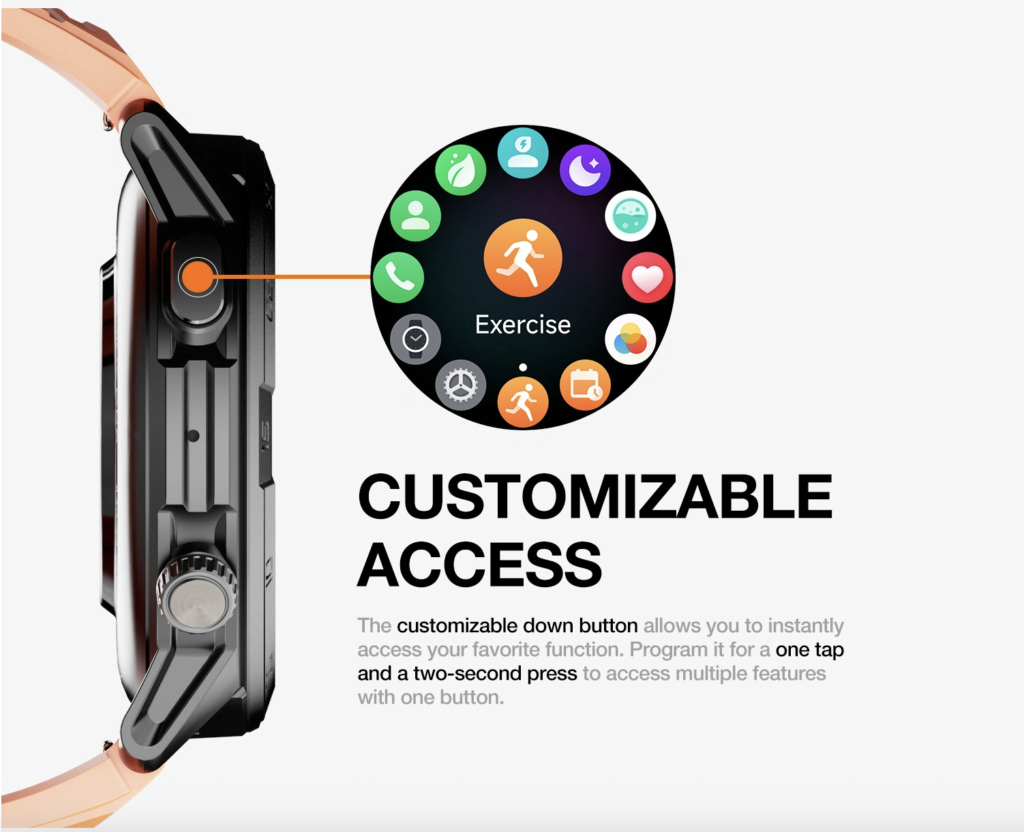
A smartwatch branch opens only when phone-linked information or interactive wrist functions are genuinely required. Examples include selected administrative alerts, useful caller context, permitted short calls, or an app-based function that a simpler device cannot provide.
Choosing this path also introduces additional ownership responsibilities:
- phone compatibility;
- a legitimate companion app;
- permissions and background settings;
- notification filtering;
- recharging;
- privacy controls;
- and more screen interaction.
Juror names, case numbers, summons details, courtroom assignments, phone numbers, addresses, attendance notes, and confidential messages must not appear openly on the wrist. The coordinator also should not interact with a watch while assisting jurors, moving through security, using stairs, crossing a parking area, driving, or carrying courthouse records.
The buyer should verify the complete phone partnership before choosing the smartwatch path. When time, date, alarms, and a timer complete the job, adding apps and notifications creates Smart Feature Overbuy.
Fitness-Band Branch: Make Tracking the Main Job
A fitness band should win when activity information is the central purpose rather than a pleasant extra. The branch may fit a buyer who primarily wants step awareness, exercise logging, lightweight continuous wear, sleep trends, or basic progress data.
The Baton Rouge coordinator does not need activity records to organize jury orientation or manage check-in periods. Step counts and wellness trends may be interesting, but they do not complete a required courthouse task.
Some fitness bands can display phone notifications or caller information. Those secondary capabilities do not automatically make a tracker the right communication device. A compact screen may provide less context than the buyer needs, while app syncing and sensor use still add ownership burden.
Because tracking is not the coordinator’s main job, this branch closes. Choosing it for one attractive dashboard would create Wrong Watch Type.
Digital-Watch Branch: Protect Simple Courthouse Timekeeping
The digital-watch branch asks whether basic wrist tools complete the entire requirement. For this buyer, the relevant functions are time, date, alarms, a countdown timer, readable controls, and low attention demand.
A digital watch does not need to imitate a smartwatch to qualify. Simplicity can be the reason it wins. No companion app is required for the core task. Phone permissions do not need management. Private messages cannot appear when the device does not receive them. Buttons may also allow the buyer to complete basic actions without opening layers of menus.
The coordinator still must evaluate the exact product. Category alone does not prove display readability, alarm behavior, timer controls, comfort, water resistance, battery duration, or durability. Those details belong to the later product-selection stage.
At the category level, however, the digital branch remains open because it completes every required task without adding functions the coordinator does not need. This is the strongest current path toward the best budget watch.
Hybrid-Watch Branch: Require Analog Form and Limited Connection
A hybrid watch belongs between conventional presentation and selected connected functions. It should proceed only when two conditions are both true:
- Traditional hands or an analog appearance are a genuine requirement.
- Limited tracking or phone-linked information remains useful enough to justify setup and syncing.
This branch is not a universal compromise. Some hybrids offer minimal displays, product-specific controls, or limited interactive detail. Others may still depend on a phone app and regular synchronization.
The jury-services coordinator likes an analog appearance but does not require it. The job depends more on a clear countdown timer and direct digital information. Styling alone cannot outweigh the required task card, so the hybrid branch closes.
Compare the Ownership Burden Across All Five Paths
Several categories may perform the same basic function, yet they can ask the buyer to manage very different systems.
| Category | Phone dependence | App and setup burden | Typical interaction | Tracking role | Primary reason to choose |
|---|---|---|---|---|---|
| Smartwatch | Often high | Often high | Interactive screen | Varies | Required phone-linked wrist functions |
| Fitness band | Usually connected | Moderate | Compact screen or limited controls | Primary | Activity and wellness trends |
| Digital watch | Usually none | Low | Buttons and digital display | Usually absent | Time, alarms, timer, and basic tools |
| Hybrid watch | Varies | Varies | Analog display with a limited smart layer | Secondary or product-dependent | Analog presentation plus selected smart functions |
| Current watch | Existing burden | Nothing new | Already familiar | Existing | No required task is missing |
These are category tendencies, not universal specifications. Exact products can behave differently. The table helps identify unnecessary burden before the buyer compares individual offers.
Run the Wrist Device Fork in the Correct Order
The Wrist Device Fork works best when the buyer follows a fixed sequence:
- Does the current watch already complete every required task? If yes, keep it.
- Is phone-linked information necessary on the wrist? If yes, open the smartwatch branch.
- Is activity tracking the main purpose? If yes, open the fitness-band branch.
- Is analog presentation essential alongside limited connected functions? If yes, test the hybrid branch.
- Can time, alarms, and basic digital tools complete the job? If yes, choose the digital-watch branch.
The order prevents one dramatic feature from controlling the category choice. A call screen should not force a smartwatch decision when wrist calling is unnecessary. A long activity list should not select a fitness band when the buyer does not plan to track exercise.
Only after the connected branch survives should the coordinator apply the budget smartwatch checks only when the smartwatch branch survives.
Do Not Confuse Battery Style With Device Type
Battery expectations can distort the category decision. A buyer may assume every digital watch runs for an extremely long period, every smartwatch requires constant charging, every hybrid lasts longer than a connected screen device, or every fitness band offers the same endurance.
Those assumptions create Battery Trade Misread.
Category choice should begin with the job. Battery behavior comes afterward and must be verified for the exact product, operating conditions, enabled functions, charging system, and replacement method. The best budget watch is not selected by the most attractive battery stereotype. It is selected by task first and product evidence second.
Correct Four Wrong-Category Buying Failures
Smart Feature Overbuy
The buyer pays for apps, calls, notifications, and syncing even though timekeeping completes the job. Correction: require a real phone-linked wrist task before opening the smartwatch branch.
Battery Trade Misread
The buyer chooses a category based on assumed charging or battery behavior. Correction: select the category by required tasks, then verify the exact product’s battery evidence.
Screen Complexity Cost
The buyer accepts menus, gestures, permissions, and repeated interaction without needing them. Correction: prefer simpler controls when they complete every requirement.
Wrong Watch Type
One attractive feature overrides the main purpose. Correction: return to the complete wrist-job card and test every required task together.
Issue the Baton Rouge Category Verdict
Budget Smartwatch Fit
Choose this verdict when only a smartwatch can complete one or more required phone-linked or interactive wrist tasks.
Fitness Band Fit
Use this result when activity tracking is the central purpose and full smartwatch interaction is unnecessary.
Simple Digital Fit
Apply this verdict when time, date, alarms, a timer, or similar basic tools complete the entire job.
Decision Needs Reframing
Use this outcome when the hybrid branch wins, the current watch already qualifies, requirements conflict, or the buyer cannot separate essentials from preferences.
The Baton Rouge coordinator receives Simple Digital Fit. The verdict does not name a product or claim that every digital watch will qualify. It only identifies the category that deserves later comparison.
For this user, the best budget watch is not the device with the most capabilities. It is the digital-watch category because it completes the required job with the lowest unnecessary ownership burden.
What Happens After the Device Category Wins?
The Wrist Device Fork ends at category selection. Product evaluation begins afterward.
- If a smartwatch wins, compare smartwatch types, exact phone support, required functions, battery, comfort, seller evidence, and returns.
- If a fitness band wins, define the required tracking, display, app, comfort, and syncing behavior.
- If a digital watch wins, compare time tools, buttons, readability, fit, product evidence, and exact battery arrangement.
- If a hybrid wins, test analog presentation against the required connected layer.
- If the current watch wins, stop shopping.
A smartwatch buyer can locate the lowest viable price only after confirming the smartwatch category. Once a candidate qualifies, the buyer may also test long-term suitability after a budget smartwatch qualifies.
Questions U.S. Buyers Ask Before Choosing a Watch Type
Is a smartwatch always the best budget watch?
No. A smartwatch is the correct category only when required phone-linked or interactive wrist functions justify its setup, charging, screen, and app burden.
Is a digital watch better for long battery life?
Some digital watches may reduce charging dependence, but battery behavior must be verified for the exact product rather than assumed from the category.
Should I choose a fitness band instead of a smartwatch?
Choose a fitness band when activity tracking is the main job and full smartwatch interaction is unnecessary.
Can a fitness band show phone notifications?
Some can. Limited notifications do not automatically make a fitness band suitable for a communication-centered task.
When does a hybrid watch make sense?
A hybrid can fit when analog presentation is truly important and the buyer also needs a limited connected or tracking layer.
Do I need wrist calling?
Only when calling is permitted, safe, private, and central enough to justify the smartwatch category. Complex conversations should return to the phone.
Can keeping my current watch be the best budget decision?
Yes. When the current watch completes every required task reliably, buying nothing is the simplest qualified branch.
Which watch type is best for courthouse work?
The answer depends on the actual tasks and applicable courthouse, employer, courtroom, and security policies. The workplace label alone cannot select the category.
The Best Budget Watch Starts With the Right Category
The five arrows remain on the yellow legal pad, but only one is circled. The smartwatch path did not lose because smart features are bad. It lost because apps, calls, notifications, and phone dependence did not complete a required task for this buyer.
The fitness-band and hybrid paths also added capabilities that were not central to jury-services coordination. Keeping the current watch failed because the required timer was missing and one control had become unreliable.
The best budget watch is the simplest category that completes the entire wrist job without adding ownership burden the buyer does not need. For the Baton Rouge coordinator, that category is a digital watch. Product comparison can now begin without asking a smartwatch to solve a problem that never required one.
When your own Wrist Device Fork genuinely ends at a connected device, test this connected option only if your fork ends at smartwatch.