
Better battery life can eliminate several charging sessions each week, but the real cost of leaving an Apple Watch may be hidden in the routines that no longer work the same way.
A smartwatch alternative to Apple Watch better battery may last longer between charges, provide more reserve for calls, and feel easier to manage during travel or extended workdays. That does not automatically make it a better choice for every iPhone owner.
The Apple Watch may already be connected to your health history, mobile payments, favorite apps, bands, chargers, notification habits, and cellular plan. Moving to another watch can improve battery life while creating new compromises elsewhere.
Before comparing replacement models, divide the functions you use into four columns:
- Keep
- Replace
- Give up
- Verify before buying
That migration list will reveal whether better battery life is worth the switching cost.
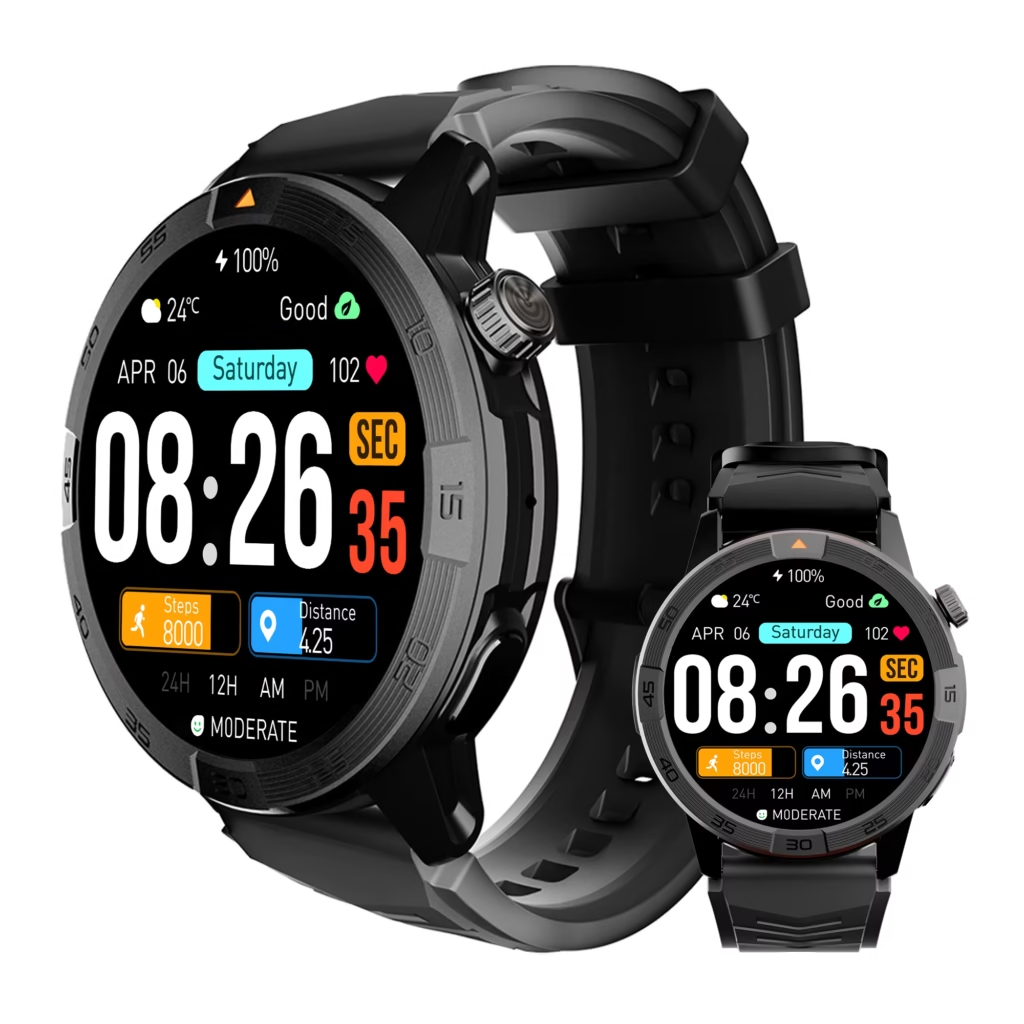
Why a Smartwatch Alternative to Apple Watch Better Battery Requires a Migration Plan
Battery frustration is easy to recognize.
You may be tired of:
- Charging every night
- Removing the watch before sleep
- Carrying another charger while traveling
- Starting a long day with limited reserve
- Losing tracking time while the watch charges
- Worrying about battery during calls, workouts, or navigation
The replacement decision becomes more complicated when you consider everything the Apple Watch already does inside your daily routine.
An alternative may provide longer runtime but handle iPhone notifications differently. It may support Bluetooth calls but offer fewer apps. It may track workouts but store the data in another platform. It may provide wrist payments through a different service—or not support the payment method you currently use.
The correct comparison is not:
Which watch advertises more days?
It is:
Which watch gives me more battery without removing the functions I depend on?
Build a Four-Column Apple Watch Migration List
Open a note on your phone and list the Apple Watch functions you use during a normal week.
Do not list every feature the watch supports. Include only the functions you actually use.
Your list may contain:
- Incoming-call alerts
- Wrist calling
- Text notifications
- Calendar reminders
- Alarms and timers
- Mobile payments
- Workout tracking
- Heart-rate information
- Sleep tracking
- Music controls
- Maps or directions
- Weather
- Third-party apps
- Cellular calling
- Emergency features
- Watch faces
- Health-history synchronization
Place each function into one of four columns.
| Migration column | Meaning |
|---|---|
| Keep | The alternative can provide a similar function without a major change |
| Replace | The function remains possible but requires a different app, service, or habit |
| Give up | The function will not be available or will lose too much value |
| Verify | Compatibility depends on the model, iPhone, app, carrier, bank, or setup |
This prevents battery life from dominating the decision before compatibility has been checked.
What You May Be Able to Keep
Some everyday smartwatch functions are available on many battery-first alternatives.
The exact experience varies by model, but buyers may be able to keep:
- Incoming-call alerts
- Basic Bluetooth calling
- Time, alarms, and timers
- Calendar notifications
- App notifications
- Activity and workout tracking
- Heart-rate summaries
- Sleep tracking
- Weather information
- Music controls
- Basic watch-face customization
Keeping a function does not mean the experience will be identical.
A replacement watch may show notifications but provide fewer reply options. It may support calls but use different contact-syncing behavior. It may track sleep but present the information through its own companion app.
The important question is whether the alternative performs the job well enough for your routine.
Caller awareness may transfer more easily than advanced communication
Many users mainly rely on their Apple Watch to identify callers, reject unwanted calls, and handle brief conversations.
A battery-first alternative with a microphone, speaker, and dependable Bluetooth connection may preserve much of that convenience.
Before buying, verify:
- Whether caller names appear correctly
- Whether contacts synchronize
- Whether calls can be answered and ended from the watch
- Whether the microphone works clearly
- Whether the watch reconnects automatically
- Whether these functions work properly with your iPhone model
A watch that lists “Bluetooth calling” but displays only numbers instead of contact names may not preserve the experience you expected.
What You May Need to Replace
Some Apple Watch routines can continue only after moving to another app, payment method, accessory, or workflow.
These are replacement costs rather than complete losses.
Health and Fitness History
A new watch may collect many of the same types of information, but historical trends may remain divided between platforms.
Before switching, consider:
- Where previous workout history is stored
- Whether health information can be exported
- Whether the new app can write information to Apple Health
- Whether older and newer records will appear together
- Which trends matter enough to preserve
A runner who reviews years of pace, heart-rate, and workout data has a higher migration cost than someone who checks only daily steps.
Mobile payments
Apple Pay on the iPhone can remain available after leaving the Apple Watch, but wrist payments depend on the replacement watch, its payment platform, and supported financial institutions.
A U.S. buyer who frequently pays from the wrist should verify:
- Whether the watch supports contactless payments
- Which payment service it uses
- Whether the user’s bank or card is supported
- Whether payment works without opening the phone
- Whether the feature works when the watch is paired with an iPhone
Do not assume that every watch with NFC provides the same payment experience.
Workout and health apps
A replacement may use a different health dashboard.
You may need to learn a new app for:
- Workout summaries
- Sleep reports
- Heart-rate trends
- Activity goals
- Device settings
- Firmware updates
- Notification permissions
The software experience matters because the watch and companion app operate as one system.
A watch with excellent battery life can still become frustrating when the app is unreliable, confusing, or poorly supported.
Charging equipment
Apple Watch chargers generally do not become useful for an unrelated watch design.
Switching may require:
- A new magnetic charger
- A spare cable for work
- A travel charger
- A replacement charging dock
- Another cable in the car or luggage
Longer battery life may reduce how often these accessories are needed, but the replacement cost still belongs in the migration calculation.
Bands, cases, and accessories
Existing Apple Watch bands, protectors, docks, and cases may not fit the replacement.
Count the accessories you would need to repurchase.
The cost of leaving the ecosystem is not limited to the watch itself.
What You May Have to Give Up
Some Apple Watch functions may not transfer fully to another brand, particularly when they depend on Apple-specific integration.
The exact limitations differ by model, but potential losses may include:
- Certain watchOS apps
- Deep interaction with Apple services
- Some message-response options
- Existing watch faces
- Apple-specific safety functions
- Seamless continuity with other Apple devices
- Particular health or fitness features
- Cellular features tied to supported Apple Watch plans
- Automatic synchronization of certain records
This does not mean every loss will matter.
A battery-focused buyer may happily give up a large app library when the watch is mainly used for calls, notifications, time, sleep, and fitness basics.
Another user may discover that the ecosystem functions are more valuable than the inconvenience of frequent charging.
Do not confuse feature names with equal experiences
Two watches may both advertise:
- Calling
- Notifications
- Sleep tracking
- Heart-rate monitoring
- Navigation
- Payments
That does not mean the features work in the same way.
Compare the actual experience:
- What can be done from the wrist?
- What still requires the phone?
- How quickly does information synchronize?
- Which apps are supported?
- How reliable is the connection?
- What happens when the phone is out of range?
The battery gain should be measured against real functionality, not matching words on two specification sheets.

What U.S. iPhone Owners Must Verify Before Buying
Compatibility is the gate that every replacement watch must pass.
Some watches work with both iPhone and Android. Others provide limited iPhone support. Some are designed primarily or exclusively for Android.
Do not assume that Bluetooth pairing means full compatibility.
iPhone support
Confirm:
- Supported iPhone models
- Required iOS version
- Companion-app availability in the U.S. App Store
- Call handling
- Contact syncing
- Notification access
- Calendar support
- Music controls
- Health-data options
- Firmware-update support
The product page should clearly identify what works with iPhone.
Notification behavior
A watch may display iPhone notifications without allowing replies or advanced actions.
Check whether you can:
- Read the caller’s name
- See message previews
- Control which apps reach the wrist
- Silence low-priority notifications
- Clear alerts
- Receive calendar reminders
- Maintain notifications after reconnecting
For many Apple Watch users, notification quality matters as much as the battery itself.
Bluetooth calling
Confirm that the watch contains both a microphone and a speaker.
A call alert alone is not the same as conducting a conversation from the wrist.
Also verify whether calling depends on the nearby iPhone. Many battery-first watches support Bluetooth calling but do not provide independent cellular service.
Standalone cellular service
Buyers who currently use an Apple Watch away from the iPhone should treat cellular support as a separate requirement.
Before ordering an alternative, confirm:
- Whether a cellular version exists
- Whether it supports a U.S. carrier
- Whether a separate plan is required
- Whether the watch can call without the phone nearby
- How cellular use affects battery life
Do not assume that a watch with Bluetooth calling can replace a cellular Apple Watch.
Health-data continuity
Check whether the companion app can share information with Apple Health and which data categories are supported.
A general statement such as “works with Apple Health” may not mean every metric transfers in both directions.
Verify the specific information you care about, such as:
- Workouts
- Steps
- Heart rate
- Sleep
- Calories
- Distance
- Weight
- Other health measurements
Returns, warranty, and support
U.S. consumers should evaluate the entire purchase, not only the watch.
Review:
- Final price in U.S. dollars
- Shipping costs
- Sales tax where applicable
- Return-window length
- Restocking fees
- Warranty coverage
- Customer-support access
- Replacement-charger availability
- Replacement-band availability
A generous return window is valuable because iPhone compatibility and battery performance should be tested under normal use.
Battery Gain Versus Switching Cost
The battery benefit should be compared with the effort required to rebuild your routine.
| Battery benefit | Possible switching cost |
| Fewer charging sessions | New charger and accessories |
| More overnight tracking | Different sleep app |
| More reserve for calls | Different call and contact behavior |
| Longer travel coverage | Fewer apps or ecosystem features |
| Less battery anxiety | New companion-app workflow |
| Better multi-day continuity | Divided health history |
| Less dependence on outlets | Possible loss of wrist payments |
| Longer outdoor use | Different navigation experience |
A switch makes sense when the benefits appear in your daily life more often than the compromises.
Estimate the weekly battery benefit
Consider how many charging sessions the alternative may remove from a typical week.
Then ask what that change allows you to do:
- Wear the watch overnight
- Travel without a daily charger
- Finish long workdays with reserve
- Use calling without constant battery concern
- Track several workouts between charges
- Keep the watch available during weekend trips
Battery life is valuable when it improves continuity—not simply when it produces a larger number on a product page.
Three American Users, Three Different Decisions
The same battery-first alternative can be right for one iPhone owner and wrong for another.
The San Jose account manager
A San Jose account manager commutes by light rail and uses the Apple Watch for calendar reminders, caller screening, wrist payments, and short message interactions.
Longer battery life is appealing, but mobile payments and notification behavior are important parts of the commute.
The migration list may look like this:
- Keep: Call alerts, alarms, calendar reminders
- Replace: Fitness and sleep app
- Give up: Some watch-specific apps
- Verify: Wrist payments and iPhone message behavior
This user should not switch until the payment and notification experience has been confirmed.
The Minneapolis recreational runner
A Minneapolis runner has years of workout history and uses the watch for outdoor runs, heart-rate trends, sleep, and activity goals.
The daily charging routine is frustrating, especially when the watch needs power before an evening workout.
The migration cost is mainly data-related.
The runner should verify:
- Workout accuracy
- GPS behavior
- Health-data sharing
- Historical record continuity
- Cold-weather battery performance
- App quality
A longer-lasting watch may be worth the change, but only when the new fitness platform supports the information the runner actually reviews.
The Tampa field-sales traveler
A field-sales representative based in Tampa takes domestic flights, rents cars, visits customer sites, and often finishes the day away from a charger.
The watch is used for:
- Calls
- Alarms
- Calendar reminders
- Basic activity tracking
- Travel notifications
- Time-zone changes
This user depends less on advanced Apple Watch apps and more on multi-day continuity.
The migration list may show a low switching cost and a strong battery benefit.
For this traveler, a battery-first alternative can be the more practical choice.
Stay, Switch, or Use Two Watches
The migration list usually produces one of three decisions.
Stay with Apple Watch
Staying may make sense when:
- Apple-specific features are used daily
- Wrist payments are essential
- Health and fitness history must remain continuous
- Cellular independence matters
- App integration is more valuable than longer runtime
- Charging can be managed without much disruption
Battery frustration alone may not justify losing a deeply integrated routine.
Switch completely
A complete switch may make sense when:
- Multi-day battery is the top priority
- The watch is mainly used for calls and notifications
- Basic fitness features are sufficient
- Fewer apps are acceptable
- Travel and long workdays create repeated charging problems
- The alternative works reliably with the iPhone
The best replacement is the one that preserves essential functions while eliminating the charging problem.
Use a battery-first watch for selected situations
Some users may keep the Apple Watch for ordinary days and use a longer-lasting watch for:
- Weekend travel
- Camping
- Long work shifts
- Road trips
- Outdoor activities
- Multi-day events
- Situations with limited charger access
This approach avoids a complete ecosystem migration while solving the specific battery problem.
It also means managing two apps, two chargers, and divided data, so the arrangement should remain simple enough to justify itself.
Questions Apple Watch Users Ask Before Switching
Will a non-Apple smartwatch work fully with an iPhone?
Not necessarily. Compatibility varies by model. Some watches support calls and notifications but limit replies, apps, health syncing, or other functions. Verify each required feature before buying.
Can Apple Health data move to another smartwatch app?
Some apps can share selected information with Apple Health, but historical migration and supported data categories vary. Confirm exactly what imports, exports, and synchronizes.
Will Apple Pay work on an Apple Watch alternative?
Apple Pay remains available on the iPhone, but wrist payments depend on the replacement watch’s payment system and supported banks or cards.
Can an alternative smartwatch answer iPhone calls?
Many Bluetooth calling watches can answer calls when paired with a nearby iPhone, but the microphone, speaker, contact display, and compatibility should be confirmed.
Will Apple Watch bands and chargers work with another watch?
Usually not. Most unrelated watch designs use their own bands, cases, and charging systems.
Is longer battery life worth losing Apple ecosystem features?
It depends on which functions are used every week. Longer battery life is worth the change when charging disruption is a bigger problem than the features being replaced or lost.
Make the Switch on Paper First
A smartwatch alternative to Apple Watch better battery should not be chosen by battery claims alone.
Write down the five Apple Watch functions you use most often.
Mark each one:
- Keep
- Replace
- Give up
- Verify
Then calculate the practical battery gain.
Will the new watch reduce charging interruptions, improve travel coverage, preserve overnight tracking, or provide more reserve for calls and long workdays?
Switch only when the functions you keep are more valuable than the conveniences you lose.
After completing the migration list, review a long-battery calling alternative and verify each nonnegotiable iPhone function during the return period.