
An American buyer opens the phone’s Bluetooth menu and sees two connections for the same watch. One appears to handle notifications. The other seems related to call audio. Several permissions are still waiting for approval, and the product page never explained which ones are essential.
At that point, the phrase smartwatch with phone call support and long battery has not proved very much.
Before the return window closes, the buyer still needs to confirm what the watch can actually do during a call, whether the paired phone must remain nearby, and how much practical battery reserve remains after calling becomes part of daily life.

What Phone Call Support Means in the United States
“Phone call support” does not describe one standardized capability across the U.S. smartwatch market.
Depending on the product, it may mean that the watch can:
- Display an incoming-call notification
- Silence or reject a call
- Answer through a nearby paired phone
- Support a two-way conversation through its own microphone and speaker
- Start calls from contacts or recent-call history
- Make independent cellular calls without the phone nearby
Those functions should not be treated as interchangeable.
A U.S. consumer who wants brief wrist conversations may be disappointed by a watch that only mirrors caller alerts. Another buyer may expect phone-free calling and later discover that the watch depends entirely on Bluetooth.
Battery descriptions can create similar confusion. A long standby estimate may not reflect everyday American use with calls, notifications, commuting, health tracking, and evening responsibilities enabled.
The buyer must verify the calling level first. Battery life should then be judged with that actual capability active.
Place the Watch on the Call-Support Ladder
A five-level ladder makes vague product language easier to interpret.
Level 1: Incoming-call notification
The watch announces that someone is calling.
It may show:
- A saved contact name
- A phone number
- A contact image
- A ringtone or vibration
The phone is still required for the conversation.
Level 2: Call control
The wearer may be able to:
- Silence the alert
- Reject the call
- Dismiss the notification
- Send a preset response on supported systems
This can reduce unnecessary phone retrieval, but it does not prove that the watch supports wrist conversations.
Level 3: Two-way wrist calling
The watch contains a microphone and speaker.
The paired phone usually handles the cellular connection while the wearer speaks and listens through the watch.
This is the capability many American shoppers expect when they see “Bluetooth calling.”
Level 4: Outgoing call initiation
The watch can start a call through:
- Recent calls
- Synced contacts
- Favorite contacts
- A dial pad
- A supported voice assistant
Outgoing calling should be tested independently. A watch may answer calls successfully while offering limited ways to start one.
Level 5: Standalone cellular calling
A cellular smartwatch may place or receive calls when the phone is not nearby.
In the United States, this can involve:
- Compatible LTE hardware
- Carrier support
- eSIM activation
- A separate wearable plan
- Additional monthly costs
Never assume standalone calling from the words “phone call support” alone.
Verify the Hardware Before Trusting the Calling Claim
Two-way calling requires more than a phone icon on the watch face.
Built-in microphone
The microphone should capture understandable speech during brief conversations.
Ask another person to evaluate the call while the watch is used:
- In a quiet home
- Inside an office
- Near light street noise
- At normal wrist distance
A successful connection is not enough when the other caller cannot understand the wearer.
Built-in speaker
The speaker should remain audible without forcing the user to hold the watch directly against the ear.
American users who expect calls during commutes, warehouse movement, client visits, or family errands should test the environments they actually encounter.
Practical call controls
Answering, rejecting, muting, adjusting volume, and ending the call should require minimal interaction.
Tiny buttons or confusing menus can make a technically supported feature frustrating to use.
Contacts and recent-call access
A watch that advertises outgoing calling should offer a practical way to choose the recipient.
Check for:
- Synced contacts
- Favorites
- Recent-call history
- A dial pad
The buyer should also confirm whether the watch syncs all contacts or only a selected group.
Confirm What the Phone Must Provide in U.S. Daily Life
Many affordable calling watches sold to U.S. consumers rely on a paired smartphone.
That dependency affects range, reliability, privacy, and battery use.
Phone proximity
Bluetooth calling commonly requires the phone to remain within a dependable connection range.
Test the watch while the phone is:
- In a pants or jacket pocket
- Inside a backpack or handbag
- On a nearby office desk
- In another room at home
- Stored safely inside a parked vehicle
Walls, building layouts, and distance can weaken the connection.
App permissions
The companion app may request access to:
- Contacts
- Call logs
- Notifications
- Nearby devices
- Bluetooth
- Background activity
Denying a required permission may prevent caller names, outgoing calls, or automatic reconnection from working.
Review the permissions carefully rather than approving everything without understanding why it is needed.
Multiple Bluetooth connections
Some watches use one Bluetooth connection for app synchronization and a second connection for call audio.
The watch may continue receiving steps and notifications even when its calling connection has dropped.
U.S. buyers should inspect both the companion app and the phone’s Bluetooth settings before assuming that calls are ready.
Background-app restrictions
Battery-saving settings on an iPhone or Android phone may limit companion-app activity.
When the app stops running in the background, the watch may reconnect slowly or miss some alerts.
Readers who need a deeper reliability check can review what a reliable calling feature should demonstrate.
Prove an Incoming Call From Beginning to End
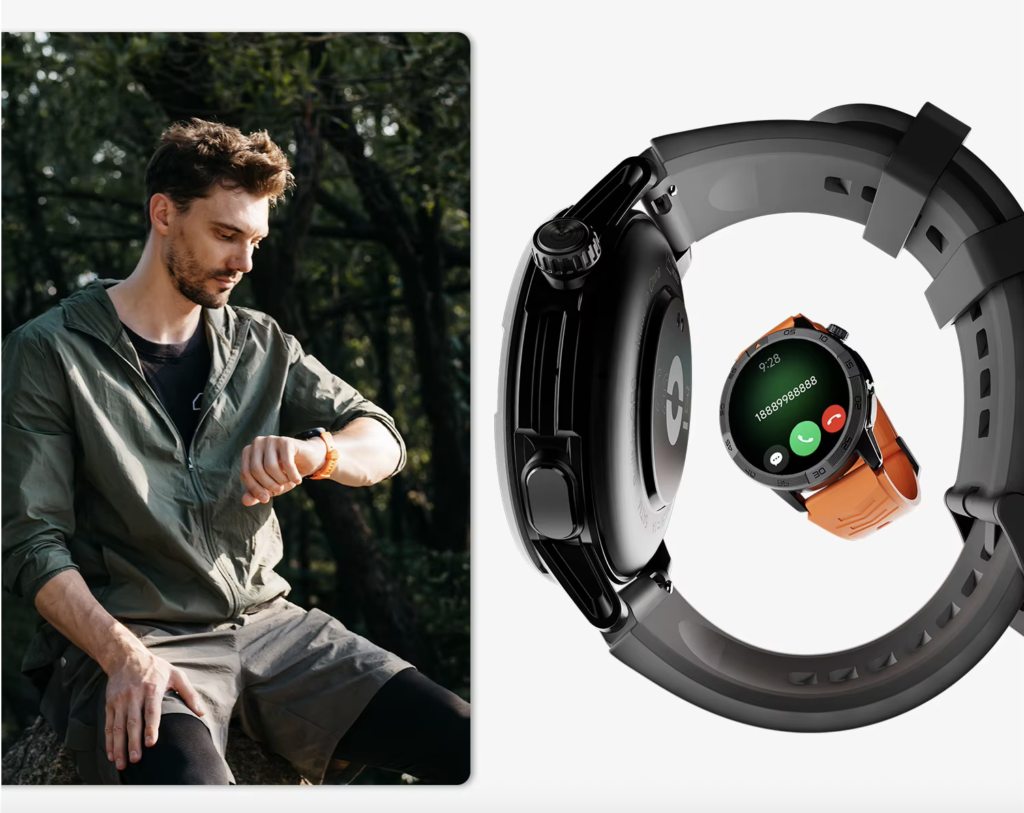
Do not stop the test when the watch vibrates.
Complete the entire call process.
Confirm caller identification
Call the paired phone from a saved U.S. contact.
Check whether the watch shows the correct name clearly and without a long delay.
Repeat the test with an unknown number to see how unsaved callers appear.
Answer directly from the wrist
Use the watch control without touching the phone.
Confirm that:
- The call connects
- Audio plays through the watch
- The microphone activates
- The phone does not unexpectedly take over
Evaluate both sides
Ask the other caller to assess:
- Voice clarity
- Volume consistency
- Echo
- Dropouts
- Background noise
Then judge whether the watch speaker remains understandable on your side.
End the call from the watch
A complete test includes ending the conversation without retrieving the phone.
The watch should respond quickly and return to its normal screen.
Prove Outgoing Calling Separately
Incoming-call support does not guarantee that the watch can begin a call in the way the buyer expects.
Call from recent history
Recent calls are often the fastest option for American professionals, delivery workers, parents, and commuters who need to return a missed call.
Check whether tapping the entry starts the call correctly.
Use synced contacts
Verify that the intended contacts appear.
Some watches display only favorites or a limited list chosen through the companion app.
Inspect the dial pad
A dial pad can be useful for:
- Unsaved U.S. numbers
- Temporary business contacts
- Service providers
- Office extensions
Make sure the buttons are readable and responsive.
Confirm the audio destination
The watch should make it clear whether the call is using:
- The wrist speaker
- The phone
- Wireless earbuds
- A vehicle
- Another Bluetooth device
A call that starts but sends audio to the wrong device has not passed the full test.
Test Audio Routing in American Cars, Earbuds, and Offices
Many Americans connect one phone to several audio devices throughout the day.
The calling watch should behave predictably as those connections change.
U.S. commuting and vehicle Bluetooth
A call started from the watch may route through the vehicle when the phone connects to the car.
Run this test only while safely parked.
Observe what happens when:
- The vehicle starts
- Bluetooth connects automatically
- A call arrives
- The watch is used to answer
- The vehicle is turned off
The watch should regain its expected call behavior without a complicated repair process.
Earbuds during commuting or exercise
When earbuds are active, call audio may move away from the watch.
That can be useful, but the transition should be clear and consistent.
American offices and computer headsets
Professionals who alternate between computer meetings and phone calls should test recovery after using a work headset.
Repeated re-pairing during a U.S. workday creates more inconvenience than the feature solves.
Measure Battery With Calling Enabled
Battery life should be tested with the same functions the owner plans to keep active.
Use three different days.
No-call baseline
Wear the watch normally without wrist conversations.
Keep typical settings active:
- Caller alerts
- Notifications
- Normal brightness
- Health tracking
- Alarms
Record the battery percentage at the beginning and end of the day.
Normal American calling day
Make or receive several brief calls similar to everyday U.S. use.
Examples include:
- Confirming an appointment
- Updating a family member
- Telling a coworker you will call back
- Coordinating an arrival
- Returning a short customer call
Compare the battery loss with the baseline.
Call-heavy day
Use the watch for more or longer calls than usual.
This shows how quickly the microphone, speaker, display, processor, and Bluetooth connection consume reserve together.
Battery use varies with:
- Call duration
- Speaker volume
- Signal conditions
- Bluetooth stability
- Screen activity
- GPS use
- Health tracking
- Temperature
- Battery age
The correct result is not one universal number. It is whether the watch still covers the buyer’s real routine.
Decide What Long Battery Must Cover for American Users
“Long battery” should be connected to a practical U.S. schedule.
For one American user, the watch may need to cover a long shift and the commute home. Another may expect several days between charges.
Include the full interval:
- Morning alarm
- Work or school
- Calls and notifications
- Driving or public transit
- Exercise
- Shopping and errands
- Evening responsibilities
- Overnight tracking
- Time before the next dependable charging window
A watch that lasts several days without calling may deliver a shorter interval when wrist conversations become regular.
That is not automatically a failure. The battery passes when the remaining runtime still supports the owner’s expectations.
For a deeper full-cycle evaluation, review how to balance call clarity with usable battery reserve.
Check Connection Recovery in American Homes and Workplaces
A smartwatch may work perfectly immediately after setup and become unreliable after a temporary disconnection.
Test recovery deliberately.
Leave Bluetooth range
Place the phone safely inside the home or workplace and move beyond range.
The watch should show that the connection has dropped.
Return to the phone
Check whether reconnection happens automatically.
Then place another incoming call.
Restart Bluetooth
Turn the phone’s Bluetooth off and back on.
The calling connection should return without deleting the original pairing.
Restart the phone
After the phone restarts, confirm that:
- Notifications resume
- Caller names sync
- Call audio reconnects
- Outgoing calling still works
American users who move between homes, offices, vehicles, gyms, and retail locations should not need to repair the connection after every transition.
A Hartford Coordinator Tests Every Claim
A regional event-rental coordinator in Hartford, Connecticut, receives calls from venues, delivery drivers, customers, and setup crews.
The phone often remains inside a jacket pocket while the coordinator moves through a warehouse, checks delivery loads, and visits event spaces across central Connecticut.
The product listing promises phone call support and long battery life.
Instead of relying on that description, the coordinator tests each capability during the U.S. retailer’s return period.
First, a venue manager calls from a saved contact. The watch displays the correct name, answers from the wrist, and supports a brief conversation about the loading entrance.
Next, the coordinator starts an outgoing call from recent history. The call connects through the watch without opening the phone.
A third test happens while the phone is connected to a parked delivery van. The coordinator checks where the audio routes and whether the watch regains call control after leaving the vehicle.
Later, the phone is left outside Bluetooth range inside the warehouse office. Once the coordinator returns, the watch reconnects automatically and receives another test call.
Battery use is recorded after:
- A no-call day
- A normal coordination day
- A call-heavy event setup day
The watch passes only when its demonstrated support level matches the listing and enough reserve remains for the evening delivery schedule.
Use the U.S. Return Period as a Proof Window
A return period is more than time to decide whether the watch looks good.
For American consumers, it is the best opportunity to verify the advertising before depending on the product.
Complete the tests early
Do not wait until the final eligible return day.
Within the first several days, test:
- Incoming calls
- Outgoing calls
- Contact synchronization
- Unknown callers
- Audio routing
- Reconnection
- Normal battery use
- Call-heavy battery use
Keep packaging and accessories
Until the watch passes, retain:
- The original box
- Charging cable
- Manuals
- Order confirmation
- Return instructions
Read the current policy
U.S. return conditions vary by seller.
Check for terms involving:
- Product condition
- Missing accessories
- Return shipping
- Restocking fees
- Marketplace sellers
- Cellular activation
The buyer should understand those conditions before starting a test that may affect return eligibility.
Buying Advice for U.S. Consumers
American shoppers should compare the total ownership experience, not only the listed purchase price.
Under-$150 shoppers
A buyer shopping below $150 should verify that “calling” means two-way wrist conversation rather than alerts alone.
Pay close attention to:
- Microphone and speaker quality
- Companion-app reliability
- Replacement charger availability
- Contact synchronization
- Return support
Buyers comparing the $150-to-$250 range
At this level, U.S. consumers may expect stronger displays, better materials, more dependable software, or improved sensors.
Those additions should not distract from basic calling proof and realistic battery endurance.
Premium-watch shoppers
A higher price may bring:
- Better ecosystem integration
- More polished software
- Cellular options
- Broader app support
However, advanced features can increase charging demand.
Premium pricing does not automatically guarantee the longest battery life.
Include recurring costs
Standalone cellular calling may add a U.S. carrier fee.
American buyers should compare:
- Purchase price
- Sales tax
- Optional wearable plan
- Replacement charger cost
- Strap replacement
- Warranty support
- Return shipping or fees
Consider U.S. customer preferences
Many American users value:
- Compatibility with their existing phone
- Easy setup
- Clear caller names
- Strong vibration
- Comfortable all-day wear
- Dependable return support
- Readily available accessories
A long feature list matters less when the watch cannot perform the few functions the buyer uses every day.
Questions U.S. Buyers Ask About Calling Support
Does an incoming-call notification mean the watch supports conversations?
No. A watch may show caller information and offer reject controls without including the microphone and speaker needed for two-way calling.
Does a Bluetooth-calling smartwatch need the phone nearby?
Usually, yes. Bluetooth calling commonly routes the conversation through a paired phone within a dependable connection range.
Can every calling smartwatch start outgoing calls?
No. Some watches answer calls but provide limited access to contacts, recent calls, or a dial pad.
Why does the watch request contacts and call-log access?
Those permissions may be needed to display caller names, synchronize recent calls, or start outgoing calls. Review the companion app’s requirements and your phone’s privacy controls.
What happens when the phone is connected to an American car or earbuds?
Call audio may route through the vehicle, earbuds, phone, or watch. Test the combination used most often so the behavior becomes predictable.
Does phone calling reduce smartwatch battery life?
Yes. Calls activate the microphone, speaker, display, processor, and Bluetooth connection. The effect depends on call length, volume, settings, and connection stability.
Can the watch call when the paired phone is turned off?
A standard Bluetooth-calling watch generally cannot. Independent calls usually require cellular hardware, carrier compatibility, and activation.
How should a U.S. consumer test calling support during the return period?
Complete an incoming-call test, an outgoing-call test, an audio-routing check, a reconnection test, and a realistic battery trial with calling enabled.
Require Three Proofs Before Keeping the Watch
First, confirm that an incoming call can be answered directly from the wrist. Next, start an outgoing call using the method you expect. Finally, make sure the watch completes a realistic calling day with enough reserve for the responsibilities that remain.
When one of those proofs fails, the product description has not delivered the experience the buyer intended to purchase.
Before the U.S. return deadline passes, compare the call-support model with those three requirements.