
Buying a smartwatch that works well for calls is not as simple as seeing the word “calling” in a product listing. Some watches only show call alerts. Others let you answer from the wrist. Some have a speaker but weak call controls. Others have Bluetooth calling but confusing setup steps. For U.S. shoppers, the safest approach is to verify the call experience before buying, not after the box arrives.
This pre-purchase checklist focuses on one question only: how can you tell whether a smartwatch will actually work well for calls?

Why U.S. Shoppers Should Verify Call Features Before Buying
Many American consumers shop for smartwatches through product pages, marketplaces, ads, and comparison articles. The problem is that “call support” can mean different things depending on the watch.
It may mean:
- The watch shows incoming call alerts.
- The watch lets you reject a call.
- The watch has a speaker for sound alerts only.
- The watch has a microphone for voice features.
- The watch can actually answer Bluetooth calls.
- The watch can support both incoming and outgoing calls.
Those are not the same. A smartwatch that only shows call notifications is very different from a smartwatch that lets you speak and listen from the wrist.
Use the 12-point checklist below before deciding.
1. Check for a Built-In Speaker
A smartwatch needs a speaker if you want to hear the caller from the watch. Without a speaker, the watch may still vibrate, show caller ID, or notify you about calls, but it cannot provide full wrist-based call audio.
For American users who want quick calls during work breaks, home routines, errands, or parked travel moments, speaker support is one of the first things to confirm.
Look for wording such as:
- Built-in speaker
- Speaker for Bluetooth calls
- Watch speaker for calls
- Speaker and microphone for calling
- Make and answer calls from the watch
Be careful if the listing only mentions “sound alerts,” “alarm sound,” or “notification tones.” That does not always mean the speaker works for phone calls.
For more detail on audio hardware, compare this guide on a smartwatch with speaker and microphone for calls.
2. Check for a Built-In Microphone
A speaker lets you hear the caller. A microphone lets the caller hear you.
A smartwatch may look call-ready, but if it does not clearly include a microphone, it may not support true wrist calling. Some listings mention call alerts but never confirm a mic.
Before buying, check the specification section carefully. A real call-capable smartwatch should clearly mention a built-in microphone or mic support for Bluetooth calling.
What to Verify
Look for:
- Built-in microphone
- Microphone for calls
- Mic and speaker
- Bluetooth voice calling
- Talk from the watch
- Answer calls from the wrist
Do not assume microphone support from product photos alone. If the listing is unclear, treat that as a warning sign.
3. Confirm Incoming-Call Support
Incoming-call support means the smartwatch can show a call when someone calls your phone. But this feature can still vary.
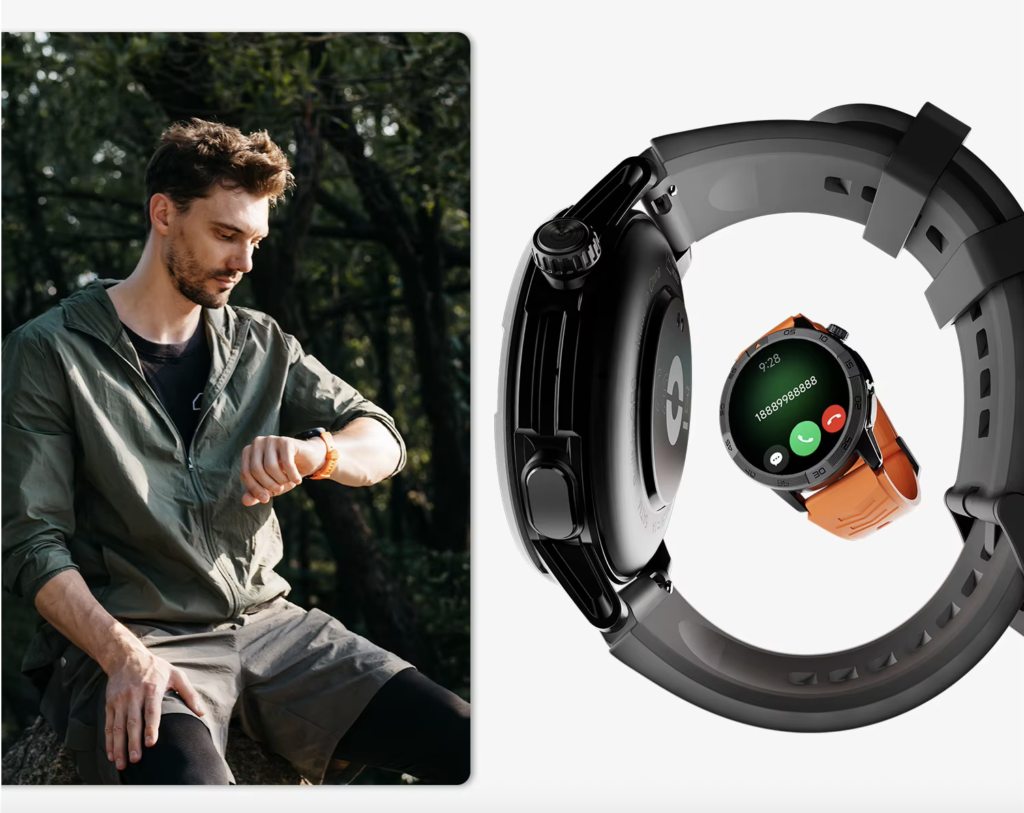
Some watches only show the caller name or number. Others allow you to answer directly from the watch. For a smartwatch to work well for calls, it should do more than notify you.
What Good Incoming-Call Support Should Include
A stronger call-ready watch should show:
- Caller name or number
- Answer button
- Decline button
- Clear call screen
- Vibration or alert
- Easy way to control the call
For U.S. buyers, incoming-call support is especially useful when the phone is nearby but not in hand. The key is whether the watch helps you act on the call, not just notice it.
4. Confirm Outgoing-Call Support
Outgoing-call support is different from answering incoming calls. Some watches can answer calls but may not make outgoing calls from the watch interface.
If outgoing calls matter to you, verify this before buying.
What to Look For
Check whether the smartwatch supports:
- Dial pad on the watch
- Recent call history
- Contact calling
- Favorite contacts
- Voice calling through the paired phone
- Outgoing Bluetooth calls
This matters for U.S. users who want to quickly call a family member, coworker, customer, or saved contact without unlocking the phone.
If the listing only says “answer calls,” do not assume it also supports outgoing calls. Look for direct confirmation.
5. Check Contact Access
A smartwatch that works well for calls should make it easy to know who is calling. Contact access helps the watch display saved names instead of only phone numbers.
Without proper contact access, you may see unfamiliar numbers even when the person is saved in your phone. That makes call screening harder.
Why Contact Access Matters
Contact access is useful when you want to identify:
- Family members
- Coworkers
- Customers
- Dispatch contacts
- School or daycare numbers
- Appointment offices
- Delivery or service contacts
A good calling smartwatch should display caller information clearly and should have permission to sync or access contacts when required by the companion app.
For easier call-screen usability, this guide on a smartwatch with easy phone call answering can help explain what to check visually.
6. Verify Volume Control
A smartwatch call is only useful if you can hear the other person clearly enough for short conversations.
Volume control should be easy to access. If the speaker volume is too low or difficult to adjust during a call, the calling feature may feel frustrating.
What to Check Before Buying
Look for:
- Adjustable call volume
- Speaker volume settings
- In-call volume controls
- Watch-side audio controls
- Clear speaker description
A smartwatch speaker is not usually meant to replace a phone speaker or earbuds for long private calls. But it should be practical enough for quick conversations in normal settings.
Avoid listings that use vague phrases like “excellent calling” without explaining the speaker, microphone, or call controls.
7. Check Stable Reconnection
A smartwatch may work well when first paired, but the real test is whether it reconnects reliably after the phone moves away, Bluetooth disconnects, or the watch restarts.
Stable reconnection matters because most Bluetooth calling smartwatches depend on the nearby paired phone.
Why Reconnection Matters for American Users
In daily U.S. routines, your phone may move in and out of range:
- Phone left in another room
- Phone in a bag
- Phone in a parked vehicle
- Phone disconnected after restart
- Watch removed during charging
- Bluetooth toggled off and back on
A call-capable smartwatch should reconnect without constant manual repair. If a watch requires frequent pairing fixes, the call feature becomes less dependable.
8. Confirm Compatible Phone Support
A smartwatch may support calls, but that does not guarantee every feature works the same way on every phone.
Before buying, check whether the watch supports your phone type. Most U.S. buyers use either iPhone or Android, so compatibility should be clear.
Compatibility Details to Verify
Check:
- iOS support
- Android support
- Required app
- Minimum phone system version
- Bluetooth calling setup steps
- Any limitations by phone type
- Permission requirements
The smartwatch in this project supports iOS and Android compatibility, which is important for buyers comparing call use across different phone ecosystems.
Do not rely only on “works with smartphones.” That phrase is too broad. Look for specific phone compatibility details.
9. Check the Permission Setup
Even if the smartwatch has a speaker and microphone, calls may not work correctly unless permissions are set up properly.
Bluetooth calling often requires permissions for contacts, phone audio, notifications, Bluetooth pairing, and sometimes app access.
What a Clear Setup Should Explain
A good product page or manual should explain how to:
- Pair the watch with the phone
- Enable Bluetooth call audio
- Allow contact access
- Allow call notifications
- Select the watch as a call audio device
- Troubleshoot if calls do not appear
- Reconnect after Bluetooth disconnects
If setup instructions are vague, the calling experience may still work, but buyers should be prepared for extra setup time.
For call setup and answering behavior, readers may also compare this guide on a smartwatch that can answer phone calls.
10. Understand Battery Impact
Calls use more battery than simple alerts because the smartwatch uses the speaker, microphone, display, Bluetooth connection, and call interface during the conversation.
That does not mean Bluetooth calling is a bad feature. It means shoppers should think realistically.
What Battery Impact Means for Call Buyers
If you only take occasional short calls, the battery impact may be manageable. If you expect frequent wrist calls every day, battery drain becomes more important.
Before buying, check:
- Battery capacity
- Advertised battery range
- Whether call use affects runtime
- Charging speed
- Typical usage examples
- Power-saving settings
Avoid assuming the maximum advertised battery rating will apply during heavy call use. Calling, brightness, frequent alerts, and other active features can shorten runtime.
For a deeper battery-call connection, compare this article on a smartwatch with Bluetooth calls and long battery if the page is available.
11. Review the Return Policy
A return policy matters because call performance can depend on your phone, environment, Bluetooth stability, setup permissions, and personal expectations.
Even when a smartwatch looks good on paper, the real experience may vary.
Why Return Policy Belongs in a Call Checklist
Before buying, check:
- Return window
- Condition requirements
- Restocking fees
- Who pays return shipping
- Warranty coverage
- Exchange options
- Support contact options
This is not about expecting a problem. It is about protecting yourself when buying a call-focused device online.
For U.S. shoppers, a clear return policy is part of smart buying, especially when the main feature depends on phone pairing and real-world audio use.
12. Look for Real Call-Test Evidence
The strongest way to know whether a smartwatch works well for calls is to look for real call-test evidence.
This does not mean vague claims like “crystal clear calls” or “excellent audio.” Those phrases are not enough. Better evidence shows how the watch performs during an actual call.
Useful Call-Test Evidence
Look for:
- Video demonstrations
- Actual incoming-call screen examples
- Speaker volume demonstrations
- Microphone sample clips
- Setup walkthroughs
- Buyer Q&A about call behavior
- Return-window testing after purchase
- Your own first-day call test
If you buy the smartwatch, test calls immediately. Try one quiet indoor call, one normal household call, and one short call while the phone is nearby but not in your hand. Also test whether the watch reconnects after you move away from the phone and come back.
That first-day test tells you more than a vague product phrase ever will.
Quick 12-Point Smartwatch Call Checklist
Use this before buying any smartwatch for calls:
| Verification Point | What to Confirm |
|---|---|
| Built-in speaker | Can you hear the caller from the watch? |
| Built-in microphone | Can the caller hear your voice through the watch? |
| Incoming-call support | Can the watch show and answer incoming calls? |
| Outgoing-call support | Can you start calls from the watch if needed? |
| Contact access | Does the watch show saved caller names? |
| Volume control | Can call volume be adjusted easily? |
| Stable reconnection | Does the watch reconnect reliably after Bluetooth drops? |
| Compatible phone | Does it support your iPhone or Android phone? |
| Clear permission setup | Are contact, call, and Bluetooth permissions explained? |
| Battery impact | Does calling fit your expected daily use? |
| Return policy | Can you return it if call performance disappoints? |
| Real call-test evidence | Is there proof beyond vague marketing language? |
Frequently Asked Questions
How do I know if a smartwatch works well for calls?
Check whether it has a built-in speaker, built-in microphone, Bluetooth calling, incoming-call support, outgoing-call support, contact access, adjustable volume, and clear phone setup instructions.
Is call alert support the same as Bluetooth calling?
No. Call alerts only show that someone is calling. Bluetooth calling lets you talk from the smartwatch when the paired phone is nearby.
Does a smartwatch need both a speaker and microphone for calls?
Yes. A speaker lets you hear the caller, and a microphone lets the caller hear you. Both are needed for real wrist-based calling.
Why does phone compatibility matter for smartwatch calls?
Phone compatibility matters because call features may depend on iOS or Android support, Bluetooth pairing, app permissions, and contact access.
Should I test smartwatch calls after buying?
Yes. Test calls as soon as possible. Check incoming calls, outgoing calls, contact names, volume, reconnection, and call clarity while you are still within the return window.
What is a red flag when buying a smartwatch for calls?
A red flag is a listing that only says “call alerts,” “call reminder,” or “smart notifications” without clearly confirming speaker, microphone, and Bluetooth calling support.
Final Buying Advice: Validate the Calls Before You Trust the Listing
A smartwatch that works well for calls should prove itself through specific details, not vague promises.
Before buying, confirm the speaker, microphone, incoming-call support, outgoing-call behavior, contact access, volume control, phone compatibility, setup permissions, battery impact, return policy, and real call-test evidence.
If a listing only says “call alerts,” that is not enough. If it clearly explains Bluetooth calling, speaker, microphone, phone pairing, and call controls, it is much easier to trust.
For buyers comparing this option, check the call-support details and setup features before deciding whether it matches your phone and call habits.