
The best smartwatch battery life for commuting should cover your trip to work, a full day on the job, the ride home, and overnight sleep tracking without making you search for a charger. That matters whether you drive, take the train, ride a bus, bike to work, or combine several forms of transportation. The featured $150 smartwatch offers extended advertised battery life alongside Bluetooth calling, built-in GPS, offline maps, an AMOLED display, and everyday activity tracking. This guide explains how those features fit a commuter’s routine, what battery life may look like in practice, and which limitations to consider before buying.
Best Smartwatch Battery Life for Commuting: What Actually Matters?
A commuter does not necessarily need the smartwatch with the largest app store or the most advanced athletic tools. The better choice is often the one that stays powered, displays important information clearly, and reduces how often you need to reach for your phone.
Useful commuter features include:
- Multi-day battery life
- Bluetooth calling
- Clear call and message alerts
- A readable screen
- Built-in GPS
- Alarms and calendar reminders
- Music controls
- Comfortable all-day wear
- Sleep and activity tracking
- Compatibility with your smartphone
The goal is simple: your watch should make the trip easier without adding another charging task to your evening.
For a broader look at endurance-focused models, read our guide to a smartwatch with strong battery performance.
Why Battery Life Matters During a Daily Commute
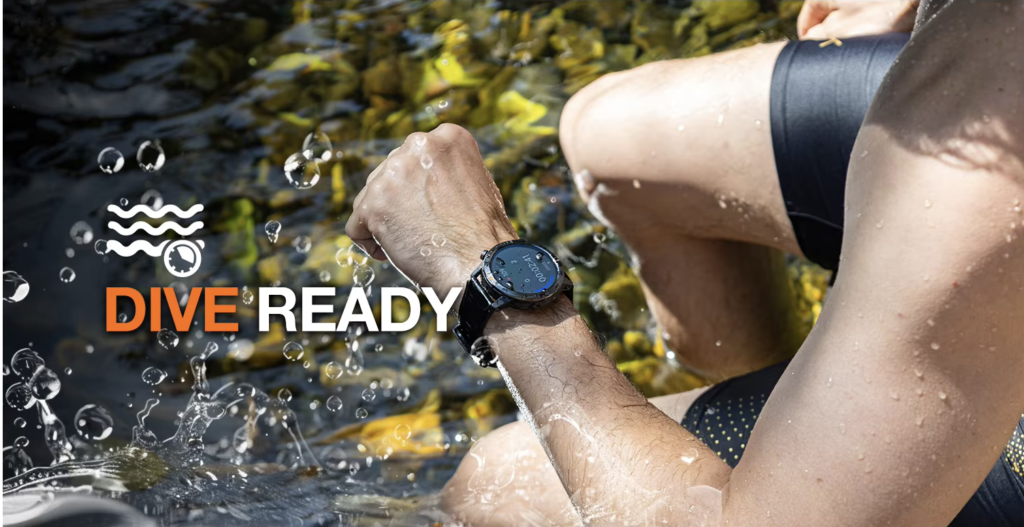
Commuting adds several hours of use to a normal workday. A person may leave home early, spend an hour traveling, work a full shift, run errands, and return home late.
A low-battery smartwatch may survive the morning but struggle to remain useful through the entire routine.
Fewer Morning Battery Checks
Most people already check their phone, earbuds, laptop, and other work gear before leaving home. A smartwatch that lasts several days removes one more decision from a busy morning.
You should be able to put it on and leave rather than waiting for a last-minute charge.
Reliable Alerts Through the Evening
A watch that remains powered can continue showing calls, calendar reminders, transit-related notifications, alarms, and messages after work.
This is useful when a train is delayed, traffic increases, or an unexpected errand extends the day.
Better Sleep Tracking
Daily charging often happens at night, which can create gaps in sleep records. Longer battery life allows the watch to stay on your wrist after the commute home and continue tracking overnight.
Less Cable Clutter
Commuters already carry charging cables, power banks, and adapters. A watch that needs less frequent charging keeps another accessory out of your work bag.
Readers who want to reduce charging interruptions can also explore our guide to a smartwatch that does not need frequent charging.
Featured Long-Battery Smartwatch for Commuters
The featured smartwatch is currently listed at $150 with free shipping. It is aimed at buyers who want long battery life, wrist calling, navigation, and a premium-looking display without moving into flagship pricing.
Its listed features include:
- 370mAh battery
- Up to 30 days of advertised battery life
- Bluetooth calling and wrist dialing
- Built-in GPS and offline maps
- 1.43-inch AMOLED touchscreen
- 466 × 466 display resolution
- Heart-rate and sleep tracking
- Step and calorie tracking
- Multiple sports modes
- Smart notifications
- Music controls
- Alarm and calendar functions
- Compass and altitude meter
- IP68 and 5ATM ratings
- Android and iPhone compatibility
- Black and orange color options
The main attraction is the combination. Many long-lasting fitness watches provide notifications but no voice calling. Apple, Samsung, and Wear OS watches offer more apps and deeper phone integration, but usually need charging more often.
You can review the full specifications for this long-battery smartwatch with Bluetooth calling.
How Long Could the Battery Last for Commuting?
The seller advertises up to 30 days of battery life, but that is a maximum claim rather than a guarantee for every routine.
Real battery performance depends on:
- Display brightness
- Always-on display use
- Number and length of calls
- GPS activity
- Notification volume
- Health-monitoring frequency
- Screen wake-ups
- Temperature
- Bluetooth connection quality
Light Commuting Use
Light use may include checking the time, viewing occasional calls and messages, counting steps, tracking sleep, and using moderate brightness.
Someone who drives a short distance or takes a quiet train ride without using GPS continuously may get closer to the longer end of the advertised range.
Typical Commuting Use
A realistic routine may include frequent notifications, several short calls, music controls, calendar alerts, automatic heart-rate checks, sleep tracking, and occasional GPS use.
Actual runtime will likely be lower than the maximum. Even charging once every week or two, however, can feel much more convenient than charging every night.
Heavy Commuting Use
Battery drain increases when you use:
- Long wrist calls
- Continuous GPS
- Offline navigation
- Maximum brightness
- Always-on display
- Constant health monitoring
- Frequent screen activation
A cyclist recording GPS on every commute will use more power than a train passenger who mainly checks notifications. A delivery driver using calls and navigation throughout the day will also need to charge sooner.
The right question is not whether every person gets the maximum figure. It is whether the watch can comfortably cover several commutes and workdays before charging.
Bluetooth Calling During the Commute
Bluetooth calling can reduce how often you need to take out your phone.
Once the watch is paired with a compatible smartphone, you can typically:
- See who is calling
- Accept or reject a call
- Dial from your wrist
- Speak through the built-in microphone
- Hear the caller through the watch speaker
On a Train or Bus
A wrist alert can help you decide whether a call is important while your phone stays inside a backpack, purse, or coat pocket.
Public transportation can be noisy, and speaking through a watch may reduce privacy. For longer calls, earbuds or the phone itself may be more practical.
While Walking
Wrist calling is useful when you are carrying a coffee, work bag, groceries, or an umbrella. You can answer a brief call without stopping to search for your phone.
During a Driving Commute
A wrist alert may help you notice an incoming call, but the watch should not become a distraction. Set up calling and notifications before driving, and use a legal hands-free method.
Bluetooth calling is not independent cellular service. The paired phone normally needs to remain nearby.
For more value-focused calling options, see our guide to an affordable smartwatch with long battery life and calling.
Notifications and Music Controls Without Constant Phone Checking
One of the biggest commuter benefits is quick access to information.
A smartwatch can help you see:
- Incoming calls
- Text and app alerts
- Calendar reminders
- Alarm notifications
- Basic social-media alerts
- Music controls
- Activity progress
This is particularly convenient in crowded spaces where taking out a phone is uncomfortable or risky.
Not every notification deserves immediate attention. Consider limiting alerts to calls, messages, calendar events, and important work apps. Reducing unnecessary notifications can also improve battery life.
Music controls may be useful when your phone is stored away. You can pause, skip, or adjust playback without unlocking your phone, although the exact controls depend on the companion app and connected service.
GPS, Offline Maps, and Commuting Routes
Built-in GPS and offline maps may help with walking, cycling, running, travel, and unfamiliar routes.
A commuter might use GPS to:
- Record a bike ride
- Track a walk between stations
- Navigate from transit to an office
- Explore an unfamiliar neighborhood
- Save an outdoor route
- Track distance during an after-work run
Before ordering, confirm:
- How maps are downloaded
- Whether turn-by-turn directions are included
- Which U.S. regions are supported
- Whether routes must be created on a phone
- How much map storage is available
- Whether maps work without an active phone connection
Continuous GPS is one of the fastest ways to drain a smartwatch battery. Occasional route checks use much less power than recording an hour-long bike commute twice each day.
AMOLED Display for Indoor and Outdoor Travel
The watch has a listed 1.43-inch AMOLED display with a 466 × 466 resolution.
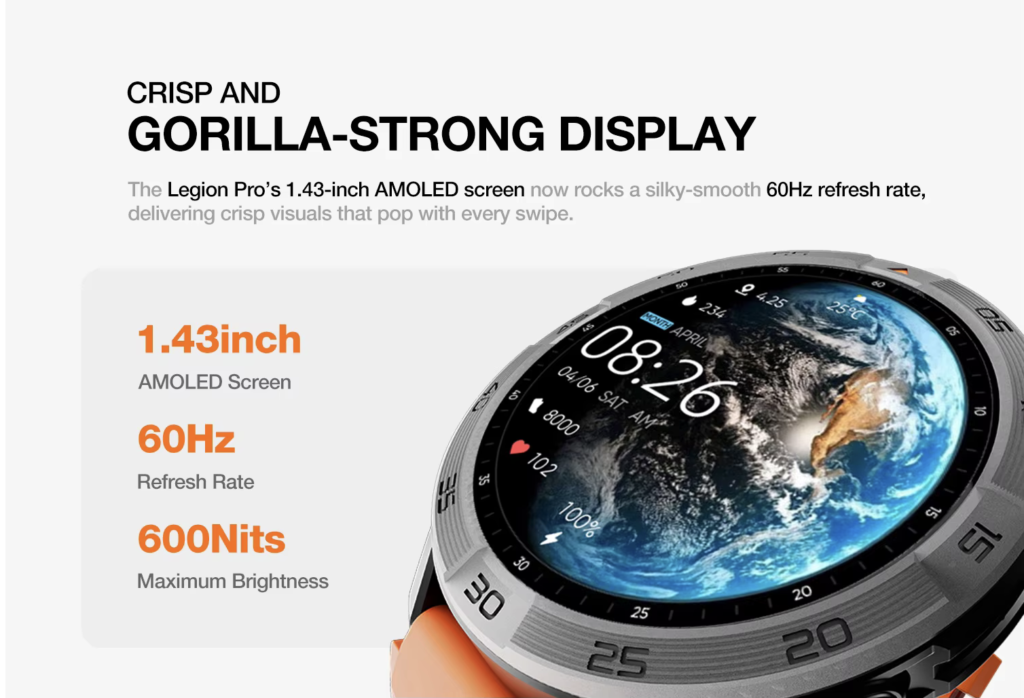
A clear screen can make caller names, messages, maps, steps, heart-rate information, and calendar reminders easier to read at a glance.
That matters in changing conditions. A commuter may move from a dim train platform to bright sunlight, then into an office or vehicle.
Higher brightness improves visibility but consumes more battery. To balance readability and endurance:
- Use automatic or moderate brightness
- Shorten the screen timeout
- Turn off the always-on display when unnecessary
- Choose a simple watch face
- Reduce raise-to-wake sensitivity if the screen activates too often
The black version may fit office and business-casual clothing more naturally, while the orange version provides a sportier look for cycling, gym use, and outdoor travel.
Practical Commuting Use Cases
Train and Subway Commuters
A watch can display calls, messages, alarms, and calendar alerts while your phone remains secure. The AMOLED screen may also be easier to check quickly when boarding or changing platforms.
The watch does not replace official transit information unless the connected app specifically supports it.
Bus Commuters
Long battery life is valuable when your trip includes transfers or unexpected delays. Music controls, notifications, and alarms can remain available throughout the day.
Drivers
The most useful features are call alerts, time checks, and longer battery life. Drivers should avoid reading detailed notifications or interacting with menus while moving.
Cyclists and Walkers
GPS and activity tracking can record distance and movement. Cyclists should mount or use navigation equipment safely rather than repeatedly looking at their wrists in traffic.
Hybrid and Long-Distance Workers
Some people drive to a station, take a train, walk to work, and repeat the process at night. Others travel between offices or work sites.
For these users, battery endurance becomes more important because the watch is active for a larger part of the day.
People balancing commuting with extended workdays may also find our guide to a smartwatch for long work shifts useful.
Comparison With Popular Battery-Focused Alternatives
Battery figures use different manufacturer test conditions, so they should be treated as general guidance rather than identical laboratory results.
| Smartwatch | Advertised Battery Life | Calling | Best Commuter Benefit | Main Trade-Off |
|---|---|---|---|---|
| Featured Long-Battery Smartwatch | Up to 30 days | Bluetooth calling | Calls, GPS, offline maps, AMOLED, and $150 value | Limited customer feedback |
| Amazfit Bip 6 | Up to 14 days typical use | Bluetooth calling | Lightweight budget option with a large display | More basic software and design |
| Moto Watch | Up to 13 days | On-wrist Bluetooth calls | Polar-powered tracking and dual-frequency GPS | Android-focused and newer platform |
| OnePlus Watch 3 | About 3–5 days | Bluetooth calling | Wear OS apps, Google services, and fast charging | More frequent charging |
| Garmin Instinct 3 AMOLED | Up to 18–24 days | No voice calling | Excellent GPS and outdoor durability | Higher price and limited mainstream smart features |
| Apple Watch Series 11 | Around one day under advertised normal use | Bluetooth and optional cellular | Strong iPhone integration and transit-friendly apps | Daily or near-daily charging |
The featured smartwatch suits buyers who prioritize battery life, wrist calls, GPS, and a moderate price.
Amazfit is a more established budget option. Moto Watch may appeal to Android users who want Polar-powered health tools. OnePlus is stronger for apps, while Garmin is better for serious outdoor tracking. Apple Watch remains the better ecosystem choice for many iPhone users but needs more frequent charging.
Pros and Cons
Pros
- Long advertised battery life
- Bluetooth calling
- Built-in GPS and offline maps
- Readable AMOLED display
- Android and iPhone compatibility
- Sleep and activity tracking
- Useful notifications and music controls
- Suitable for work, commuting, fitness, and travel
- Premium feel without a premium price
- Free shipping listed
Cons
- Maximum battery claim may not reflect heavy use
- Calls and GPS reduce runtime
- Bluetooth calling requires a nearby phone
- No independent LTE service is listed
- Product page currently shows no customer reviews
- Long-term software support is unclear
- Offline-map functions should be confirmed
- Wrist calls may lack privacy on public transportation
- Health readings are not medical-grade
Who Should Buy It?
This smartwatch may suit:
- Train and subway commuters
- Bus riders
- Drivers who want call alerts
- People who walk or bike to work
- Office employees
- Long-shift workers
- Travelers
- Gym users
- Buyers tired of nightly charging
- People with a budget around $150
It makes the most sense when battery life, calls, notifications, GPS, and daily convenience matter more than a large app store.
Who Should Avoid It?
Choose another smartwatch if you need:
- Independent LTE calling
- Contactless payments
- Advanced transit apps
- A large third-party app ecosystem
- Professional athletic metrics
- Medical-grade health tools
- Extensive verified customer reviews
- Guaranteed long-term software updates
Apple, Samsung, and OnePlus may be better for apps and ecosystem integration. Garmin may be better for advanced cycling, running, and outdoor navigation.
Buying Checklist Before Ordering
Before purchasing, verify:
- Which Android and iOS versions are supported
- Which companion app is required
- Whether the calling feature works with your phone
- How offline maps work in your region
- Whether turn-by-turn navigation is included
- What usage conditions produced the battery claim
- What the warranty and return policy cover
- Whether the case size feels comfortable for all-day wear
Frequently Asked Questions
What Is the Best Smartwatch Battery Life for Commuting?
A good commuter smartwatch should last through several workdays while providing calls, notifications, GPS, alarms, and activity tracking. The featured model advertises extended battery life and includes Bluetooth calling, offline maps, AMOLED, and iPhone and Android support.
Can I Answer Calls on a Train or Bus?
Yes, when the watch is connected to a compatible nearby phone through Bluetooth. Earbuds may provide better privacy and audio quality in public.
Can It Last Through a Full Workday and Commute?
It should easily cover one workday and commute under normal conditions. The larger advantage is the possibility of covering multiple days before charging.
Does GPS Work Without a Phone?
The watch lists built-in GPS and offline maps, but buyers should confirm which navigation functions work independently and how maps are downloaded.
Is It Good for Cycling to Work?
It may track distance and routes through GPS. Continuous GPS reduces battery life, and riders should avoid interacting with the watch in traffic.
Is It Worth $150?
It may offer good value for commuters who prioritize battery life, Bluetooth calls, GPS, offline maps, and an AMOLED display. Buyers who want LTE, payments, or a large app ecosystem may prefer another model.
Conclusion: Is This the Best Smartwatch Battery Life for Commuting?
The best smartwatch battery life for commuting should remain powered from the morning trip through the workday, evening travel, and overnight tracking.
The featured $150 smartwatch combines long advertised endurance with Bluetooth calling, built-in GPS, offline maps, a clear AMOLED display, and everyday wellness tools. That combination can be useful for drivers, train passengers, bus riders, walkers, cyclists, and people with long or unpredictable schedules.
Actual runtime depends on calls, GPS, brightness, notifications, and health-monitoring settings. Bluetooth calls require a nearby phone, and buyers should verify offline-map functions, compatibility, returns, and warranty coverage before ordering.
For commuters who want fewer charging interruptions and practical everyday features without flagship pricing, it is worth considering.
Ready for a Smarter, Easier Commute?
Keep calls, notifications, navigation, and activity tracking available through more of your week without carrying another charger every day.
Shop the Long-Battery Smartwatch for Commuting and choose a wearable built for busy travel and everyday convenience.