
The best smartwatch for busy people battery life should remove one task from your schedule, not add another. When your day includes commuting, meetings, deliveries, workouts, errands, and family responsibilities, nightly charging becomes easy to forget. The featured smartwatch combines longer runtime, Bluetooth calling, GPS, offline maps, an AMOLED display, and wellness tracking for $150. This guide explains how those features fit a demanding routine, where the battery claim needs context, and when Apple, Samsung, Garmin, Amazfit, or OnePlus may be a better choice.
Best Smartwatch for Busy People Battery Life: What Actually Matters
Busy people rarely need the watch with the longest feature list. They need one that works reliably without demanding constant attention.
A practical smartwatch should help you check calls, see important alerts, track activity, and move through your day without reaching for your phone every few minutes. It should also last long enough that forgetting the charger for one night does not create a problem the next morning.
The most useful features are usually:
- Long battery life
- Bluetooth calling
- Clear notifications
- A bright display
- Sleep and activity tracking
- Built-in GPS
- Simple controls
- Comfortable all-day wear
- Compatibility with your phone
That combination may be more valuable than dozens of apps you rarely open.
For a deeper look at endurance-first models, see our guide to a smartwatch built for strong battery performance.
Why Long Battery Life Helps a Busy Routine
A short-battery watch creates small interruptions that become frustrating over time. You charge it overnight and miss sleep data. You forget it on the charger before work. It dies during a long shift when you still need calls, alarms, or directions.
Longer runtime gives you flexibility.
Fewer Morning Decisions
Busy mornings already involve checking your phone, packing a bag, organizing work items, and getting out the door. A watch that can last several days removes one more battery check.
Better Sleep Tracking
If the watch needs to charge every night, sleep tracking becomes inconvenient. A long-battery model can stay on your wrist through the day and overnight.
Less Travel Planning
For a weekend road trip or short business trip, you may be able to leave the watch charger at home. That means one less cable and one less device competing for an outlet.
More Confidence During Long Days
A delivery driver, warehouse employee, nurse, office worker, or field technician may not know exactly when the workday will end. Extra battery capacity provides a useful margin when a shift runs late.
People especially frustrated by charging routines may also want our guide for smartwatch users tired of charging every day.
Featured Smartwatch for Busy Everyday Use
The featured smartwatch is listed at $150 with free shipping and supports iPhone and Android.
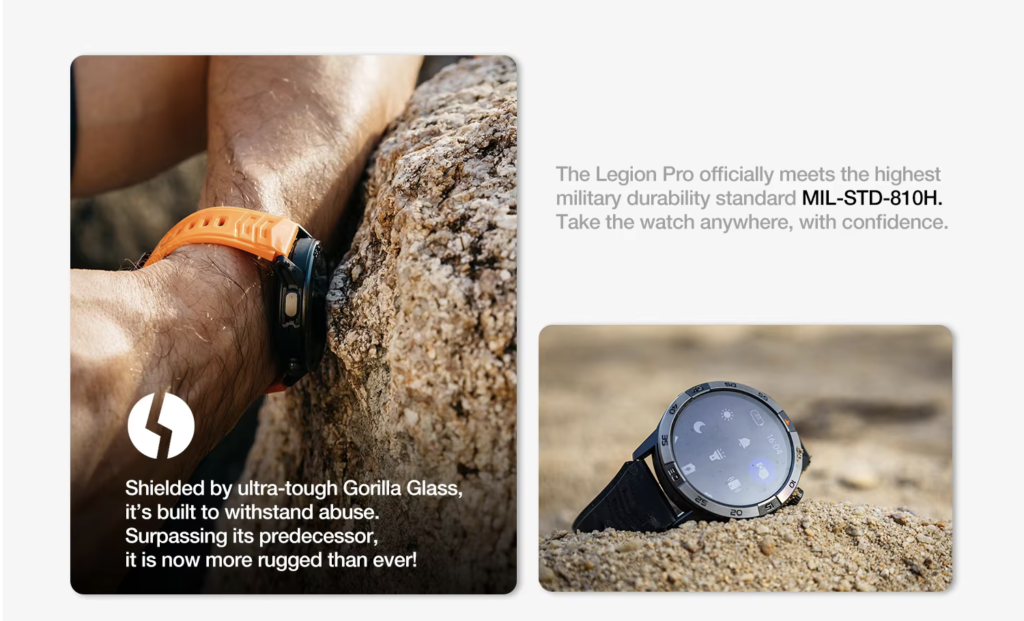
Its listed features include:
- Up to 30 days of advertised battery life
- 370mAh battery
- Bluetooth calling and wrist dialing
- Built-in GPS and offline maps
- 1.43-inch AMOLED touchscreen
- 466 × 466 display resolution
- Heart-rate and sleep tracking
- Step and calorie tracking
- Multiple sports modes
- Music controls and smart notifications
- Compass and altitude meter
- IP68 and 5ATM ratings
- Black and orange color options
The strongest reason to consider it is balance. Some long-lasting watches offer only basic notifications. Premium app-based watches do more but need frequent charging. This model aims to cover the features many busy people use most without flagship pricing.
You can review the full specifications for this long-battery smartwatch with Bluetooth calling.
How Long Will the Battery Last in Real Life?
The product advertises up to 30 days, but actual runtime depends on how you use the watch. Treat “up to” as a maximum under favorable conditions, not a promise that everyone will go a full month between charges.
Light Use
A lighter user may mainly check the time, read occasional notifications, count steps, track sleep, and use moderate brightness.
Turning off the always-on display and limiting calls and GPS gives the watch the best chance of approaching the longer end of the claim.
Typical Use
A realistic routine may include frequent notifications, several short calls, automatic heart-rate checks, sleep tracking, music controls, and a few GPS workouts each week.
Battery life will probably be lower than the maximum. Even so, charging once every week or two could still be a major improvement over nightly charging.
Heavy Use
Battery drain increases with long Bluetooth calls, continuous GPS, offline navigation, maximum brightness, constant sensor monitoring, frequent screen wake-ups, and a high volume of alerts.
A delivery driver using calls and GPS all day should expect shorter runtime than an office worker who mainly checks messages and calendar reminders.
The useful question is not, “Will I get exactly 30 days?” It is, “Will this watch reduce charging enough to make my routine easier?”
Our guide on how a smartwatch battery can last up to 30 days explains which settings have the greatest effect.
Bluetooth Calling for People Who Are Always Moving
Bluetooth calling lets you handle short conversations without immediately finding your phone.
After pairing the watch with a compatible smartphone, you can typically:
- See incoming caller information
- Accept or reject calls
- Dial from your wrist
- Speak through the microphone
- Hear the caller through the watch speaker
An office employee can screen a call while walking between meetings. A warehouse worker may notice an important call while the phone remains in a secure pocket. A delivery driver can see whether a dispatcher or customer is calling while the phone stays mounted.
Wrist calling can also help while carrying groceries or exercising. For longer conversations, earbuds or the phone may provide better privacy.
Bluetooth calling is not independent cellular service. The paired phone usually needs to remain nearby. Buyers who want calls without a phone should consider a cellular Apple Watch or Samsung Galaxy Watch.
GPS, Offline Maps, and a Readable AMOLED Display
Built-in GPS and offline maps can help with running, walking, travel, and unfamiliar work locations.
Before buying, confirm:
- How maps are downloaded
- Whether turn-by-turn directions are available
- Which U.S. regions are supported
- Whether route creation requires a phone
- How much map storage is included
GPS is one of the fastest ways to reduce battery life. Occasional route tracking is very different from running navigation for several hours every day.
The 1.43-inch AMOLED display has a listed 466 × 466 resolution. A clear screen helps you read caller names, messages, workout statistics, maps, and reminders at a glance.
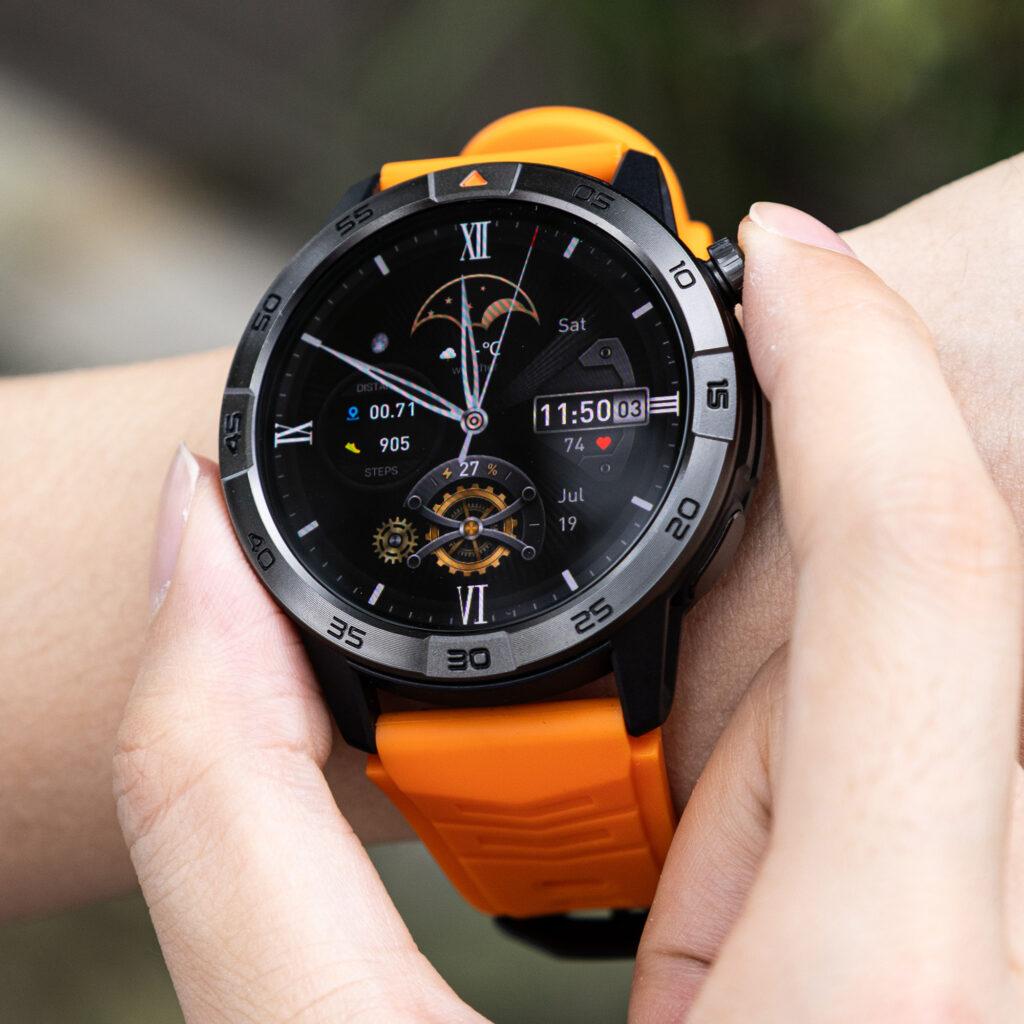
For better endurance, keep brightness at a comfortable level, shorten the screen timeout, and disable the always-on display when you do not need it.
Practical Use Cases for Busy People
Office Work and Commuting
The watch can help you screen calls, see calendar alerts, set alarms, and check notifications without repeatedly taking out your phone. On a bus, train, or subway, it keeps important information visible while your phone stays in a bag.
Warehouse Jobs and Long Shifts
Workers moving throughout a facility may value visible call alerts, step tracking, and a battery that covers repeated shifts. A loud environment may make the speaker harder to hear, so wrist calling is best for quick conversations.
Delivery Drivers and Field Work
Calls, GPS, notifications, and battery life are the most relevant features. Extra endurance can help when routes run late, though the watch should never become a distraction while driving.
Gym, Sleep, and Travel
You can track a workout, continue wearing the watch overnight, and collect sleep information without charging immediately. For short trips, longer runtime also means fewer cables and charging decisions.
Comparison With Popular Smartwatches for Busy People
Battery claims use different test conditions, so they are not perfectly comparable. The table shows each watch’s main priority.
| Smartwatch | Advertised Battery Life | Calls | Best For | Main Trade-Off |
|---|---|---|---|---|
| Featured Long-Battery Smartwatch | Up to 30 days | Bluetooth calling | Calls, GPS, AMOLED, and a $150 price | Limited published customer feedback |
| Amazfit Bip 6 | Up to 14 days typical use | Bluetooth calling | Budget fitness and notifications | More basic design and software |
| OnePlus Watch 3 | Up to 5 days in Smart Mode | Bluetooth calling | Android users wanting Wear OS apps | More frequent charging |
| Garmin Instinct 3 AMOLED | About 18–24 days | No voice calling | Outdoor training and rugged use | Higher price and fewer mainstream smart features |
| Withings ScanWatch 2 | Around 30 days | No voice calling | Classic style and wellness tracking | Small display and no built-in GPS |
| Apple Watch Series 11 | Up to 24 hours | Bluetooth and optional cellular | iPhone apps and integration | Daily or near-daily charging |
| Samsung Galaxy Watch8 | Up to 30 hours with AOD | Bluetooth and LTE options | Samsung apps and standalone features | Much shorter battery life |
The featured watch stands out by combining multi-week advertised endurance, Bluetooth calls, AMOLED, GPS, cross-platform compatibility, and a $150 price.
Apple, Samsung, and OnePlus are stronger for apps, voice assistants, payments, and smartphone integration. Garmin is a better choice for serious training. Withings suits buyers who prefer a traditional watch design and do not need voice calls.
Pros and Cons
Pros
- Long advertised battery life
- Bluetooth calling
- Built-in GPS and offline maps
- AMOLED touchscreen
- Android and iPhone compatibility
- Sleep and activity tracking
- Useful for work, commuting, fitness, and travel
- Premium feel without a premium price
- Free shipping listed
Cons
- Maximum battery claim may not reflect heavy use
- Calls and GPS shorten runtime
- Bluetooth calling requires a nearby phone
- No LTE service is listed
- No customer reviews are currently displayed
- Software-update policy is unclear
- Map support should be confirmed
- Health readings are not medical-grade
Who Should Buy It?
This smartwatch may fit people with packed schedules, long-shift workers, delivery drivers, office employees, commuters, travelers, gym users, and buyers who want useful features around $150.
It makes the most sense when you prioritize battery life, calls, notifications, navigation, and general wellness tracking over a large app store.
Who Should Avoid It?
Choose another watch if you need LTE calling, contactless payments, a large third-party app store, advanced medical features, professional athletic metrics, proven high-accuracy GPS, extensive verified reviews, or guaranteed long-term updates.
Apple and Samsung are better for ecosystem features. OnePlus is better for Wear OS apps. Garmin is stronger for serious outdoor training.
Buying Checklist Before Ordering
Before purchasing, confirm:
- What usage pattern produced the maximum battery claim?
- Which Android and iOS versions are supported?
- Which companion app is required?
- Do offline maps cover the places where you travel?
- Is the speaker loud enough for your environment?
- What does the warranty cover?
- Can you return the watch if the fit or app performance is not right?
Specifications alone cannot show comfort, call quality, software reliability, or GPS accuracy.
Frequently Asked Questions
What Is the Best Smartwatch for Busy People Battery Life?
A good choice should last several days, display important notifications, support calls, and fit work, travel, and fitness routines. The featured model advertises multi-week battery life and includes Bluetooth calling, GPS, offline maps, and AMOLED.
Will the Battery Really Last for Weeks?
It may under lighter settings. Calling, GPS, high brightness, always-on display, and continuous monitoring reduce runtime.
Can I Answer Calls Directly From the Watch?
Yes. It supports Bluetooth calling through its microphone and speaker when paired with a compatible nearby phone.
Does It Work With iPhone and Android?
The product listing states compatibility with both. Check the minimum operating-system version and required app before ordering.
Is It Good for Long Work Shifts?
It may be useful for call alerts, time checks, steps, and notifications. Actual battery life will depend on how heavily you use calling, GPS, and the display.
Is It Worth $150?
It may offer good value for buyers who prioritize battery life, calling, GPS, and AMOLED. The lack of published customer reviews and clear software-support information should still be considered.
Conclusion: Is This the Best Smartwatch for Busy People Battery Life?
The best smartwatch for busy people battery life should simplify your schedule rather than create another charging obligation.
The featured $150 model offers long advertised runtime, Bluetooth calling, GPS, offline maps, a sharp AMOLED display, and everyday wellness tracking. That mix can work well for long shifts, commuting, workouts, errands, travel, and sleep tracking.
The limitations matter. The maximum battery figure depends on usage, calls require a nearby phone, and the product currently lacks published customer reviews and a clearly explained update policy.
For buyers who want dependable everyday features and fewer charging breaks more than a large app ecosystem, this smartwatch is worth considering.
Ready for a Watch That Keeps Up With Your Schedule?
Keep calls, notifications, GPS, and activity tracking available through more of your week without planning every night around a charger.
Shop the Long-Battery Smartwatch for Busy Days and choose a wearable built around everyday convenience.