
The workday rarely stays inside a neat 9-to-5 box. An early commute can lead into back-to-back meetings, a late client call, an after-work workout, and one final check of tomorrow’s calendar before bed. The best battery smartwatch for office workers should support that entire routine without becoming another device that needs attention during it.
For office use, battery life is only part of the decision. The watch also needs quiet notifications, clear call handling, all-day comfort, a professional appearance, and enough power to remain useful after leaving the desk. The right model should help you stay organized while reducing unnecessary phone checking.
Why the Best Battery Smartwatch for Office Workers Needs More Than Fitness Tracking
Office workers need more than step counts. Their day is shaped by small interruptions: calendar reminders, messages, calls, room changes, and deadlines. Pulling out a phone for each update can break concentration.
A useful office smartwatch acts as a filter. It lets you glance at essential information, decide whether it needs action, and return to the task.
That makes the following features more important than a long list of workout modes:
- Calendar and meeting alerts
- Readable notifications
- Quiet vibration alarms
- Bluetooth calling for brief conversations
- Comfortable all-day wear
- A display that looks appropriate in professional settings
- Battery life that lasts beyond one workday
- Sleep and activity tracking outside office hours
The best office smartwatch should not try to replace a laptop or phone. Its job is to reduce small interruptions and keep essential information visible.
Battery Life During a Busy Workweek
Office workers may have easy access to outlets, but frequent charging is still inconvenient. A watch on a charger cannot deliver meeting reminders, track an evening workout, or monitor sleep.
Daily charging also creates avoidable problems. You may leave the watch at home, arrive at work with a low battery after sleep tracking, or pack another proprietary cable for a short business trip.
For most office workers, a smartwatch should comfortably handle:
- A full workday
- The commute in both directions
- After-work errands or exercise
- Overnight sleep tracking
- Several additional days as a safety margin
A watch with multi-week battery potential creates more flexibility. It can stay useful through changing schedules instead of needing a carefully chosen charging window every day.
Calls, high brightness, frequent screen wake-ups, GPS, and continuous monitoring reduce runtime. A 30-day rating is a maximum, but it still provides more room than a watch designed for nightly charging.
Professionals with especially crowded calendars may also find useful examples in this guide to smartwatch battery life for busy people.
Calendar, Alarm, and Notification Convenience
The strongest office benefit is not seeing more notifications. It is seeing fewer of the wrong ones. A watch that mirrors every promotional email and group chat can become more distracting than a phone.
The most useful office alerts are usually:
- Meeting reminders
- Calendar changes
- Calls from selected contacts
- Direct work messages
- Task deadlines
- Quiet alarms
- Travel or commute updates
A wrist vibration can be less disruptive than a ringing phone and more discreet during presentations or shared work. Calendar alerts are most valuable when they provide enough information to act.
A reminder that says a meeting begins in ten minutes is useful. A constant stream of partial notifications is not.
The best setup is selective. Keep urgent work alerts, calendar events, and important personal contacts. Remove shopping alerts, newsletters, games, and conversations that do not need immediate attention.
This improves focus and battery life at the same time.
Bluetooth Calls Between Meetings
Bluetooth calling is useful in an office when the conversation is brief.
Imagine walking to a conference room while a coworker calls to confirm the room number. Answering from the wrist saves time without stopping to find the phone.
Other practical situations include:
- Confirming an appointment while carrying a laptop
- Answering a short personal call between meetings
- Responding while making coffee
- Taking a quick update while the phone charges across the room
- Checking whether an incoming call is urgent
It is less suitable for long client calls, confidential discussions, or noisy offices.
Bluetooth calling also requires the paired phone nearby because it is not independent LTE service. Its practical value is handling a quick exchange without finding and unlocking the phone.
For many office workers, this is enough. The phone is usually in the same room, work bag, or desk drawer. The watch simply makes short conversations easier to manage.
Comfort During All-Day Desk Wear
Office comfort is different from workout comfort.
A watch may feel fine for 45 minutes at the gym but become irritating after ten hours of typing, commuting, and sleeping. Case shape, strap fit, weight, and wrist position all matter.
Choose a strap that stays comfortable from the commute through bedtime. A larger display is easier to read, but the case should not catch on shirt cuffs or press against a laptop edge.
The watch should stay stable during typing without feeling tight. Clean the strap after exercise and adjust the fit if the skin becomes irritated.
A round case can work well in professional settings because it resembles a traditional watch. A simple watch face can also look less distracting during meetings than a screen filled with activity rings and bright graphics.
Comfort is not a minor detail. A watch cannot improve the workday if you keep taking it off.
Professional Design and AMOLED Display
An office smartwatch needs to look appropriate during a team meeting, client lunch, evening workout, and commute.
A clean round case, simple watch face, and sharp display help it fit business-casual and everyday clothing.
An AMOLED screen is useful in an office because it can provide:
- Strong contrast for quick reading
- Clear text and icons
- Rich color without a washed-out appearance
- Dark watch faces that feel less distracting
- A more polished look than a basic low-resolution tracker
The 30-day-rated smartwatch uses a 1.43-inch AMOLED touchscreen with 466 × 466 resolution, giving reminders and caller information room to remain readable.
Moderate brightness, raise-to-wake, and a simple dark watch face can preserve power while maintaining a professional look.
The goal is not to attract attention during every meeting. A good office display should make information easy to read and then disappear into the background.
Readers choosing a watch partly for appearance can explore what separates a premium-feeling smartwatch with long battery life from a basic fitness tracker.
Commuting and After-Work Use
An office smartwatch should remain useful before and after office hours.
During the commute, it can show a call, calendar change, alarm, or important message while the phone stays in a bag. During a drive, alerts must remain secondary to safe driving and local laws.
Built-in GPS and offline maps can help with walking routes, business travel, unfamiliar neighborhoods, and after-work exercise.
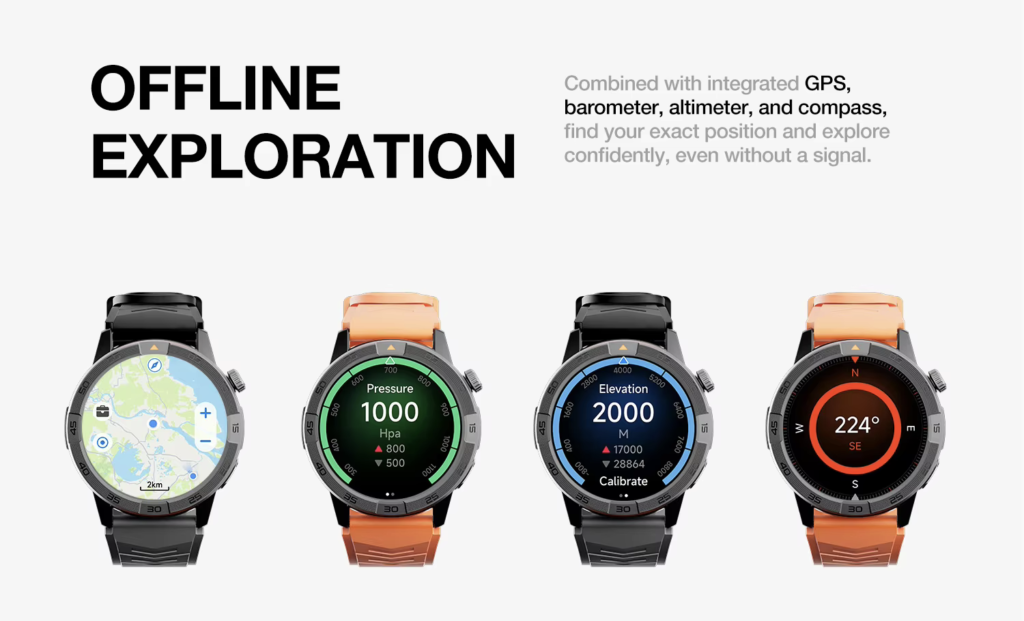
After work, the same watch can support:
- Step and calorie tracking
- An evening walk or run
- Heart-rate monitoring
- Music controls at the gym
- Alarms and reminders
- Overnight sleep tracking
This is where battery endurance earns its value.
The watch should not finish the workday only to become useless during the hours when fitness and sleep features matter most. A model that remains powered through the evening provides more complete value than one designed only to survive office hours.
A detailed commuting-focused guide is available for readers comparing long-battery smartwatches for commuting.
Best Settings for Office Use
Use a simple office profile:
- Allow calendar alerts, important calls, direct messages, and only a few personal apps.
- Choose raise-to-wake and moderate brightness instead of keeping the screen at maximum power.
- Turn on do-not-disturb during presentations, focused work, and sleep.
- Use wrist calling for quick confirmations, then move private or long conversations to a phone or headset.
- Schedule movement reminders around times when you can realistically stand.
- Charge during a shower or quiet weekend period rather than building the day around a nightly charge.
These settings reduce distractions without turning the watch into a basic clock.
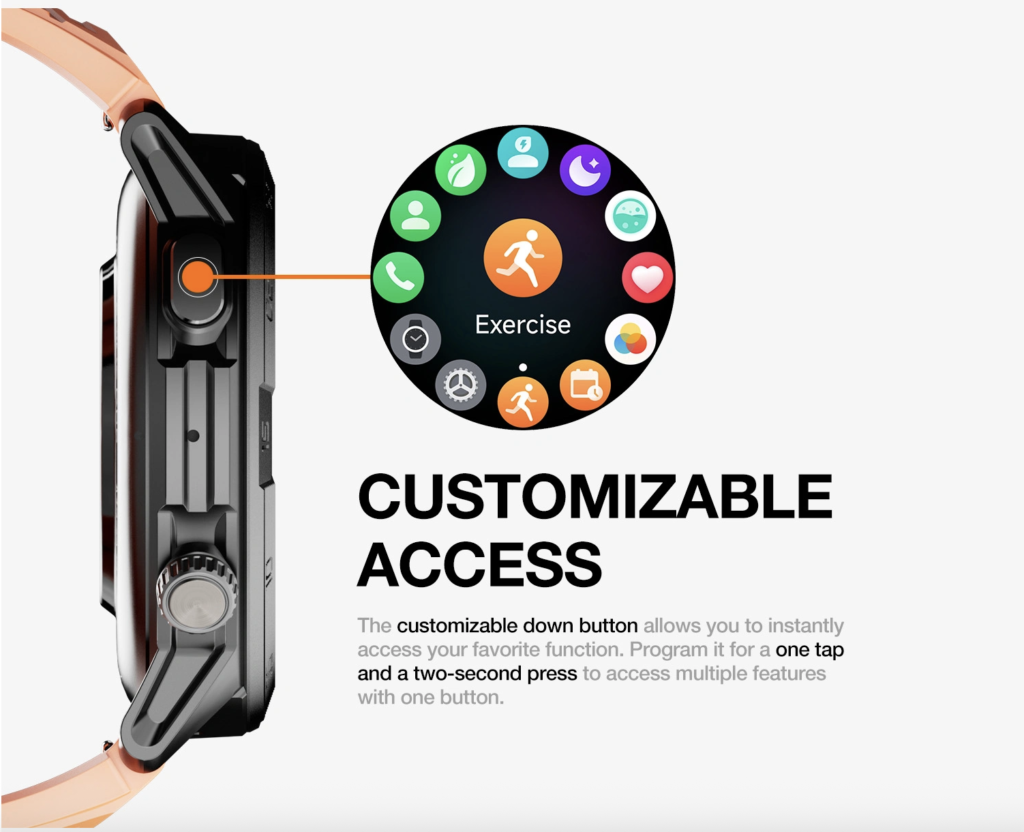
The aim is not to disable every feature for the sake of battery life. It is to keep the functions that make the workday easier and remove the alerts that add noise.
Where the 30-Day Smartwatch Fits
The $150 smartwatch discussed here combines up to 30 days of advertised battery life with Bluetooth calling, GPS, offline maps, notifications, alarms, calendar tools, music controls, and activity tracking.
It also supports iOS and Android and lists IP68 and 5ATM protection.
Its role is clear: it is for someone who wants a professional-looking everyday watch with quick calls, readable alerts, after-work fitness tools, and less charging rather than a large app platform or advanced athletic computer.
The product is not being recommended only because it carries a large battery claim. Its advantage is the combination of office-friendly features and longer potential runtime.
An office worker can use it for a morning alarm, calendar reminders, short calls, commute alerts, evening activity, and overnight sleep tracking without treating charging as part of every workday.
Who Should Buy It?
This type of smartwatch is well suited to office workers who:
- Want meeting and call alerts without checking a phone constantly
- Wear a watch from the commute through bedtime
- Prefer charging occasionally instead of every night
- Use basic fitness and sleep tracking
- Want Bluetooth calling without paying for a cellular plan
- Need compatibility with either Android or iPhone
- Prefer a polished AMOLED display around the $150 price point
It may be especially useful for professionals with changing schedules, frequent meetings, business travel, or after-work fitness routines.
It also makes sense for someone who does not need a large smartwatch app store. If most of your daily use involves notifications, calls, time, alarms, fitness, navigation, and sleep, the feature balance may be more valuable than advanced software you rarely open.
Who Should Choose Another Watch?
A different smartwatch may be a better choice for people who need:
- Independent LTE calling away from a phone
- A large third-party app ecosystem
- Mobile payments through a specific platform
- Deep integration with one phone brand
- Medical-grade measurements
- Advanced running, cycling, or recovery analytics
- Extensive long-term software support from a major platform provider
The product page also currently shows no customer reviews. Buyers who place heavy weight on verified owner feedback should consider that limitation and review the return, shipping, and warranty terms before purchasing.
The watch may also be unnecessary for someone who only wants time and step counts. A simpler fitness tracker may cost less and still cover those basic needs.
Office-Focused Pros and Cons
Pros
- Multi-week battery potential reduces workweek charging
- Bluetooth calling helps with short conversations
- Calendar, alarm, and notification tools support office routines
- AMOLED display offers a polished professional appearance
- GPS and fitness features remain useful after work
- Sleep tracking supports overnight wear
- Works with iOS and Android
- Priced at $150 with free shipping listed
Cons
- Actual runtime will be shorter with frequent calls, GPS, or always-on display use
- Bluetooth calling requires the paired phone nearby
- No LTE service is listed
- Long wrist calls may be unsuitable in shared offices
- No customer reviews are currently displayed
- Specialized apps and advanced training tools may be limited
Frequently Asked Questions
What Is the Best Battery Smartwatch for Office Workers?
The best option should combine long battery life with calendar alerts, readable notifications, Bluetooth calling, all-day comfort, and a design suitable for professional settings. Battery life alone is not enough.
How Much Smartwatch Battery Life Does an Office Worker Need?
At minimum, the watch should handle a full day, commute, after-work activity, and overnight tracking. A multi-day or multi-week rating provides more flexibility for busy schedules and travel.
Can I Answer Work Calls From a Bluetooth Smartwatch?
Yes, when the watch has a microphone and speaker and the paired phone remains within Bluetooth range. It is best for brief calls rather than private or extended conversations.
Is an AMOLED Display Good for Office Use?
Yes. AMOLED provides clear text, strong contrast, and a polished appearance. Moderate brightness, raise-to-wake, and a simple dark watch face can help preserve battery.
Can a Smartwatch Reduce Phone Distractions at Work?
It can when notifications are limited to important calls, messages, meetings, and deadlines. Mirroring every phone alert can create more distractions instead.
Is a 30-Day Battery Claim Guaranteed?
No. “Up to 30 days” is a maximum rating. Calls, GPS, brightness, display settings, tracking frequency, and notification volume affect actual runtime.
Final Recommendation
The best battery smartwatch for office workers should make the workday calmer, not busier.
It should show the meeting reminder without inviting ten unrelated distractions. It should handle a quick call without making you search for your phone. It should feel comfortable at the keyboard, look appropriate in a meeting, and retain enough power for the commute, gym, and overnight sleep tracking.
The 30-day-rated smartwatch offers a strong balance for that purpose. Its AMOLED display, Bluetooth calling, calendar tools, notifications, GPS, offline maps, activity tracking, and cross-platform compatibility cover the parts of daily life that extend beyond the desk.
Its biggest selling point is not simply the battery claim. It is the ability to support a complete professional routine while asking for less attention from the charger.
Explore the 30-day smartwatch with GPS and Bluetooth calling and decide whether its mix of workday convenience, professional style, and longer battery life matches your schedule.