
Four battery complaints reach a Grand Junction support desk before lunch:
“It stops charging at 82%.”
“loses power overnight.”
“suddenly drains before dinner.”
“never lasts beyond one day.”
They sound like versions of the same complaint, but they should not begin with the same fix. Smartwatch battery problems and solutions become easier to navigate when the symptom is classified before settings are changed. Incomplete charging, sudden daytime drain, overnight loss, a fixed runtime ceiling, and gradual decline each require a different first test.
Generic advice creates confusion because lowering brightness cannot diagnose a charging fault, and battery saver cannot explain why a problem began immediately after an update.
The better approach is simple:
- Identify the dominant symptom.
- Complete one controlled first test.
- Avoid changing unrelated settings.
- Follow the correct troubleshooting branch.
This article is a diagnostic navigator, not a complete repair manual.
Sort the Symptom at a Grand Junction Support Desk
The Colorado support technician begins by asking what the owner can actually observe.
Possible answers include:
- The watch does not charge fully.
- Battery drain became suddenly faster.
- Most of the loss happens overnight.
- The watch consistently lasts only one day.
- The problem began after an update.
- Runtime declined gradually over several months.
- The watch reaches full charge but drops quickly afterward.
- The case, charging area, or temperature feels physically abnormal.
The first task is not finding a fix. It is choosing the correct branch.
Choose the dominant battery symptom
Some owners describe several frustrations at once:
“It charges slowly, loses power overnight, and barely lasts through work.”
The technician should identify the clearest repeated behavior:
- Does the charge fail to complete?
- Does the watch begin at full charge and then drain?
- Is the loss concentrated during sleep?
- Has the result always been short?
- Did a specific event begin the problem?
Start with the symptom that appeared first or prevents normal use most clearly.
Avoid combining several diagnoses
These complaints enter different branches:
- “It stops at 82%” begins with charging completion.
- “It reaches 100% and loses 20% in an hour” begins with weak post-charge recovery.
- “It loses 25% only overnight” begins with overnight loss.
- “It has always lasted one active day” begins with runtime expectations.
- “It became worse immediately after an update” begins with the software-change branch.
Correct classification comes before correction.
Confirm Full Charging Before Diagnosing Battery Drain
An incomplete charge can look like fast drain.
Before reducing notifications, disabling GPS, or changing display settings, verify that the watch is actually receiving and completing a normal charging session.
What the owner notices
Charging complaints may include:
- The percentage stops below full.
- Charging repeatedly connects and disconnects.
- The watch remains on the charger with little progress.
- A normal charge takes much longer than before.
- The display reports charging inconsistently.
- The percentage rises, pauses, and never finishes.
On watches with an optimized charging or charge-limit feature, stopping near a certain level may be intentional rather than a hardware failure. The exact behavior must be checked in the manufacturer’s current instructions.
First test: verify the charging path
Using the instructions for the exact model, confirm:
- The charger is positioned correctly.
- Charging contacts are unobstructed.
- The cable is fully connected.
- The power source works normally.
- The watch remains connected throughout the session.
- Charging occurs under suitable indoor conditions.
- Any supported charge-limit feature has been reviewed.
Do not substitute remembered instructions from another smartwatch.
What not to change yet
Avoid starting with:
- Lower screen brightness
- Fewer alerts
- Disabled tracking
- Reduced Bluetooth calling
- Battery saver
- App removal
Those changes affect how power is used after charging. They do not establish whether the watch received a complete charge.
Owners can separate a charging problem from a routine that simply requires frequent charging before treating every short interval as a hardware issue.
Route the complaint
Move next to:
- Charger or cable validation
- Charging-contact guidance
- Power-source testing
- Temperature-related charging guidance
- Manufacturer support
- Authorized service
Follow the Sudden Daytime-Drain Branch
Sudden drain means the watch previously completed a normal day but now loses power much faster during comparable use.
What the owner notices
Common reports include:
- The watch no longer reaches dinner.
- Battery percentage falls rapidly during work.
- The change appeared within one or two days.
- The owner’s main routine seems unchanged.
- Drain is visible while the watch is actively worn.
This is different from a watch that has always lasted one day.
First test: identify the most recent change
Record whether the problem began after:
- Watch software changed
- The paired phone updated
- The companion app updated
- A new watch face was installed
- More notifications were enabled
- Calling increased
- GPS use increased
- A new tracking feature was activated
- The phone was replaced
- Bluetooth reconnection became unstable
The most recent change is not automatically the cause, but it provides the best first comparison.
What not to change yet
Do not disable five features at once.
If the owner simultaneously changes brightness, notifications, calling, GPS, and tracking, the next result cannot reveal which adjustment mattered.
Change one controlled variable only after the symptom has been documented.
Readers can compare active calling demand before labeling daytime battery loss a hardware fault when communication use changed around the same time.
Route the complaint
Continue to:
- Sudden-drain troubleshooting
- Post-update investigation
- Bluetooth reconnection testing
- Background synchronization review
- Active-feature battery comparison
Investigate Overnight Battery Loss Separately
Overnight loss needs its own branch because the watch may behave differently while tracking sleep, synchronizing data, reconnecting to the phone, or remaining unused.
What the owner notices
The watch ends the evening with adequate charge but wakes with an unexpectedly large loss.
The device may have been:
- Worn for sleep tracking
- Left beside the phone
- Removed from the wrist
- Left with the display active
- Connected or disconnected overnight
First test: record one complete night
Document:
- Starting percentage
- Ending percentage
- Overnight duration
- Sleep-tracking status
- Screen mode
- Phone connection
- Background synchronization
- Restart or update activity
- Whether the watch was worn
- Whether the earlier charge completed normally
Repeat a comparable night before treating one unusual result as a permanent problem.
What not to change yet
Do not immediately:
- Declare the battery worn out
- Disable every notification
- Turn off all tracking
- Reset the watch
- Compare the result with daytime use
The goal is to reproduce the overnight symptom first.
Route the complaint
Move to:
- Overnight background-activity testing
- Sleep-tracking review
- Connection and synchronization checks
- A repeat-night comparison
- Support when the loss remains large and unexplained
Separate a Consistent One-Day Ceiling From a New Fault
A watch that reliably lasts one active day may not have a new battery problem.
The owner may instead be comparing heavy real-world use with a claim based on lighter or standby conditions.
What the owner notices
The watch:
- Reaches the end of each day consistently
- Rarely continues into a second active day
- Has behaved similarly since purchase
- Shows no sudden decline
- Produces a stable result under the same routine
Consistency is the important clue.
First test: compare use with the advertised conditions
Record:
- Bluetooth call frequency
- GPS duration
- Screen brightness
- Screen wake frequency
- Notification volume
- Activity tracking
- Always-on display, when supported
- Phone connection behavior
- Standby wording versus active-use wording
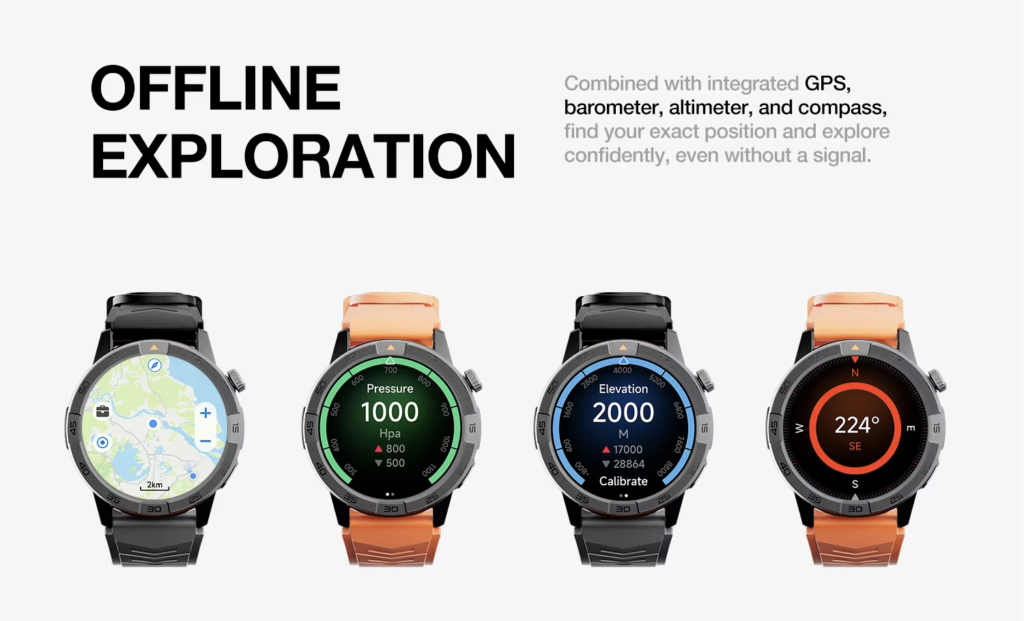
A long standby figure does not automatically predict the result of frequent calls, bright screen use, tracking, and GPS.
What not to change yet
Do not label the battery defective merely because the active routine does not match the largest advertised number.
First determine whether the watch is performing consistently under a demanding setup.
Owners can compare multiweek battery expectations with an active one-day routine before entering a hardware-fault branch.
Route the complaint
Continue to:
- Active-use versus standby guidance
- Calling-demand analysis
- GPS and display-use review
- A repeatable-use test
- Product-support clarification
Check Whether an Update Changed the U.S. Owner’s Setup
Software-related problems need a separate route because the correct instructions depend on the current watch, phone, operating system, and companion app.
What the owner notices
The change begins soon after:
- A watch update
- An iPhone or Android update
- A companion-app update
- Re-pairing
- Repair or restoration
- A restart following installation
Other signs may include delayed notifications, repeated synchronization, unstable Bluetooth, or changed charging behavior.
First test: record the software state
Capture:
- Watch software version
- Phone operating-system version
- Companion-app version
- Update date
- Restart status
- Pairing status
- Synchronization behavior
- Whether the drain repeats after normal use resumes
This information is more useful than saying, “It started after the latest update.”
What not to change yet
Do not use a reset as the automatic first response.
A reset can erase settings, require new pairing, and make the original behavior harder to reproduce. Follow the manufacturer’s current troubleshooting order.
Route the complaint
Move to:
- Official update guidance
- Companion-app troubleshooting
- Connection repair
- Controlled testing after the system settles
- Manufacturer support
Distinguish Gradual Decline From a Heavier Routine
Gradual decline develops across months rather than appearing on one identifiable day.
What the owner notices
The watch:
- Requires charging more frequently
- Ends similar days with less reserve
- Shows no sudden collapse
- Has accumulated long-term use
- Has experienced several software and routine changes

First test: compare past and present routines
Record:
- Approximate device age
- Earlier charging interval
- Current charging interval
- Previous call frequency
- Current call frequency
- GPS changes
- Notification growth
- Display-setting changes
- Tracking changes
- Whether the decline repeats
A heavier routine can imitate battery aging.
What not to change yet
Do not conclude that age alone proves the battery needs replacement.
First rule out meaningful changes in:
- Calling
- GPS
- Display activity
- Tracking
- Notifications
- Phone connection
Route the complaint
Continue to:
- Battery-health evaluation
- Manufacturer diagnostics
- Warranty review
- Service eligibility
- Replacement planning
Diagnose Weak Recovery After a Full Charge
Some watches reach full charge but lose power unusually quickly soon afterward.
This symptom deserves a separate branch because the charge appears complete.
What the owner notices
Examples include:
- The watch reaches full charge and drops sharply within an hour.
- Early use after charging is much worse than normal.
- The same decline happens after several sessions.
- The device feels unusually warm.
- The displayed full charge does not produce normal runtime.
First test: validate one controlled charging session
Confirm:
- Charging completed normally.
- The usual charger was used.
- The watch did not update or restart.
- The device was not exposed to unusual heat.
- First-hour activity was comparable.
- The result repeats after another controlled session.
What not to change yet
Do not conclude after one event that:
- The charger is defective
- The battery has failed
- Every app must be removed
- A reset is required
One weak result may coincide with synchronization, an update, a restart, or unusually heavy first-hour use.
Route the complaint
Move to:
- Charging validation
- Early-drain testing
- Battery diagnostics
- Official support
- Authorized service
Stop Routine Troubleshooting for Physical Warning Signs
Physical warning signs should leave the settings-based diagnostic flow.
Possible signs include:
- Case separation
- Visible swelling
- Unusual odor
- Damage near the charging area
- Repeated abnormal heat
- Impact damage followed by battery problems
- Liquid exposure followed by abnormal behavior
First action: follow official safety guidance
Stop the ordinary experiment and contact the device manufacturer or an authorized service provider for instructions.
Do not continue charging or testing a visibly damaged device merely to collect another battery percentage.
Do not attempt internal battery repair
Avoid:
- Opening the watch
- Puncturing the battery
- Pressing a separated case closed
- Attempting an unauthorized internal repair
- Placing the device in household trash
- Putting it in a curbside recycling bin
U.S. disposal and recycling procedures vary by location, but lithium-ion devices should be directed to appropriate electronics-recycling or household hazardous-waste channels rather than ordinary trash.
Route the complaint
Continue to:
- Manufacturer support
- Authorized repair
- Warranty service
- Retailer assistance
- Local battery or electronics recycling guidance
Prepare the Information a U.S. Support Team Will Request
Clear documentation can make support faster and reduce repeated troubleshooting.
Record the device setup
Prepare:
- Watch model
- Purchase date
- Approximate age
- Paired iPhone or Android model
- Phone operating-system version
- Watch software version
- Companion-app version
- Charger and cable used
Describe one reproducible symptom
Good descriptions include:
- “Charging stops at 82% across three sessions.”
- “The watch loses about 25% between bedtime and morning.”
- “It drops sharply during the first hour after charging.”
- “Drain began the day after the software update.”
- “Runtime declined gradually over six months.”
Avoid combining several possible symptoms into one vague complaint.
Include the first-test result
Tell support:
- What was tested
- What remained unchanged
- Whether the symptom repeated
- Starting and ending percentages
- Relevant charging details
- Relevant software details
Review American service considerations
U.S. owners may also need:
- Proof of purchase
- Warranty documentation
- Retailer information
- Shipping instructions
- Authorized service locations
- Replacement-charger availability
- Local recycling options
A warranty does not automatically cover every failure, so review the actual terms and claims process.
Smartwatch Battery Problems and Solutions: Use the Route Card
The navigator can be summarized in one table:
| Symptom | First test | Do not change yet | Next route |
|---|---|---|---|
| Incomplete charging | Verify the full charging path | Apps and screen settings | Charger, contact, power source, support |
| Sudden daytime drain | Identify the most recent change | Several features at once | Drain, update, or connection branch |
| Overnight loss | Record one complete night | Assume aging | Overnight repeat test |
| Consistent one-day ceiling | Compare active use with claim conditions | Declare a defect | Runtime-expectation branch |
| Post-update change | Record versions and timing | Automatic reset | Official update guidance |
| Gradual decline | Compare past and current routines | Blame age immediately | Health or service evaluation |
| Weak recovery after charging | Validate another controlled session | Conclude hardware failure | Early-drain diagnostics |
| Physical warning sign | Follow official safety instructions | Continue testing | Support or service |
Use one branch at a time
Select the symptom that best matches the repeated behavior.
Completing one first test produces clearer evidence than applying every possible fix.
Reclassify when the evidence changes
An owner may begin in the overnight-loss branch and discover that the watch never charged fully.
That new evidence moves the complaint to the charging branch.
The navigator is not permanent. It follows the strongest available evidence.
Questions U.S. Owners Ask About Battery Diagnosis
What should be checked before changing battery settings?
Confirm that the watch receives and completes a normal charge. An incomplete charging session can resemble fast battery drain.
Should every battery problem be treated with battery saver?
No. Battery saver may reduce power use, but it does not identify a charging fault, software change, overnight process, or physical battery problem.
How can an owner distinguish fast drain from a charging fault?
Verify charging completion first. Then observe whether the fully charged watch loses power unusually quickly during a comparable routine.
When should the watch be reset?
A reset should follow the manufacturer’s current troubleshooting sequence rather than serve as the automatic first step.
Can the charger cause the problem?
The charger, cable, contact alignment, power source, or charging conditions may contribute. Test the charging path according to the exact device instructions.
When is service more appropriate than troubleshooting?
Escalate when physical warning signs appear, charging remains unreliable after controlled tests, the symptom repeats without explanation, or official support recommends service.
Correct Classification Comes Before Correction
Use one route card before changing multiple settings:
Symptom: loses 30% overnight
First test: repeat one comparable night and record connection, tracking, screen, charging, and update behavior
Do not change yet: brightness, notifications, GPS, and several apps at once
Next destination: overnight-loss troubleshooting branch
The safest way to approach smartwatch battery problems and solutions is to classify the symptom first, complete one controlled test, and follow the appropriate branch instead of applying every possible fix at once.
Select one symptom:
- Incomplete charging
- Sudden daytime drain
- Overnight loss
- Consistent one-day ceiling
- Post-update change
- Gradual decline
- Weak recovery after charging
- Physical warning sign
Complete only that branch’s first test before changing anything else.