
The sales vehicle is parked outside an equipment yard in Amarillo, Texas. Before beginning a regional customer trip, an industrial-equipment salesperson checks where an incoming call will play, confirms which microphone is active, and decides what should happen when a client calls after the wheels begin moving.
To answer does smartwatch calling work while driving, two separate questions must be addressed. A Bluetooth call may connect technically, but that does not make looking at, touching, or troubleshooting a watch safe while operating a vehicle.
Hands-free audio is not the same as attention-free driving. A wrist call can still create visual, manual, and cognitive demands. For that reason, the safest routine begins with parked configuration and continues with one firm boundary: no watch interaction from the moment the vehicle moves until it is safely parked again.
This article explains parked setup and no-touch behavior. It does not instruct drivers to operate a smartwatch while a vehicle is moving.
Start With a Parked Audio Test in Amarillo, Texas
Every connection decision should be completed before the regional trip begins.
The salesperson keeps the vehicle fully parked outside the Amarillo equipment yard while checking the phone, smartwatch, and vehicle audio system. No part of the setup should be postponed until the vehicle is in traffic.
Confirm the phone-to-watch connection before departure
The smartwatch provides phone-assisted Bluetooth calling. The paired phone therefore remains part of the call pathway.
Before leaving, confirm that:
- The phone and watch are connected
- Incoming-call alerts appear as expected
- Caller information is recognizable
- Short test audio works
- The phone remains within dependable range
- Both devices have enough battery for the trip
- Low-priority notifications are limited
The goal is not to perform a complete pairing tutorial. The driver only needs to establish that the intended setup works before shifting into drive.
Readers who need more background can understand how phone-assisted Bluetooth calls depend on the paired phone.
Test the vehicle’s audio destination while stationary
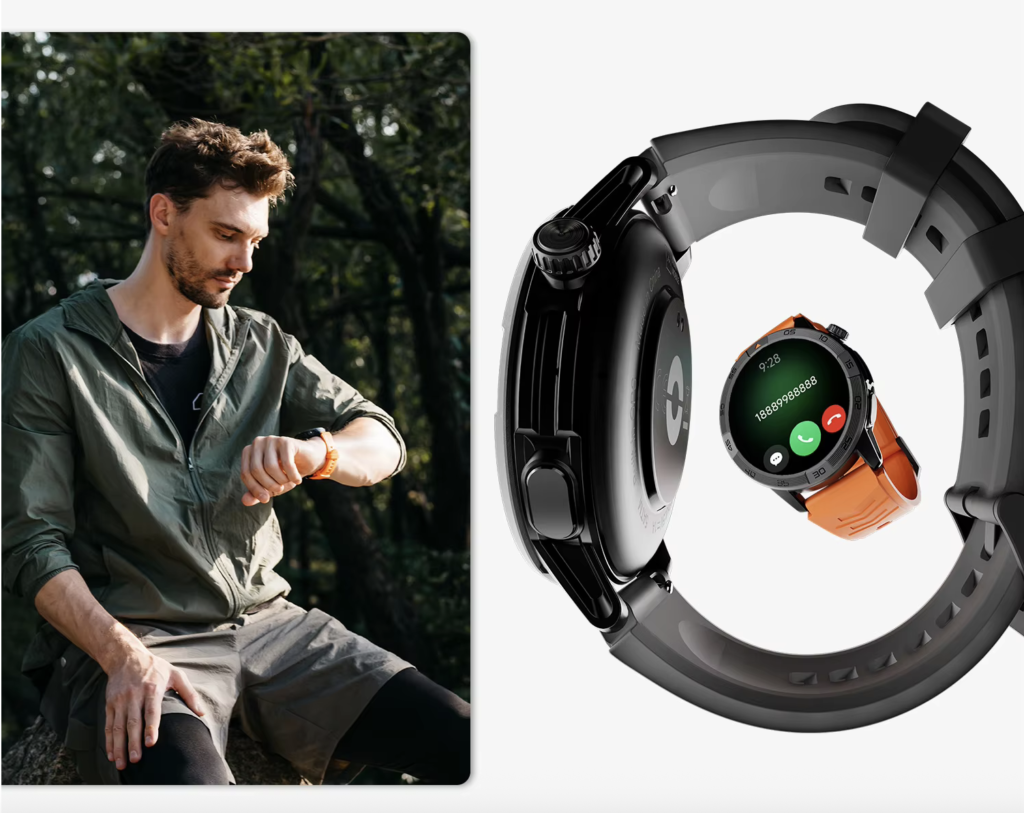
When a phone, smartwatch, and vehicle are connected simultaneously, audio behavior may depend on the exact hardware, software, and connection order.
While parked, determine whether the call routes through:
- The vehicle speakers and microphone
- The watch speaker and microphone
- The phone
- Another paired audio accessory
Do not assume that every American vehicle gives the car’s audio system priority. One setup may route calls automatically, while another may require a selection that should never be attempted after departure.
Use one controlled incoming call
A parked test call can answer several practical questions:
- Which screen shows the caller?
- Which speaker plays the conversation?
- Which microphone captures the driver’s voice?
- Does the audio route change unexpectedly?
- What happens when the watch and vehicle are both connected?
- Does the connection recover after the call ends?
Resolve uncertainty before entering traffic.
When the audio route remains unreliable, the safest choice is to leave smartwatch calling unused until the system can be tested again while parked.
Does Smartwatch Calling Work While Driving on U.S. Roads?
Technically, the watch may remain connected while the vehicle moves.
That technical fact does not establish that the driver should interact with it.
A connected smartwatch does not make it appropriate to:
- Raise the wrist to inspect a caller
- Tap an answer or reject control
- Scroll through contacts
- Read a notification
- Change the speaker route
- Adjust call settings
- Troubleshoot a lost connection
The device may continue operating in the background while the driver gives it no attention.
A wrist call can create three kinds of distraction
NHTSA describes distracted driving broadly as any activity that diverts attention from the task of driving. Phone conversations and adjustments to entertainment or navigation systems are included in that definition.[Source Link]
A smartwatch can introduce:
Visual distraction: looking away from the roadway to read the wrist.
Manual distraction: moving a hand to tap, swipe, or adjust the device.
Cognitive distraction: concentrating on the conversation instead of traffic, road conditions, and surrounding vehicles.
Removing the handheld phone does not automatically remove these demands.
U.S. crash data supports a stricter boundary
NHTSA reports that distracted driving was involved in 3,208 deaths and 315,167 injuries in the United States during 2024.[Source Link]
TxDOT reported in April 2026 that distracted driving contributed to more than 86,000 Texas crashes during the previous year. The agency advises drivers to keep devices out of reach and to come to a complete stop in a safe place before making a call or doing something else that could distract them.[Source Link]
Those figures do not measure smartwatch calling specifically. They demonstrate why “hands-free” should never be treated as permission to divide attention casually.
Keep the calling capability accurately described
The smartwatch supports Bluetooth calling through the paired phone. It is not an independent LTE watch.
The technical chain is:
Phone receives the call → Bluetooth connection remains active → call function reaches the watch or preconfigured vehicle system
That connection can exist without requiring the driver to touch the watch.
Draw the No-Touch Boundary Before the Wheels Move
The no-touch protocol begins when the vehicle starts moving.
It ends only after the driver reaches a safe, lawful parking location.
Prohibit wrist interaction while moving
During the trip, the salesperson should not:
- Look at the caller display
- Tap answer or reject
- Read alerts
- Change volume from the wrist
- Switch audio destinations
- Open contacts
- Respond to messages
- Diagnose Bluetooth problems
The rule is intentionally simpler than deciding whether each individual action seems brief enough.
Keep the rule active in slow traffic
The same boundary applies during:
- Congestion
- Parking-lot travel lanes
- Toll queues
- Work-zone slowdowns
- Drive-through lines
- Brief traffic pauses
A vehicle moving slowly still requires attention.
Treat red lights as part of the driving period
This article does not recommend using the watch at a red light.
State laws can define vehicle operation and stopping differently, but the safety protocol remains straightforward:
The smartwatch stays untouched until the vehicle is safely and lawfully parked.
That rule avoids turning every signal into a new legal or safety judgment.
Do not use the roadside shoulder as the normal callback location
A shoulder may leave the vehicle exposed to passing traffic.
A better stopping place might be:
- A customer parking lot
- A service station
- A rest area
- A designated turnout
- Another lawful location separated from active travel lanes
The objective is genuine parking, not merely reducing speed or stopping where traffic risk remains.
Preselect What Happens When a Client Calls
The driver should not begin deciding what to do after hearing the ringtone.
Choose the default call outcome before leaving Amarillo.
Let the call remain unanswered
The simplest no-touch option is to allow the call to continue unanswered.
The salesperson can return it after reaching the next safe parking location. Missing an immediate conversation is usually less disruptive than creating an in-motion device decision.
Use only a lawful, preconfigured vehicle or voice system
Where the exact vehicle and phone support it, a preconfigured system may manage calls without touching the watch.
Possible controls include:
- Vehicle voice commands
- Steering-wheel buttons
- Automatic audio routing
- A phone driving mode
The system must already be configured before departure. Do not assume that every voice command, steering-wheel control, or vehicle interface works with every watch.
The driver must also follow current laws and employer policy. A system being technically hands-free does not guarantee that a company permits business calls while driving.
Use an automatic driving response when available
Some phones can suppress calls or send an automatic response during driving.
Where supported, this can tell the caller that the driver is unavailable and will respond later.
Platform-specific behavior changes over time, so it should be verified on the exact phone before relying on it.
Return detailed calls from a parked location
Calls involving any of the following should wait:
- Equipment specifications
- Pricing
- Financing
- Delivery changes
- Site-access instructions
- Customer complaints
- Contract terms
- Multiple connected decisions
The salesperson should not attempt to remember several figures, change a route, or make a complex business decision while moving.
Use Vehicle or Voice Controls Only When Already Configured
A vehicle interface may be easier to manage than a watch, but it is not automatically free from distraction.
The preferred system is the one that requires no mid-drive setup and complies with applicable rules.
Prefer the interface designed for the vehicle
Where lawful and supported, a vehicle system may provide:
- Audio through fixed speakers
- A vehicle microphone
- Steering-wheel controls
- Voice activation
- A larger fixed display
The driver should still avoid extended or demanding conversations. A business call can consume attention even when no screen is touched.
Do not repair an audio-routing problem while moving
Suppose a client call unexpectedly plays through the watch instead of the vehicle.
The wrong response is to inspect the wrist and start switching outputs.
Use this sequence instead:
- Do not interact with the watch.
- Let the call remain unanswered or end.
- Reach a safe parking location.
- Correct the audio route.
- Resume the trip only after setup is complete.
Test competing Bluetooth devices before a regional U.S. trip
Multiple connected devices may complicate routing.
The Amarillo salesperson should test the interaction among:
- The vehicle
- The smartwatch
- Wireless earbuds
- The phone
- Any other paired audio accessory
A parked comparison can help the driver compare Bluetooth call audio before a U.S. road trip without experimenting in traffic.
Move Detailed Sales Calls to a Safe Parked Location
A call can begin simply and become complicated.
The driver needs a clear point at which the conversation stops or waits.
Identify calls that require complete attention
A parked location is appropriate before discussing:
- Exact machine dimensions
- Delivery availability
- Customer account details
- Financing options
- Installation requirements
- Product compatibility
- Pricing changes
- A complaint requiring investigation
These topics may require records, calculations, notes, or several decisions.
Park before taking notes or viewing customer information
The driver should not:
- Read a customer record
- Enter an appointment
- Write down a serial number
- Review a photograph
- Open an attachment
- Change the route
- Search a product specification
A detailed conversation becomes a parked task as soon as supporting information is required.
Use a clean parked handoff
After reaching a safe location:
- Put the vehicle in park.
- Confirm that the location is lawful and protected from active traffic.
- Open the necessary customer or equipment record.
- Return the call.
- Complete all notes before driving again.
Field professionals planning longer sales routes can plan call access for a longer American road trip.
Check Texas, Interstate, and Employer Rules Before Departure
This section provides a verification framework, not individualized legal advice.
Laws and policies can change, so they should be checked again before publication and before travel.
Review the current Texas rule
Texas law prohibits using a portable wireless communication device for electronic messaging while operating a motor vehicle, subject to statutory definitions and exceptions.[Source Link]
TxDOT summarizes the state rule by warning that drivers cannot send or receive electronic messages while driving. It also notes that restrictions can differ between cities and that additional rules apply to certain drivers and locations.[Source Link]
This does not create one universal answer about every possible smartwatch tap. The safer editorial approach is not to argue that wrist interaction qualifies as lawful hands-free use.
Use the stricter protocol: no watch interaction until safely parked.
Verify every state crossed on a U.S. sales route
A regional field salesperson may cross into another state.
Before departure, check current rules covering:
- Handheld devices
- Electronic messaging
- Voice calls
- School zones
- Commercial vehicles
- Local ordinances
- Device mounting
- Young or novice drivers
A Texas rule should not be presented as the rule for the entire United States.
Follow the employer’s fleet policy
A company may prohibit calls or device interaction that state law does not expressly forbid.
The salesperson should review:
- Fleet safety rules
- Company phone policy
- Hands-free call restrictions
- Required driving modes
- Customer-contact expectations
- Incident-reporting requirements
NHTSA encourages employers to establish distracted-driving policies.[Source Link]
Add FMCSA rules only when the vehicle qualifies
Do not assume that every industrial-equipment salesperson operates a commercial motor vehicle.
When federal commercial-vehicle rules apply, FMCSA restricts texting and handheld mobile-phone use. Its guidance limits reaching for or holding a phone and restricts multi-button dialing while driving a qualifying commercial vehicle.[Source Link]
The driver or employer should verify whether those regulations apply to the actual vehicle and trip.
Review Whether the Protocol Removed Driver Interaction
The post-trip review should measure behavior, not the number of calls answered.
A successful protocol may result in fewer completed calls during the drive.
Record the moving-vehicle result
After returning, ask:
- Was the watch looked at?
- Was it touched?
- Did an alert invite manual action?
- Did audio route incorrectly?
- Was troubleshooting delayed until parking?
- Were detailed calls returned from safe locations?
- Did the selected default outcome work?
Count protocol failures, not sales conversations
The desired result is:
- Zero wrist taps while moving
- Zero notification reading
- Zero manual speaker changes
- Zero moving-vehicle troubleshooting
- Zero record viewing
- Complex calls completed only while parked
Answering more calls is not the performance goal.
Correct the parked setup before the next trip
When a problem occurs, adjust the next predeparture routine:
- Reduce unnecessary notifications
- Change the default incoming-call outcome
- Remove an unreliable paired device
- Improve automatic audio routing
- Strengthen the parked-callback rule
- Follow a stricter employer requirement
Drivers applying similar principles to ordinary commuting can review smartwatch calling for an everyday U.S. commute.
Questions U.S. Drivers Ask About Smartwatch Calling
Can smartwatch call audio work through a vehicle?
It may work when the phone, watch, vehicle, and software support compatible Bluetooth routing. The exact setup should be tested while safely parked because audio priority differs among vehicles and connected devices.
Does a connected wrist call make driver interaction safe?
No. A working connection does not remove visual, manual, or cognitive distraction. The watch should remain untouched while the vehicle is moving.
Should a smartwatch be touched at a red light?
The no-touch protocol says no. Wait until the vehicle is safely and lawfully parked, and separately verify the current laws that apply to the location.
What should be configured before leaving an Amarillo parking area?
Confirm the phone connection, vehicle audio destination, active microphone, notification settings, incoming-call default, and driving mode before the vehicle moves.
When should a business call wait until the driver is parked?
Wait when the call requires records, note-taking, specifications, prices, route changes, private details, or several connected decisions.
Which rules should a U.S. field professional check?
Review state and local laws for the route, employer fleet policy, insurance requirements, and any applicable federal commercial-driving rules.
Connection Confirmed, Interaction Prohibited
Audio route tested while parked. Incoming-call outcome selected before departure. Watch untouched from the first moving mile to the next safe parking location.
The answer to does smartwatch calling work while driving is partly technical, but the more important decision is behavioral. The Bluetooth connection may continue while driver interaction does not.
While safely parked, configure the preferred audio route, select what incoming calls will do, and establish one firm boundary: the watch remains untouched from the moment the vehicle moves until it is safely parked again. Review the smartwatch’s Bluetooth calling and notification controls only as part of that parked setup—not as features to operate while driving.