
The watch vibrates beneath a jacket cuff while insulated gloves cover the controls. A reefer driver’s name flashes on the screen, but freezer fans and dock machinery swallow the first words before the Green Bay coordinator can understand them.
For this worker, a smartwatch for warehouse shifts and calls is not useful simply because it can connect to a phone call. The same ring may be suitable for caller screening at the freezer dock, a five-second acknowledgment near the loading area, and a complete conversation only after the coordinator reaches the dispatch desk.
That difference creates the cold-zone call gate. Instead of treating the entire warehouse as one calling environment, the coordinator gives each zone a specific communication role.
The Call Arrives on a Green Bay Freezer Dock
The incoming call is from a refrigerated-freight driver waiting for a dock assignment. The call matters, but the coordinator is standing in the least suitable part of the facility for a wrist conversation.

The freezer dock combines several obstacles:
- Insulated gloves cover the display and controls
- Freezer fans and equipment create constant background noise
- Workers and drivers may hear public audio
- Active freight movement leaves few safe pauses
- The paired phone may be separated by walls, doors, or distance
The watch has received the alert. The zone has not yet accepted the conversation.
Insulated gloves reduce the call to its smallest useful action
A bare-finger demonstration at home says little about what happens during a Wisconsin cold-storage shift.
The coordinator needs to know whether the actual work gloves can:
- Wake the display
- Reveal the caller name
- Decline the call
- Reach a verified physical control
- Clear the alert without several attempts
The safest useful action may be nothing more than identifying the caller.
Removing required gloves beside active freight or equipment merely to operate the watch is not a practical call plan. When the controls cannot be used safely, the response waits until the worker reaches an approved location.
Freezer noise can defeat a successful Bluetooth connection
The watch may pair correctly with the phone and answer the call, yet the conversation can still fail because of the environment.
Freezer fans, compressors, dock equipment, trailer activity, and nearby voices may cover the watch speaker. The microphone can also send warehouse noise back to the caller.
That does not automatically indicate poor hardware. It may mean the worker is trying to use the calling feature in the wrong zone.
Cold-storage employees considering broader communication demands can review how battery and calling needs change across warehouse work. This article has a narrower purpose: assigning the freezer dock one specific call role.
Public wrist audio may expose operational details
A short call can still reveal more than the coordinator intends.
Nearby workers or drivers may hear:
- A driver’s name
- A dock assignment
- A delayed shipment
- A customer-related issue
- A staffing problem
- An internal scheduling change
The freezer dock is a shared operational area, not a private conversation space.
The freezer dock gives the call a screening stamp
The reefer driver’s call is important, but the coordinator does not begin the conversation from the wrist.
The zone instruction is:
Freezer dock: identify the caller, then move the response elsewhere.
During an approved stationary moment, the coordinator may:
- Check who called
- Recognize whether the interruption is operational or personal
- Decline the call
- Preserve the missed-call record
- Continue toward the designated response area
The watch has already provided value. It identified the interruption without turning a noisy, cold work zone into a public call location.
The Wisconsin Loading Area Becomes a Holding Zone
The coordinator leaves the freezer dock and enters the loading area.
The temperature may be less restrictive. Glove use may change. The phone connection may improve. None of those changes automatically opens the call gate.
The loading area creates a different combination of risks:
- Forklift and vehicle paths
- Trailer movement
- Dock plates
- Pallets and freight
- Drivers waiting for instructions
- Conversations within earshot
The incoming call remains on hold until the coordinator reaches a specifically approved pause point.
The entire loading area is not a call location
A broad label such as “loading area” is too vague to guide safe behavior.
A practical Green Bay warehouse plan identifies one exact place, such as:
- A marked stationary point beside the dock office
- A space outside equipment lanes
- A permitted location where the paired phone remains connected
- A point that does not interfere with freight movement
When no such point exists, the loading area remains a transit zone rather than a response zone.
The coordinator should not interact with the watch while guiding a trailer, checking a dock plate, handling freight, crossing a vehicle lane, or coordinating an active load.
A safe pause may allow one short acknowledgment
At the designated pause point, the coordinator sees that the refrigerated-freight driver is still waiting.
When the worker is stationary, workplace rules allow device use, the audio is understandable, and the paired phone remains connected, the coordinator may give a short response:
“I saw your call. I’ll call from dispatch.”
That sentence confirms the call without opening a longer conversation in a public work area.
It also gives the caller a clear next step.
The loading zone still has a privacy limit
Even a brief wrist call can expose information to nearby drivers, coworkers, or visitors.
The coordinator should avoid discussing:
- Customer information
- Driver disputes
- Detailed schedule changes
- Staffing issues
- Internal operating instructions
- Personal matters
A simple arrival acknowledgment may fit the pause point. A dock problem involving several details belongs at the dispatch desk or on the phone.
The loading-area instruction becomes:
Loading-area pause point: screen, acknowledge briefly, or delay.
The Dispatch Desk Is Where the Conversation Can Finally Open
The coordinator reaches the dispatch desk and returns the call.
This location may offer several advantages:
- The worker is stationary
- Insulated gloves can be removed appropriately
- Machinery noise is lower
- The paired phone is nearby
- Schedules and dock information are accessible
- The conversation can move to the phone when necessary
The same call that was unsuitable at the freezer dock now has a workable destination.
Confirm that the Green Bay dispatch desk passes the gate
A dispatch desk may be quieter without being private.
Before designating it as the approved conversation zone, check:
- Whether nearby employees can hear sensitive information
- Whether workplace policy permits the call
- Whether the coordinator is interrupting a critical dispatch task
- Whether the phone and watch maintain a stable connection
- Whether both people can hear clearly
- Whether the discussion requires notes or records
The location must work operationally, not merely feel more comfortable than the freezer dock.
Keep short calls on the watch and move detailed calls to the phone
A brief wrist call may fit the dispatch desk when it involves:
- A simple driver-arrival confirmation
- A short dock assignment
- A low-privacy update
- A quick acknowledgment
The call should move to the phone when it requires:
- Several questions
- Customer information
- Detailed scheduling
- Better audio
- Written notes
- A longer discussion
- Greater privacy
The watch can begin the communication without being required to finish it.
Phone placement matters inside a U.S. warehouse
Bluetooth calling still relies on the nearby paired phone.
The coordinator may normally keep the phone:
- At the dispatch desk
- In an approved jacket pocket
- On a permitted workstation
- In a locker
- In another designated storage location
The test should use that normal location. Holding the phone beside the watch during setup can create a result that does not match the real shift.
Freezer walls, dock doors, equipment, and distance can all affect the connection. The coordinator should check how nearby-phone dependence affects wrist calls instead of assuming the watch will behave the same way throughout the building.
The dispatch-desk instruction is:
Dispatch desk: complete a brief approved call or move the conversation to the phone.
Route Warehouse Callers After the Zone Decision
The zone decides what type of interaction is possible. The caller’s purpose determines what happens next.
| Caller purpose | Freezer dock | Loading-area pause point | Dispatch desk |
|---|---|---|---|
| Reefer driver arrival | Identify caller | Brief acknowledgment | Complete instructions |
| Supervisor update | Recognize priority | Delay unless safely necessary | Handle privately |
| Customer-related issue | Do not discuss | Delay response | Move to phone |
| Routine personal call | Decline or ignore | Delay | Return during an approved break |
| Unknown caller | Screen only | Do not extend the call | Review before returning |
| Equipment or safety issue | Use approved workplace system | Follow warehouse procedure | Continue through official channel |
The smartwatch should not replace warehouse radios, scanners, emergency systems, or employer-approved communication tools.
A safety-critical message follows the facility’s official procedure, regardless of what appears on the wrist.
Build the Cold-Zone Call Gate
After following one call through the building, the coordinator can formalize the decision mechanism.
Every potential call location is judged by five questions.
1. Can the required control be used with the actual gloves?
The result may be:
- Full control
- Physical-control access only
- Caller viewing only
- No practical interaction
Do not assume glove compatibility from a product image or an indoor demonstration.
2. Can both people hear each other?
The gate narrows when fans, machinery, engines, or nearby conversations interfere with either side of the audio.
A functioning speaker does not guarantee an understandable warehouse call.
3. Is public audio acceptable?
The coordinator must consider who could hear:
- Driver information
- Delivery details
- Customer information
- Operational problems
- Personal conversations
When privacy is uncertain, delay the call or move it to the phone.
4. Is there a safe stationary pause?
The gate closes immediately when the worker is:
- Moving through equipment traffic
- Handling freight
- Guiding machinery
- Loading or unloading
- Climbing
- Performing a task that requires full attention
A vibrating wrist should not create pressure to interrupt active work.
5. Is the paired phone close enough?
Do not assume one successful test applies to the entire facility.
The connection should be checked with the phone in its normal permitted location and the coordinator standing in the exact screening and conversation zones.
Each location then receives one label:
- Closed: no watch interaction
- Screen only: identify the caller
- Brief response: one short, low-risk exchange
- Move to phone: complete the conversation elsewhere
- Approved conversation: suitable for a complete authorized call
Designate Two Approved Call Locations
The cold-zone call gate should produce a simple warehouse configuration rather than a long list of exceptions.
Choose one caller-screening zone
The screening zone should allow the coordinator to:
- View the caller name
- Judge basic urgency
- Decline the call
- Preserve a callback
- Give a brief acknowledgment when appropriate
For this Green Bay routine, the strongest candidate is a marked stationary point near the loading-area office—not the entire loading floor.
Choose one approved conversation zone
The conversation zone should offer:
- Lower noise
- Better privacy
- Reliable phone proximity
- No glove-control barrier
- Safe stationary use
The dispatch desk is the strongest candidate, provided workplace policy and the call’s sensitivity allow it.
Give the freezer dock a fixed instruction
A fixed rule is easier to remember during a busy shift:
Freezer dock: screen the caller only.
The finished warehouse rule could read:
Screen callers at the marked loading-area pause point. Return or complete calls at the dispatch desk. Do not conduct wrist conversations on the freezer dock.
Check the Watch Against the Green Bay Zone Plan
The watch should now be evaluated against the two selected locations rather than against a generic warehouse feature list.
Test the real Green Bay workwear setup
The coordinator should wear:
- The same insulated gloves used on shift
- The usual cold-weather jacket
- The normal sleeve or cuff arrangement
- The watch at the usual strap position
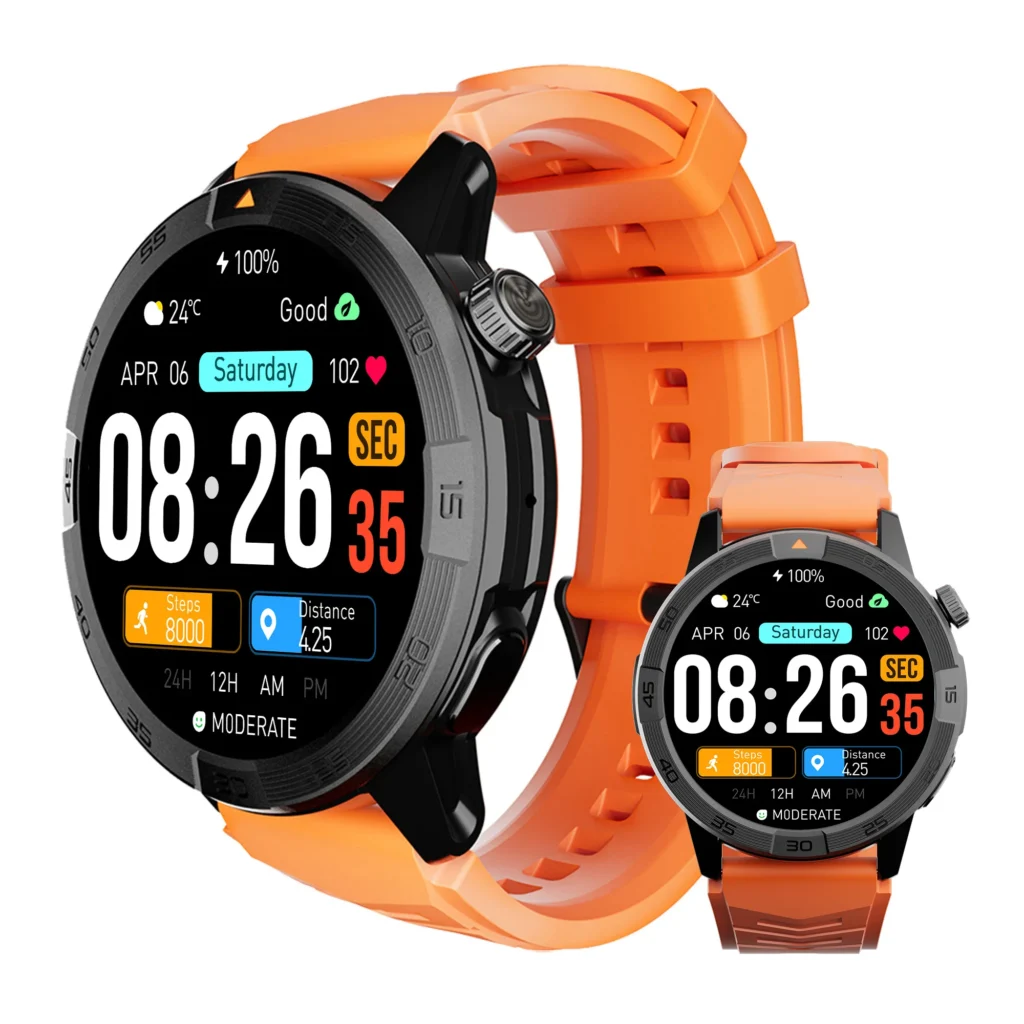
This reveals whether the screen and controls remain accessible under actual work clothing.
A watch that is easy to operate indoors may become difficult to reach beneath a thick cuff.
Test the worker’s actual iPhone or Android phone
The setup should use the same phone that will remain paired during the shift.
Confirm:
- Caller identification reaches the watch
- The selected control works
- The call remains available at the screening point
- The dispatch desk supports the intended conversation route
- The watch reconnects after moving between zones
Compatibility should be confirmed with the real phone and companion app rather than assumed from general platform language.
Test the normal phone-storage location
Place the phone where it normally stays during work.
The goal is not to prove Bluetooth coverage throughout the whole warehouse. It is to confirm:
- Reliable caller screening at the marked loading-area point
- A dependable conversation route at the dispatch desk
A watch does not need to support calls everywhere to be useful in the two approved locations.
Confirm alert noticeability beneath cold-weather clothing
The vibration should be noticeable beneath the coordinator’s normal jacket without requiring loud public audio.
A call may reach the phone and watch correctly while still going unnoticed. Workers facing that different failure can trace the alert step between the phone and the worker.
Verify decline and callback controls
Check:
- How the call is declined
- Whether recent calls are easy to find
- How the callback is remembered
- Whether the required action works with the glove setup
- Whether the control can be used without repeated screen interaction
Do not assume that a crown, side button, or gesture performs a specific calling action unless that behavior is verified.
Check battery reserve for the complete shift
Battery should cover:
- The full scheduled shift
- Repeated alerts
- Bluetooth connection
- Brief approved wrist calls
- End-of-shift communication
- Travel to dependable charging
Battery supports the cold-zone plan, but it does not determine where a call is safe or private.
Stay within documented environmental limits
Cold-storage work may involve low temperatures, condensation, moisture, and frequent transitions between zones.
The coordinator should follow the manufacturer’s published guidance for:
- Operating temperature
- Water exposure
- Cleaning
- Drying
- Charging
- Condensation
Do not deliberately expose the watch to conditions outside its documented limits merely to test durability.
Rehearse the Three-Zone Call Path Before the Next Shift
A short rehearsal turns the cold-zone gate into a repeatable routine.
Place the phone in its normal permitted location. Have a trusted person place a test call while the coordinator moves through the three zones under approved conditions.
Record the result:
| Zone | Expected role | Actual result |
|---|---|---|
| Freezer dock | Screen caller only | |
| Loading-area pause point | Brief acknowledgment | |
| Dispatch desk | Complete call or use phone |
Repeat the rehearsal when:
- The phone changes
- The watch changes
- Companion-app permissions change
- The phone’s normal location changes
- The warehouse layout changes
- A new audio device is paired
The objective is not perfect coverage across every aisle and dock door. It is predictable behavior in the two locations chosen for communication.
Smartwatch for Warehouse Shifts and Calls: Practical Questions
Can a smartwatch touchscreen work with insulated freezer gloves?
Possibly, but results vary by glove and watch. Test the actual combination and define a safe fallback when touch control is unreliable.
Can wrist calls be heard near warehouse machinery?
The Bluetooth connection may work while the conversation remains difficult to hear. Test audio only during a safe stationary pause.
Will Bluetooth calling work if the phone remains at the dispatch desk?
It depends on distance, walls, equipment, phone placement, and the specific devices. Test the real path rather than assuming full-building coverage.
Which warehouse zone is best for caller screening?
A designated stationary point away from active equipment and within reliable phone range.
When should a warehouse call move from the watch to the phone?
Move it when the discussion is longer, private, detailed, difficult to hear, or requires notes.
Should workers answer smartwatch calls near loading equipment?
No. The response should wait until the worker reaches an approved stationary location.
Give Every Warehouse Zone One Communication Role
At the freezer dock, the coordinator saw who was calling but did not begin the conversation. Once the loading-area pause point was reached, the call could be acknowledged without interrupting active freight work. The dispatch desk then provided better audio, greater privacy, and the paired phone nearby for the full response.
A smartwatch for warehouse shifts and calls fits cold-storage work best when each location has a defined communication role. The useful goal is not answering every ring from the wrist. It is knowing where the caller can be screened and where the conversation belongs.
Use one simple rule:
Screen the caller where conditions allow it. Hold the conversation where conditions support it.
Before the next Green Bay shift:
- Mark one caller-screening zone.
- Mark one approved conversation zone.
- Test glove control, noise, privacy, safe pauses, and phone range in both places.
- Give the freezer dock a fixed no-conversation rule.
Then check the call, connection, display, and battery specifications to determine whether the watch can support the cold-zone call gate without encouraging conversations in unsuitable warehouse areas.